

Clean up the spaces
1
Select products
Check the products you want to clean up. Or use filters and select all matching results.
2
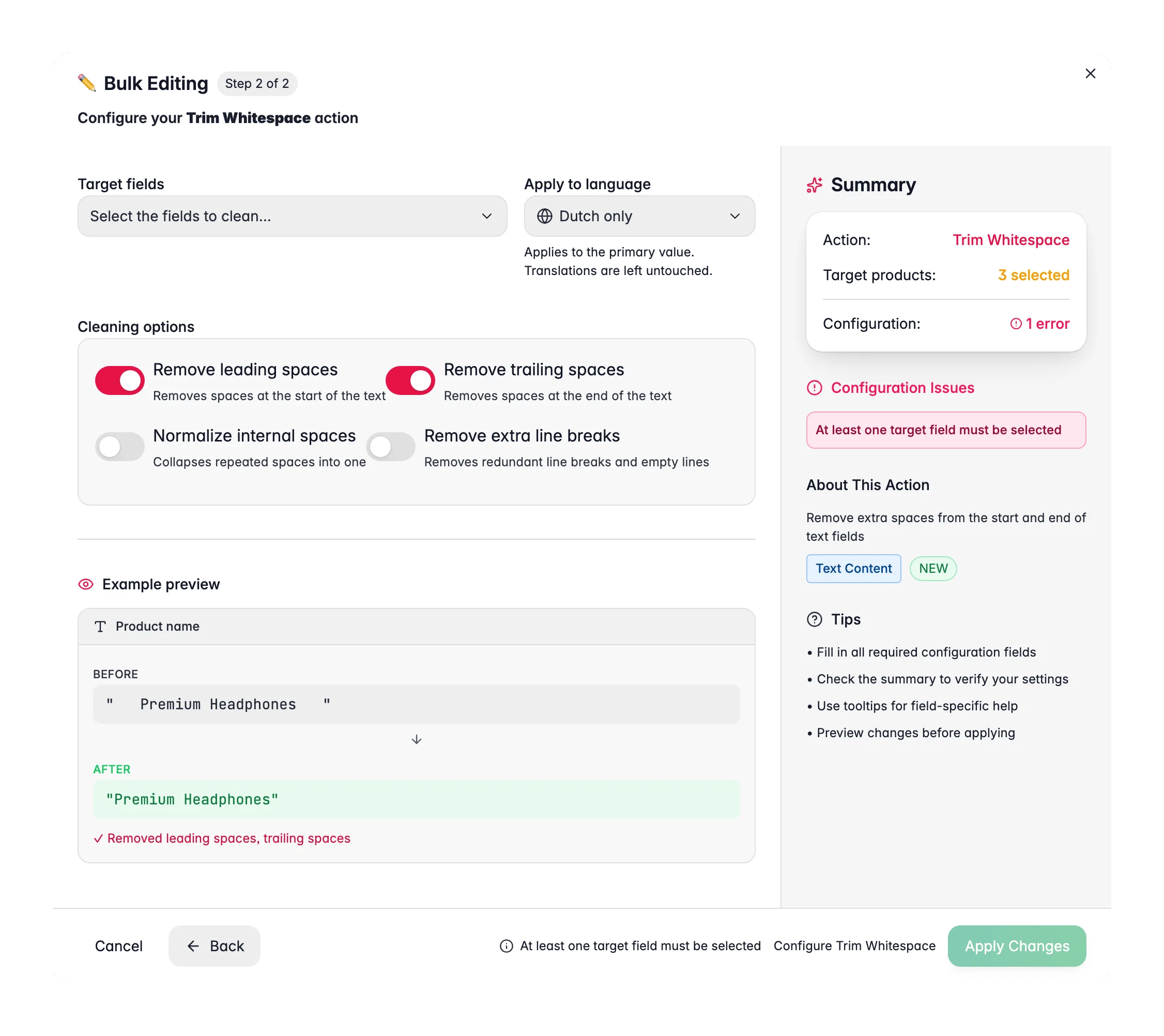
Open Bulk Edit and choose Trim Whitespace
Click Bulk Editing, then search for “Trim Whitespace” or find it under Text & Content.
3
Choose what to remove
Pick the cleanup options: leading spaces, trailing spaces, internal duplicates, or extra line breaks.
4
Choose target fields and apply
Select the fields to clean, then click Apply.
Cleanup options
Target fields: all text fields and custom text attributes.
Related
Standardize Text Case
Convert text to a consistent Title Case, UPPERCASE, or lowercase style.
Find and Replace
Fix typos or swap words across many products at once.
Append/Prepend Text
Add a prefix or suffix to any text field across your selection.
All bulk actions
Browse every bulk editing action by category.