

You need at least one connected store with imported orders. Before that, the page shows Connect a store and we’ll show your orders here. While the first import runs, it shows We’re importing your orders. with a running count per store.
Yesterday per store
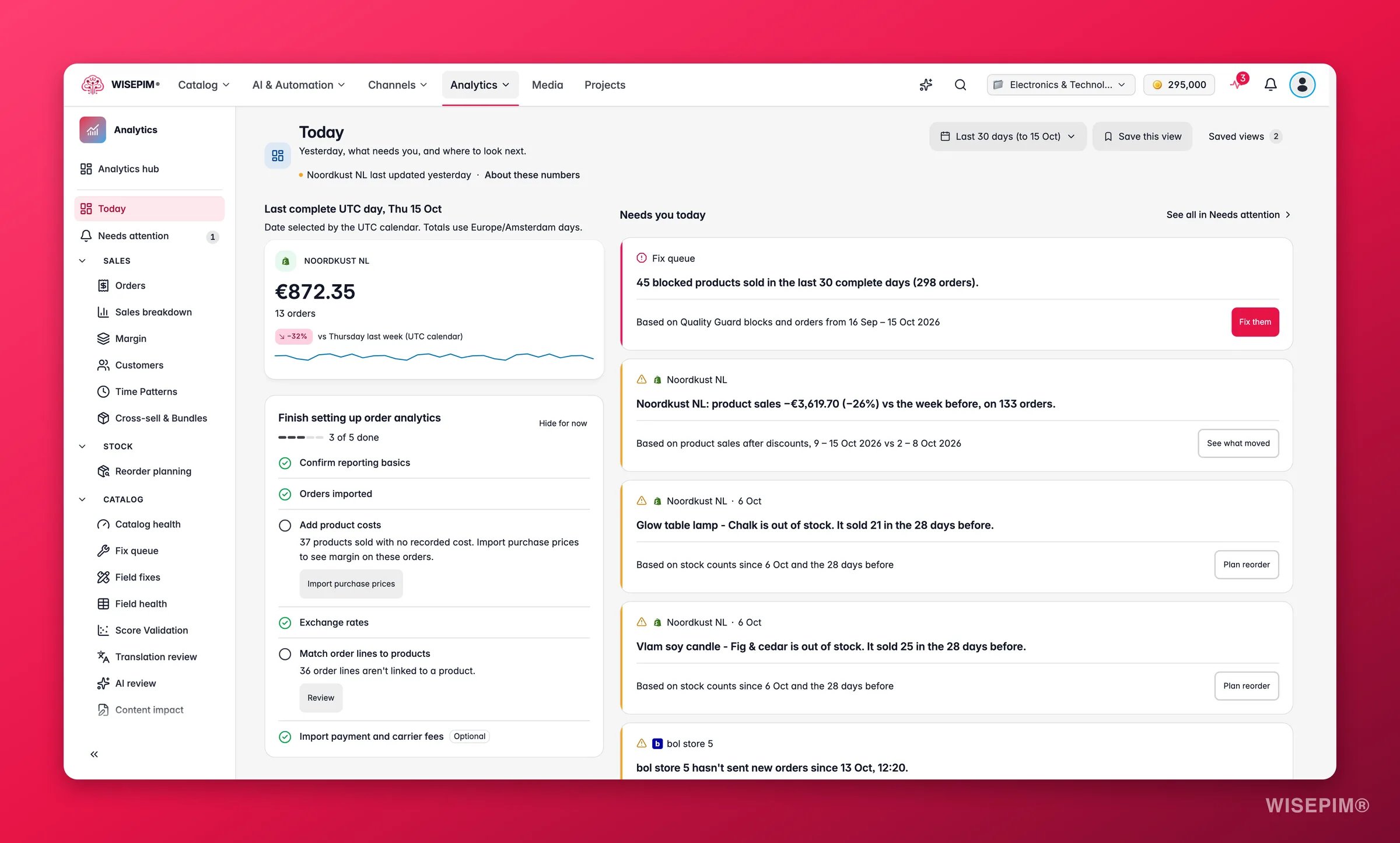
{weekday} last week (UTC calendar). With more than four stores, the rest fold behind +N more stores.
Two rules apply to these tiles:
- The day is picked on the UTC calendar, but the totals use days in your analytics timezone. The note under the heading spells it out: Date selected by the UTC calendar. Totals use
{timezone}days. - Money stays in each store’s currency. Nothing is added up across stores, and nothing is converted here.
The comparison with last week only shows when both days are closed and their history is confirmed. If a store’s history for one of those days is not confirmed, the tile shows a reason instead of a number. Nothing here is ever shown as zero when it is really unknown.
Finish setting up order analytics
Until every step is done, a checklist card sits under the store tiles with a counter such as 3 of 6 done. Each step says why it matters and offers a button.
Click Hide for now to tuck the card away. It comes back while steps are still open.
Needs you today
This section lists at most five cards, with See all in Needs attention to open the full feed. The cards come from your alert decisions, the fix queue, stock-outs, refund outliers, weekly movers, targets and stores that have gone quiet. Each one is a sentence plus a button:
When there is nothing to do, the section says Nothing needs you right now. and We check again after the next import.
Jump to
Six tiles link to the main order reports, each named after the question it answers:- Every order, by store opens Orders.
- Stores, products, promotions and returns opens the Orders report views.
- What you keep after costs opens Margin.
- Who comes back opens Customer Insights.
- What runs out first opens Reorder Planning.
- Catalog problems on products that sell opens Fix queue.
{score}/100 with Improve completeness links to Data Quality Analytics.
About the old reports
A collapsed section at the bottom explains what happened to the retired pages: “Revenue, Gross margin, Returns and Channels were retired. Their numbers had no reviewed definition of sales, costs and currency. Everything they showed now lives in Orders and Margin.” See How Order Numbers Work for what changed in the numbers themselves.Act on what you find
A store tile shows a count but no amount
A store tile shows a count but no amount
If the store is bol, that is expected: bol does not send order totals, so you see No amounts from bol. For any other platform, open the order list in Orders and check the Amount source on a few orders. Orders that arrived without a total or without a confirmed currency are kept out of money totals rather than counted as zero.
The delta against last week is missing
The delta against last week is missing
The comparison needs both days to be complete with confirmed history. A store that synced late, or a day with a gap in the import, shows a reason instead. Open Data health from the setup card to see which days are not confirmed.
The setup card keeps coming back after you hid it
The setup card keeps coming back after you hid it
Hide for now only hides it for a while. It returns as long as steps are open. Finish the steps, or leave only the optional fee import open, and the card goes away on its own.
A store hasn't sent new orders for days
A store hasn't sent new orders for days
Click Check the connection. The Connections tab under Data health shows the last sync, the last successful import and whether the connection still tests OK. Fix the connection first; the orders catch up on the next import.
Related
Orders
Every synced order, by store, product, promotion, basket and return.
Analytics Alerts
The full Needs attention feed, with alerts, decisions and signals.
Margin
What you keep after product, selling and marketing costs, per store.
How Order Numbers Work
Trust marks, native currency, complete days and coverage, explained once.