

BSH-SMS6ZCI00E into shopper-ready titles like Bosch Serie 6 Dishwasher, 14 Place Settings, Stainless Steel, across thousands of products at once, with a consistent structure you define.
Title enrichment costs 1 credit per product. The generated title is written to the Reviewed Name field, your original product name is never overwritten, so you can compare and roll back.
When to use it
- After an import where titles are supplier codes, manufacturer part numbers, or inconsistent free text.
- Before publishing to a marketplace or feed that has its own title conventions (Amazon, Google Shopping, Bol.com).
- When titles read inconsistently, some have the brand first, some don’t, some include the size, some don’t.
- As part of Auto-Fill, which fills missing titles automatically using your default title prompt.
How to run it
1
Select products
Check individual products, or filter and select all matching results. Filtering by “no title” or by supplier helps you target the products that need it.
2
Open the Enrich modal
Click Enrich with AI in the toolbar.
3
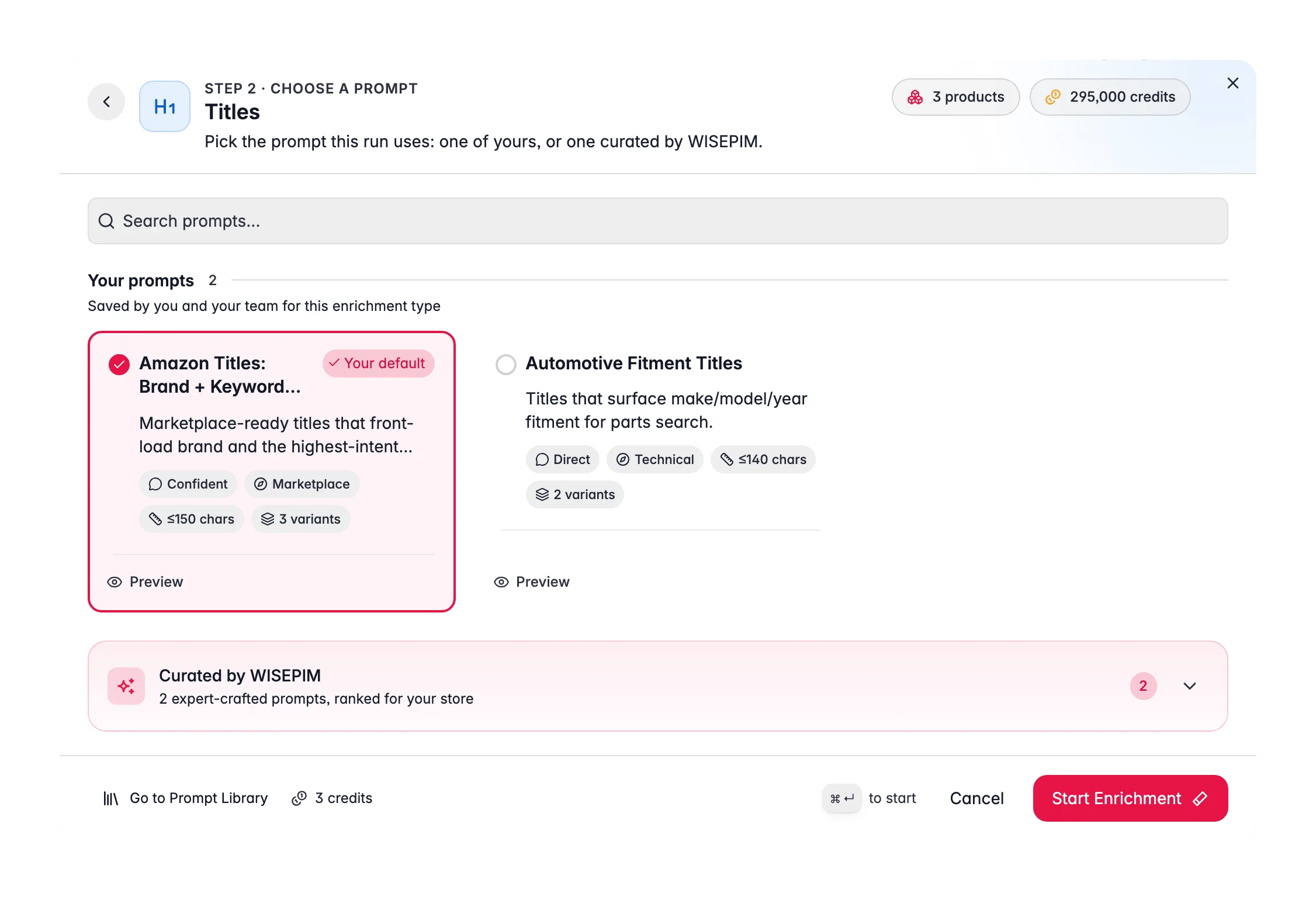
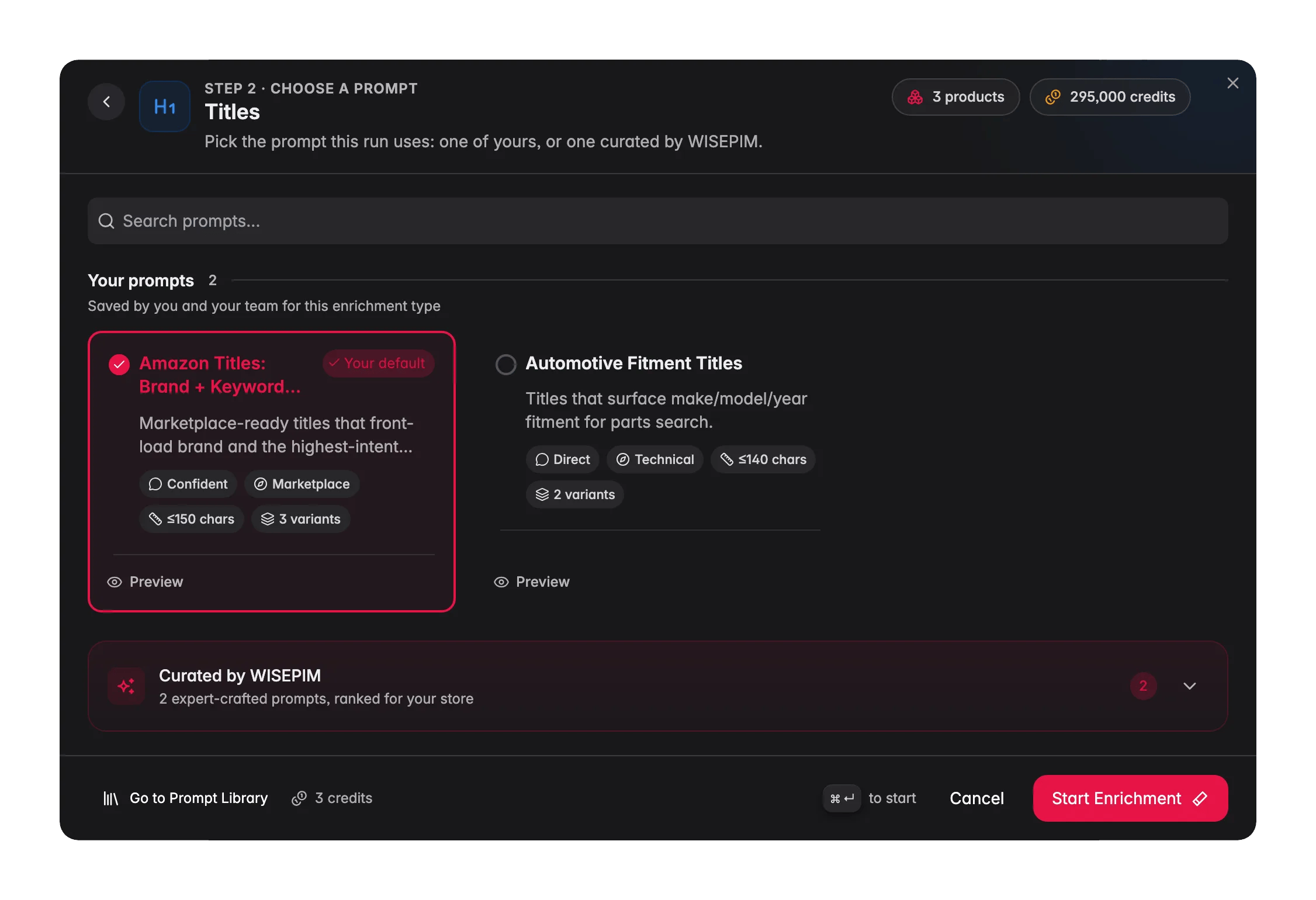
Choose Titles
Pick Titles as the enrichment type.
4
Select a prompt
Choose a title prompt from your Prompt Library. The prompt defines the structure, tone, and length. If you set a default in Settings → Enrich Prompts, it is pre-selected.Starting from scratch? Open the Curated Prompts tab. These are written by WISEPIM and ranked for your industry, so the strongest match sits near the top. Use Set as default on the one you pick and every future title run starts with it.
5
Start Enrichment
Click Start Enrichment. The job runs in the background, track it in the Process Tracker. If a run stops early, use Resume there to finish only the products that were not processed yet, at no extra credit cost.
What a great title prompt produces
A strong title prompt encodes a repeatable formula. A common, high-performing structure is:Philips Hue White and Color Ambiance Smart Bulb E27, 1100 lumens.
Good practices to bake into your prompt:
- Front-load the keyword. Put the words shoppers actually search for near the start, search engines and grid views truncate the end.
- Keep brand placement consistent. Decide whether the brand leads every title, and stick to it across the catalog.
- Include the distinguishing spec. Size, color, capacity, or material is often what separates two variants in a results list.
- Set a length ceiling. Around 60–70 characters reads well in most grids and feeds. State it in the prompt.
- No marketing fluff. “Amazing”, “best-in-class”, and “premium” waste characters that a keyword could use.
Act on what you find
Titles come out too long for your feed
Titles come out too long for your feed
Edit the prompt to state an explicit character limit (for example, “Keep titles under 65 characters”). Re-run on a small batch to confirm, then apply to the full set. Outcome: titles that fit your grid and feed without truncation.
Brand appears inconsistently
Brand appears inconsistently
Add a rule to the prompt, “Always start the title with the brand name, then the product type.” Use a Content Logic variable
{{product.brand}} so the AI uses the correct brand field. Outcome: a uniform title structure across the catalog.Some titles are generic or vague
Some titles are generic or vague
Generic output usually means thin source data. Enrich Attributes first so the AI has specs to draw from, then re-run titles. Outcome: titles that include the distinguishing details shoppers compare on.
You want to test a new title style safely
You want to test a new title style safely
Run the new prompt on 5–10 products and review the Reviewed Name output before approving. Because originals are preserved, nothing is lost if you decide not to keep it. Outcome: confidence in a new title formula before a catalog-wide run.
Measure the impact
Better titles change click-through and conversion. After enriching a batch and giving it a few weeks of sales, check Enrichment Impact to see the revenue lift, and Search & Discovery to see whether more shoppers are finding and clicking the products.Related
Enriching Products
Overview of all 15 enrichment types and how to run them.
Prompt Library
Build and organize your title prompts.
Prompt Lab
Test a title prompt on real products before running it in bulk.
Enrichment Impact
Measure the revenue lift from better titles.