

Description enrichment costs 1 credit per product. Output is written to the Enriched Description field, your original description is preserved, so you always have the source to compare against.
When to use it
- Products have no description, or only a one-line supplier blurb.
- Descriptions are duplicated across variants or copied from the manufacturer (which hurts SEO).
- You’re rebranding or repositioning and need consistent voice across the catalog.
- As part of Auto-Fill, which writes missing descriptions automatically using your default description prompt.
How to run it
1
Select products
Check products individually, or filter (for example, by “no description”) and select all matching results.
2
Open the Enrich modal
Click Enrich with AI in the toolbar.
3
Choose Descriptions
Pick Descriptions as the enrichment type.
4
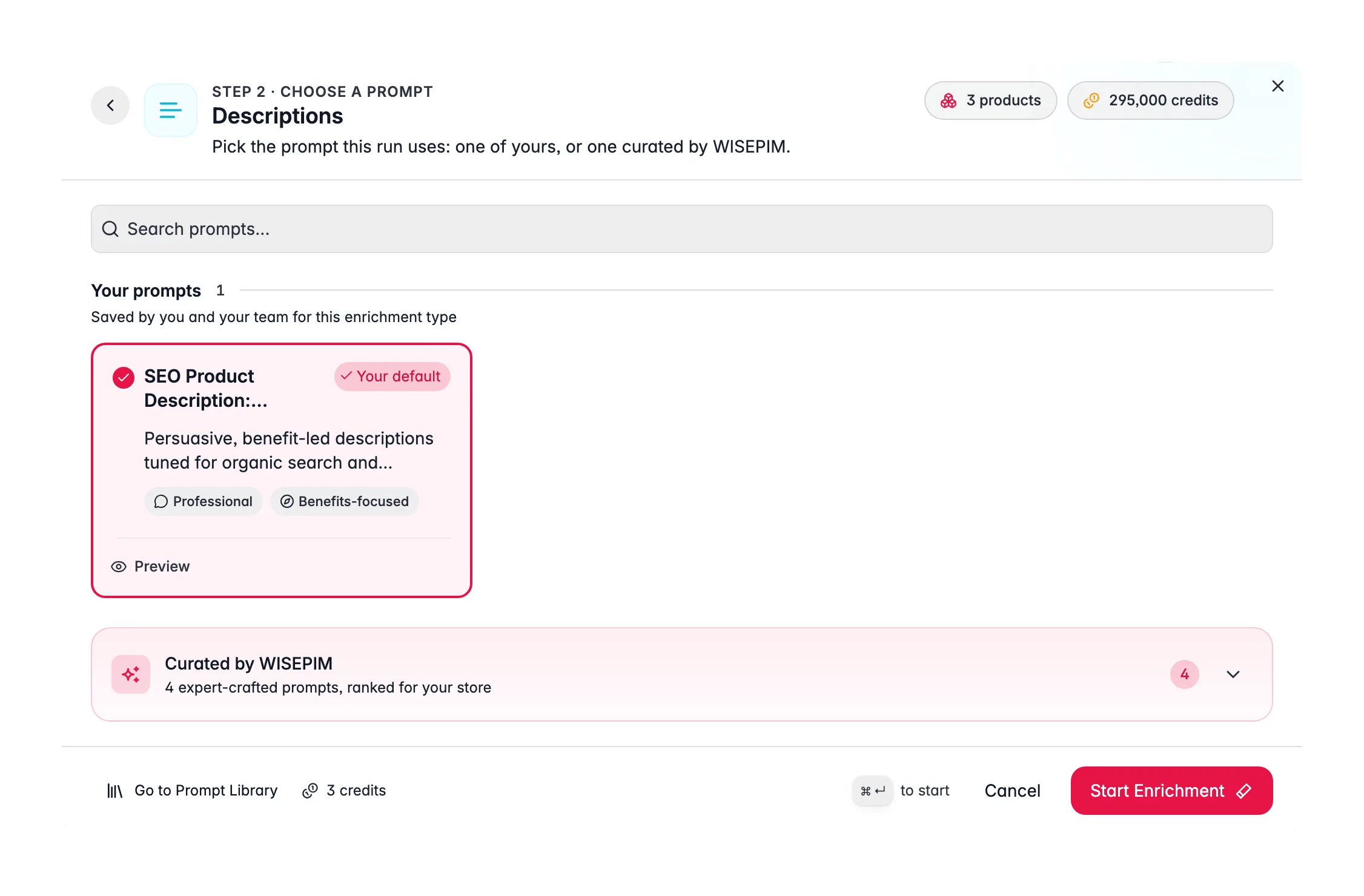
Select a prompt
Choose a description prompt from your Prompt Library. The prompt sets the structure, length, and tone.No prompt of your own yet? Open the Curated Prompts tab. These are written by WISEPIM and ranked for your industry, so the best fit is near the top. Use Set as default on the one you pick and it is pre-selected for every description run from then on.
5
Pick a target size
A description prompt carries a target size, so you do not have to spell the length out in words.
6
Start Enrichment
Click Start Enrichment. Track the job in the Process Tracker. If a run stops early, use Resume there to finish only the products that were not processed yet, at no extra credit cost.
What a great description prompt produces
The best AI descriptions are not walls of text, they are structured and scannable. Encode that in your prompt:- Open with the core benefit. Lead with what the product does for the shopper, not its spec sheet.
- Use short paragraphs and a bullet list. Shoppers skim. Ask the prompt for a 2–3 sentence intro followed by a bullet list of key features.
- Translate specs into benefits. “2000 mAh battery” becomes “all-day power on a single charge.” Give the AI the specs and ask it to explain why they matter.
- Write for the audience, not the algorithm. Natural, helpful copy that happens to include keywords beats keyword-stuffed text. For search-query-driven rewrites, use Search Intent instead.
- Stay truthful. Tell the prompt to only use facts present in the product data, so it does not invent specs.
Act on what you find
Descriptions sound generic or samey
Descriptions sound generic or samey
Generic copy comes from a generic prompt or thin source data. Write category-specific prompts (“B2B industrial fasteners” vs “fashion accessories”) and enrich Attributes first so the AI has real specs to work from. Outcome: distinctive copy that reflects each product.
The AI invented a spec that isn't true
The AI invented a spec that isn't true
Add a guardrail to the prompt: “Only state facts present in the provided product data. Do not infer or invent specifications.” Re-run. Outcome: accurate descriptions you can publish without fact-checking each one.
You want a different structure or length
You want a different structure or length
Set the target size for length (Compact, Standard, Detailed, Comprehensive, or a Custom value) and use the prompt for structure (“one intro paragraph, then 4–6 feature bullets”). Test on a small batch in Prompt Lab before the full run. Outcome: consistent structure and length across every product.
Descriptions need to match what shoppers search for
Descriptions need to match what shoppers search for
Use Search Intent enrichment instead, it rewrites descriptions using the real queries driving traffic from Google Search Console. Outcome: copy aligned to demonstrated demand, not guesses.
Measure the impact
After enriching a representative batch and collecting a few weeks of sales, open Enrichment Impact to see revenue lift attributed to description work. If descriptions consistently produce the biggest lift, that is your signal to roll them out catalog-wide.Related
Knowledge Library
Give the AI your brand voice, audience, and product context.
Prompt Library
Build and organize your description prompts.
Search Intent
Rewrite descriptions to match real search queries.
Enrichment Impact
Measure the revenue lift from better descriptions.