

Open the evidence for a field
1
Open the panel
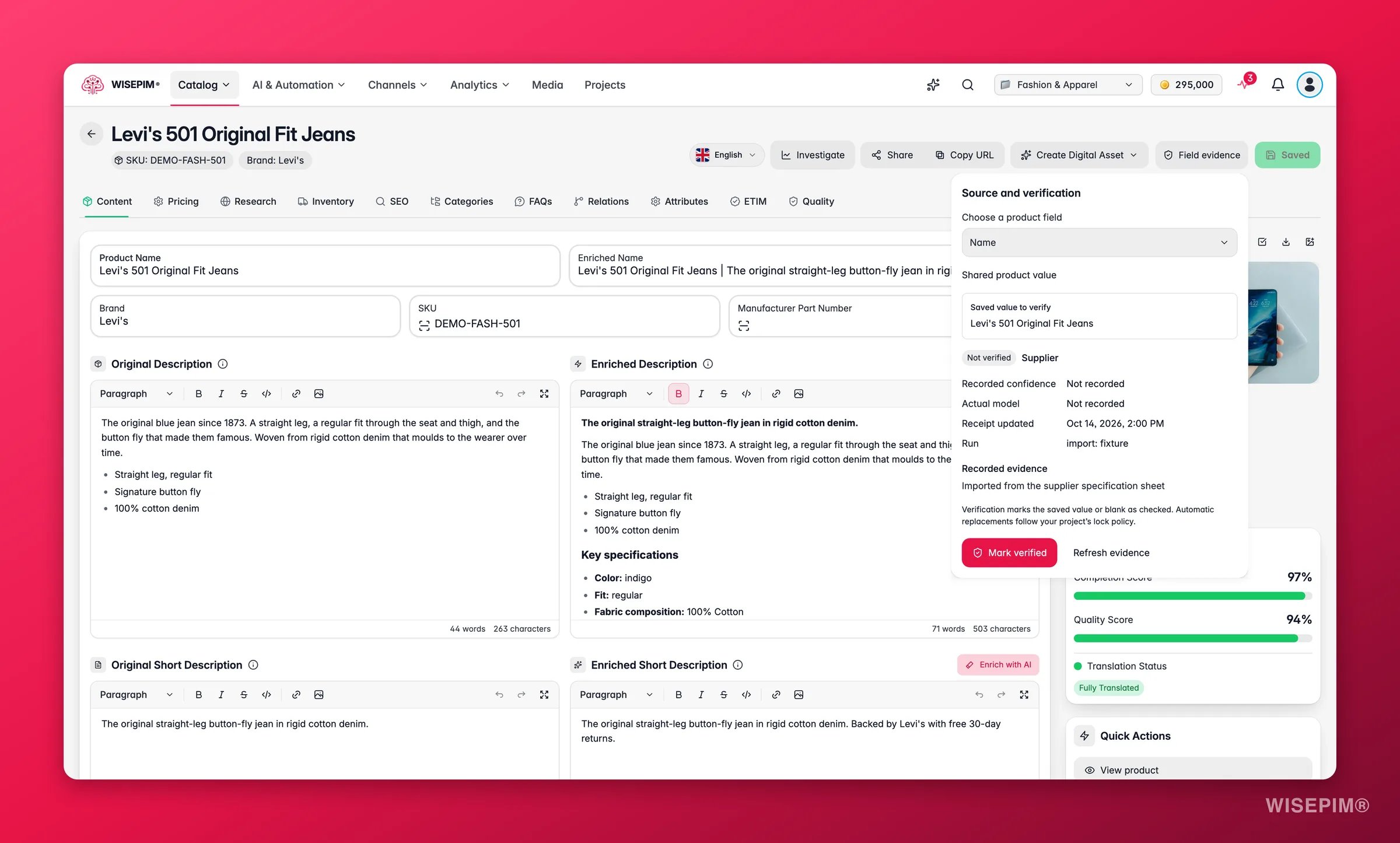
Click Field evidence in the product header. The Source and verification panel opens.
2
Pick the field
Choose it under Choose a product field. The list covers the core fields, such as Name, Description, SEO title, EAN, Price, HS code, Product family, Categories and Variant axes, plus the generated display name and descriptions.
3
Check the language
Fields that differ per language show Saved locale with the language you are editing. Fields that are the same in every language show Shared product value.
The panel describes the saved value, not what you have typed since. If you have unsaved edits, it asks you to save or discard them before you verify.
What the panel shows
Click Refresh evidence to reload the panel after a change elsewhere.
Sources
Source unknown is normal for values that were saved before WISEPIM kept receipts, or that arrived through a route that does not record one. The panel says: “No source is recorded for this saved value. Verification records your confirmation without inventing an AI or supplier origin.”
If the value changed after the receipt was written, for example by a direct edit in a route that keeps no receipt, the panel warns that the saved value differs from the recorded change. The details then describe the Earlier source, not the value you see.
Why is this blank?
For an empty field, Why is this blank? explains what happened:- “A recorded proposal is waiting for review.” An AI or supplier value is waiting in the Review Inbox.
- “The recorded proposal was rejected.” Someone turned the suggestion down.
- “This verified blank is protected from automatic replacement.” A person cleared it on purpose.
- “No recorded change or proposal explains this blank. Its cause is unknown.”
Verify a value
Click Mark verified to confirm the saved value, or Verify this blank to confirm that an empty field should stay empty. You see “Verification saved.” and the chip changes to Verified. The original source stays on the receipt, so you still know where the value came from. What a verified value means for later writes:- Imports, supplier deliveries, automation rules and AI skip it. Automatic replacements follow your project’s lock policy, and by default a person’s verification outranks every automatic source. You can still edit the field yourself.
- AI enrichment leaves it out. Verified and hand-edited fields are not offered to AI as fields to fill.
- A verified blank stays blank for imports and rules. AI can still fill a field a person cleared, because the lock protects content, not an empty field.
- Enriched copy is the exception. When you start an enrichment run, it replaces the enriched name, enriched description and enriched short description even if they were verified, because starting the run is the choice for new copy. Source fields, attributes, SEO fields and translations keep their protection.
Field evidence and verification are available on every plan and cost no credits. Verifying needs edit rights on the project and, with a custom role, permission for that field. Without it the panel says: “You can inspect this field, but you do not have permission to verify it.”
Where receipts come from
These actions write a receipt you can inspect:
Saving a product without changing a field does not turn its values into your own edits. An untouched AI description stays an AI value, so a later enrichment run can still improve it.
Act on what you find
A value came from AI with low confidence
A value came from AI with low confidence
Read the Recorded evidence and open its source links. Correct the field if needed, save, then click Mark verified so the next run leaves it alone.
An import keeps overwriting a value you fixed
An import keeps overwriting a value you fixed
Verify the fixed value. Imports and supplier deliveries skip verified values from then on.
A field should stay empty but AI keeps filling it
A field should stay empty but AI keeps filling it
A verified blank stops imports and rules, not AI. Turn off AI for that attribute in its attribute settings, or send its AI changes to review in AI Review Settings.
Most fields show Source unknown
Most fields show Source unknown
That is expected for older values. Check the ones that matter, such as name, price and EAN, and verify them. New writes from the actions listed above record their source automatically.
Related
Editing Products
The full editor and Quick Edit, where the Field evidence button lives.
Review Inbox
Accept or reject AI and supplier suggestions before they change products.
AI Review Settings
Choose which AI changes wait for your approval.
Web Research
Where web-sourced facts and their evidence come from.