

This report needs orders that contain more than one product. If most of your orders hold a single item, the data set for affinity analysis will be small.
Key metrics
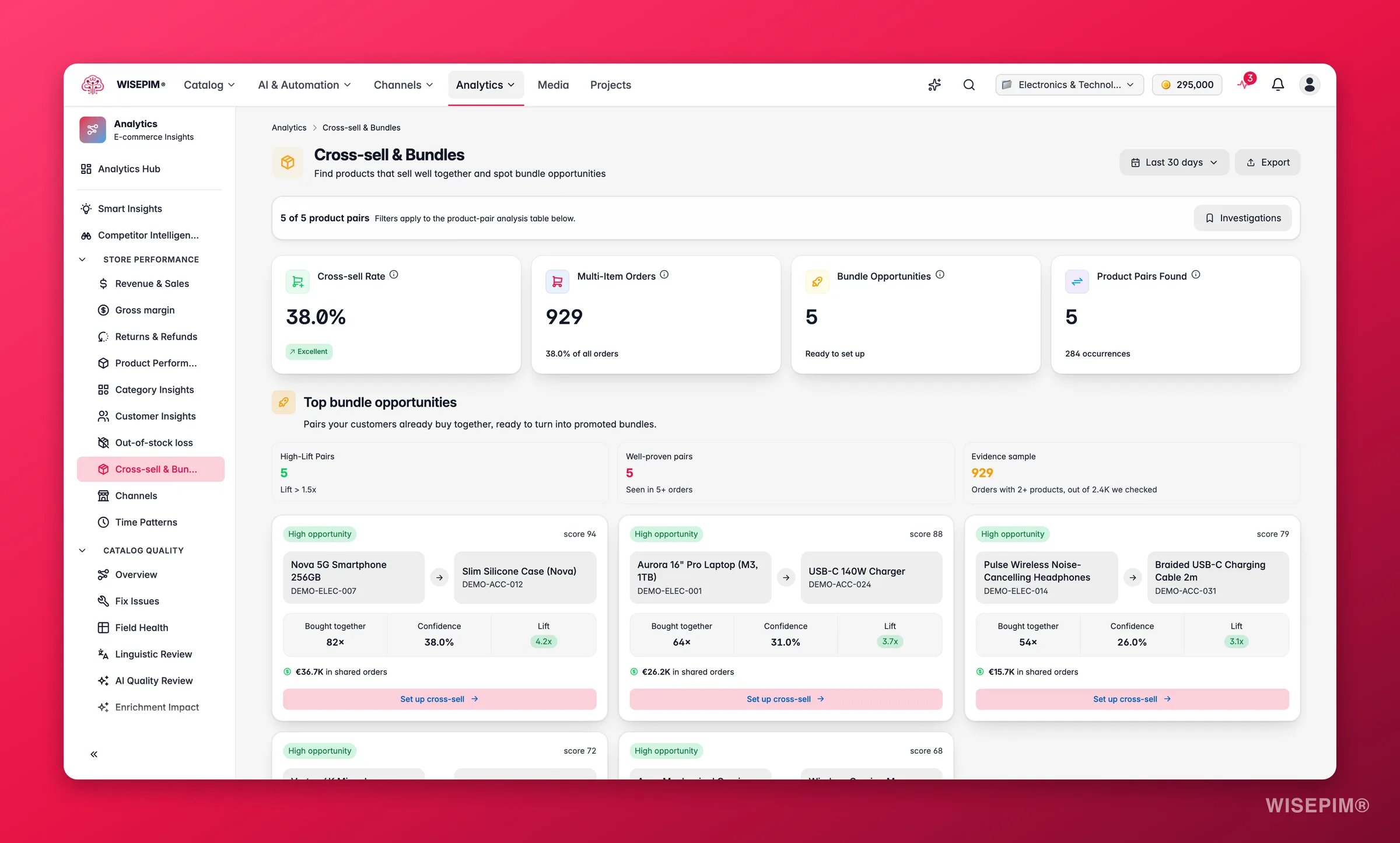
Four numbers at the top of the report give you an immediate read on the opportunity:What good looks like
Quick stats panel
Below the four KPIs, three summary stats reinforce the opportunity size:- High-lift pairs: count of pairs with lift above 1.5, which represent your strongest bundle candidates.
- Cross-sell rate: the share of orders that include a product from a known high-lift pairing.
- Estimated bundle revenue: a directional revenue estimate for the top pairs. Use it to size the opportunity, not as a precise forecast.
Bundle opportunity cards
Below the quick stats, the top bundle opportunities are shown as recommendation cards. Each card highlights one product pair and labels it with an opportunity badge:- High Opportunity: strong lift and high co-occurrence; a proven pairing worth featuring prominently.
- Quick Win: high confidence in one direction with a modest lift; easy to implement on a product page.
- Growing: a newer pairing whose co-occurrence is trending upward over the selected period.
Affinity charts
Two bar charts sit above the full table and give you a quick visual read:- Most frequently bought together: the top pairs ranked by co-occurrence count. High volume here means a common real-world pattern.
- Strongest associations: the top pairs ranked by lift score. A high-lift pair with modest co-occurrence is a real behavioral signal that just hasn’t had many chances yet; a low-lift pair with high volume is mostly explained by both products being popular.
Affinity table
The product pair affinity table lists all pairs that appear in your order data, with one row per pair.
Here is what those numbers look like in plain language:
- Co-occurrence = 45: the pair appeared in the same order 45 times.
- Confidence = 32%: 32% of customers who bought Product A also bought Product B.
- Lift = 3.2: the pair sells together 3.2 times more often than chance predicts.
Filter chips
Four chips above the table let you narrow the list without touching the search field:- All: every pair in the data set.
- High Lift: pairs with a lift score above 2.0.
- High Confidence: pairs where confidence exceeds 40%.
- Quick Wins: pairs with high confidence but modest lift; the easiest to act on.
Product focus filter
Click any product name in the table to activate the product focus filter. The table immediately narrows to show only the pairs that include that product. This is the fastest way to answer “what should I cross-sell alongside this specific item?” Click the active product chip to clear the filter and return to the full table.Category affinities
Below the pair table, the Category Affinities section aggregates the same signal at a higher level. It shows which category pairs appear together most often in multi-item orders. Use it to find cross-category bundle ideas, for example, if “Cables” and “Adapters” always co-occur with “Laptops”, that points to a natural accessory bundle.Top products ranking
The top-right panel ranks individual products by how often they appear in high-lift pairs. A product that appears in many strong pairs is a natural anchor for cross-sell recommendations, surfacing it in a “frequently bought with” widget on other product pages can lift basket size across your whole catalog.Act on what you find
High lift (above 2.0) and high co-occurrence
High lift (above 2.0) and high co-occurrence
This is a proven pairing worth featuring prominently. Open the product editor for Product A (linked directly from the bundle opportunity card) and add Product B as a cross-sell recommendation on the Relationships tab. If your platform supports bundles, create a formal bundle offer. Outcome: customers who discover Product A are prompted to add the natural companion, directly growing average order value.
High confidence in one direction only
High confidence in one direction only
The link runs one way: customers who buy Product A frequently also buy Product B, but not the reverse. Show Product B on Product A’s page only, adding a reverse recommendation would clutter Product B’s page with an irrelevant suggestion. Outcome: a directional cross-sell placed at the right point in the customer’s decision captures the companion purchase without confusing shoppers who start with Product B.
A product appears in many high-lift pairs
A product appears in many high-lift pairs
This product is a natural bundle anchor. Feature its top companions in a “frequently bought with” widget on this product’s page, and consider surfacing this product in widgets on its companion pages too. Use Product Families to formalize the relationship and make it maintainable. Outcome: a cross-sell anchor lifts basket size across multiple product pages simultaneously.
Unexpected or surprising product pairs
Unexpected or surprising product pairs
Dig into why customers buy these items together. You may have uncovered a use case you had not merchandised, which can guide new bundle ideas, category structures, or even new product additions. Outcome: acting on an unexpected insight before competitors notice it is a durable differentiation.
Cross-sell rate is strong but average lift is low
Cross-sell rate is strong but average lift is low
Customers do buy multiple items, but not in particularly meaningful combinations. This can mean your catalog has few natural companions or that existing cross-sell recommendations are not well-targeted. Use the Lift filter to find pairs with genuine statistical bonds and replace generic recommendations with specific ones. Outcome: replacing low-lift with high-lift recommendations increases the probability that a shown suggestion actually converts.
Related
Product Performance
See per-product metrics to learn which items in a bundle drive the most value.
Revenue & Sales
Track how your bundling moves shape average order value and revenue.
Category Insights
Explore cross-category affinities to find bundles across product lines.