

Show the right content for each product, automatically. Conditional blocks work like if/else statements: you set conditions, and WISEPIM picks the matching content per product. Low stock gets an urgency message, a dangerous good gets a safety warning, a premium product gets a warranty line. You write the rules once. Set them up on the Conditional tab in Settings > Content Logic.

Build a conditional block
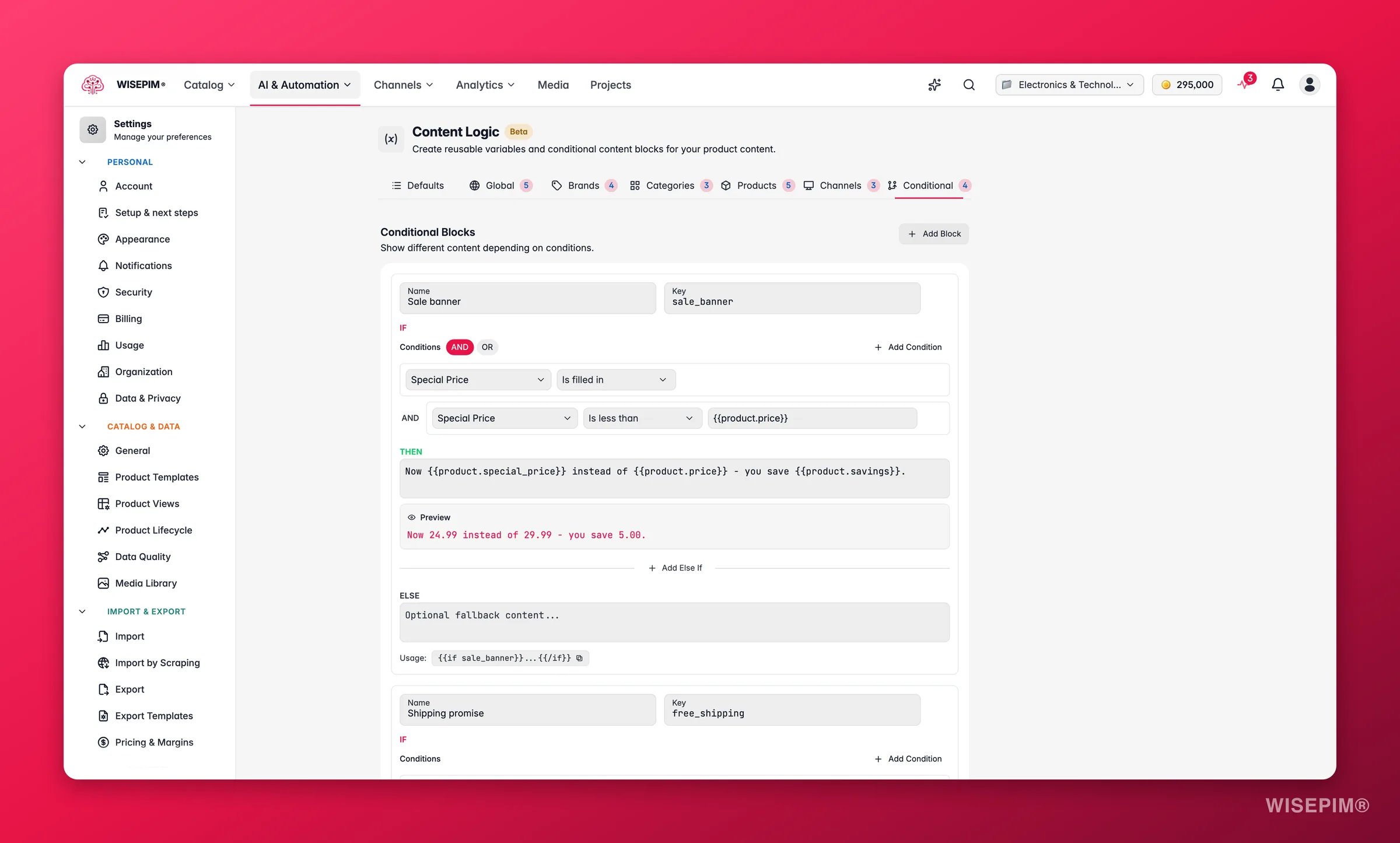
WISEPIM content logic, the Conditional tab where dynamic conditional rules are defined
1

Create the block

Give it a name and a key.
2

Define conditions

Pick a product field, choose an operator, and enter a value to compare against. Combine multiple conditions with AND or OR.
3

Write the content

Enter the content for when conditions are met (then). Add else if branches for other cases, and an optional else for the fallback.
4

Reference in content

Use the key to insert the block anywhere variables are supported.

Condition operators

OperatorWhat it checksNeeds a value?
equalsExact matchYes
not_equalsDoes not equalYes
containsContains a substringYes
not_containsDoes not containYes
starts_withStarts withYes
ends_withEnds withYes
greater_thanGreater than (numeric)Yes
less_thanLess than (numeric)Yes
greater_than_or_equalGreater than or equalYes
less_than_or_equalLess than or equalYes
in_listIs one of (comma-separated)Yes
is_emptyHas no valueNo
is_not_emptyHas a valueNo
is_trueBoolean trueNo
is_falseBoolean falseNo
Conditions can reference any product field, custom attribute, or date/time variable.

Common patterns

Here are ready-to-use blocks for everyday scenarios. Each row is one branch, evaluated top to bottom.
Show a different shipping message based on the product price. Key: free_shipping
BranchConditionContent
IFproduct.price greater than 50Free shipping included.
ELSENoneShipping calculated at checkout. Add €{{global.free_shipping_threshold}} to your order for free shipping.
Create urgency for low stock and set expectations for out-of-stock items. Key: stock_message
BranchConditionContent
IFproduct.stock_quantity less than 5 AND product.stock_status equals in_stockOnly {{product.stock_quantity}} left in stock, order soon.
ELSE IFproduct.stock_status equals out_of_stockCurrently out of stock. {{global.restock_text}}
ELSE IFproduct.stock_status equals on_backorderAvailable on backorder. {{global.backorder_lead_time}}
ELSENoneIn stock and ready to ship. {{global.lead_time_text}}
Show different promo content based on the time of year. Key: seasonal_promo
BranchConditionContent
IFcurrent.season equals WinterWinter Sale: save up to 30% on selected items.
ELSE IFcurrent.season equals SummerSummer clearance: extra discounts on last season’s stock.
ELSE IFcurrent.month equals NovemberBlack Friday deals: check {{global.website_url}}/blackfriday for offers.
ELSENone(empty, no promo)
Show the right lead time per product. Key: lead_time
BranchConditionContent
IFproduct.category in_list Custom Orders, Made to OrderLead time: 4-6 weeks. Contact {{global.support_email}} for expedited options.
ELSE IFproduct.stock_quantity greater than 100In stock. Ships within 1-2 business days.
ELSE IFproduct.stock_quantity greater than 0In stock. {{global.lead_time_text}}
ELSENoneAvailable on backorder. {{global.backorder_lead_time}}
Add safety warnings to dangerous goods automatically. Key: hazmat_notice
BranchConditionContent
IFproduct.is_dangerous_good is_trueWarning: Hazardous material. Special shipping restrictions apply. {{brand.hazmat_handling}} Refer to the Safety Data Sheet before handling.
ELSENone(empty)
Add different messaging based on the product’s price tier. Key: price_tier_text
BranchConditionContent
IFproduct.price greater than 500Premium product. Includes {{brand.warranty_text}} Contact our specialist team for bulk pricing: {{global.support_email}}
ELSE IFproduct.price greater than 100Professional grade. {{brand.warranty_text}} Volume discounts available.
ELSENone{{brand.warranty_text}}
Show different compliance statements based on where the product is made. Key: origin_compliance
BranchConditionContent
IFproduct.country_of_origin in_list CN, TW, VN, THImported product. Complies with EU import regulations. {{global.reach_statement}}
ELSE IFproduct.country_of_origin in_list DE, NL, FR, IT, ESManufactured in the EU. {{global.compliance_general}}
ELSENone{{global.compliance_general}}
Flag products with missing data in internal exports or reports. Key: data_quality_note
BranchConditionContent
IFproduct.description is_emptyMISSING: Product description not set.
ELSE IFproduct.meta_description is_emptyINCOMPLETE: SEO meta description missing.
ELSE IFproduct.main_image is_emptyINCOMPLETE: Main product image missing.
ELSENone(empty, data looks complete)
Show minimum order info that varies by product type and stock level. Key: moq_message
BranchConditionContent
IFproduct.category in_list Heavy Machinery, Industrial EquipmentMinimum order: 1 unit. Freight shipping required. Contact {{global.support_email}} for a quote.
ELSE IFproduct.stock_quantity greater than 500In stock. Order from {{category.moq}} units. Volume discounts available for 500+ units.
ELSENoneMinimum order: {{category.moq}} units. {{global.lead_time_text}}
Generate dynamic sale badge text based on the discount depth. Key: sale_badge
BranchConditionContent
IFproduct.savings_percent greater_than_or_equal 50MEGA DEAL: {{product.savings_percent}}% OFF
ELSE IFproduct.savings_percent greater_than_or_equal 25SALE: {{product.savings_percent}}% OFF
ELSE IFproduct.special_price is_not_empty{{product.savings_percent}}% OFF
ELSENone(empty, not on sale)

Tips

  • Branches are evaluated top to bottom, and the first match wins. Put specific conditions above general ones.
  • Use AND when all conditions must be true (low stock AND in stock). Use OR when any one should trigger the content.
  • Content fields support all variables: {{product.*}}, {{global.*}}, {{brand.*}}, and {{category.*}}.
  • Leave the else content empty when you want no output for non-matching products.

Default Variables

The built-in {{product.*}} and {{current.*}} fields you test against.

Global Variables

Reusable values to drop into your branch content.

Brand Variables

Brand-specific content to show inside conditions.

Category Variables

Category-specific content to show inside conditions.