

Set up a channel variable
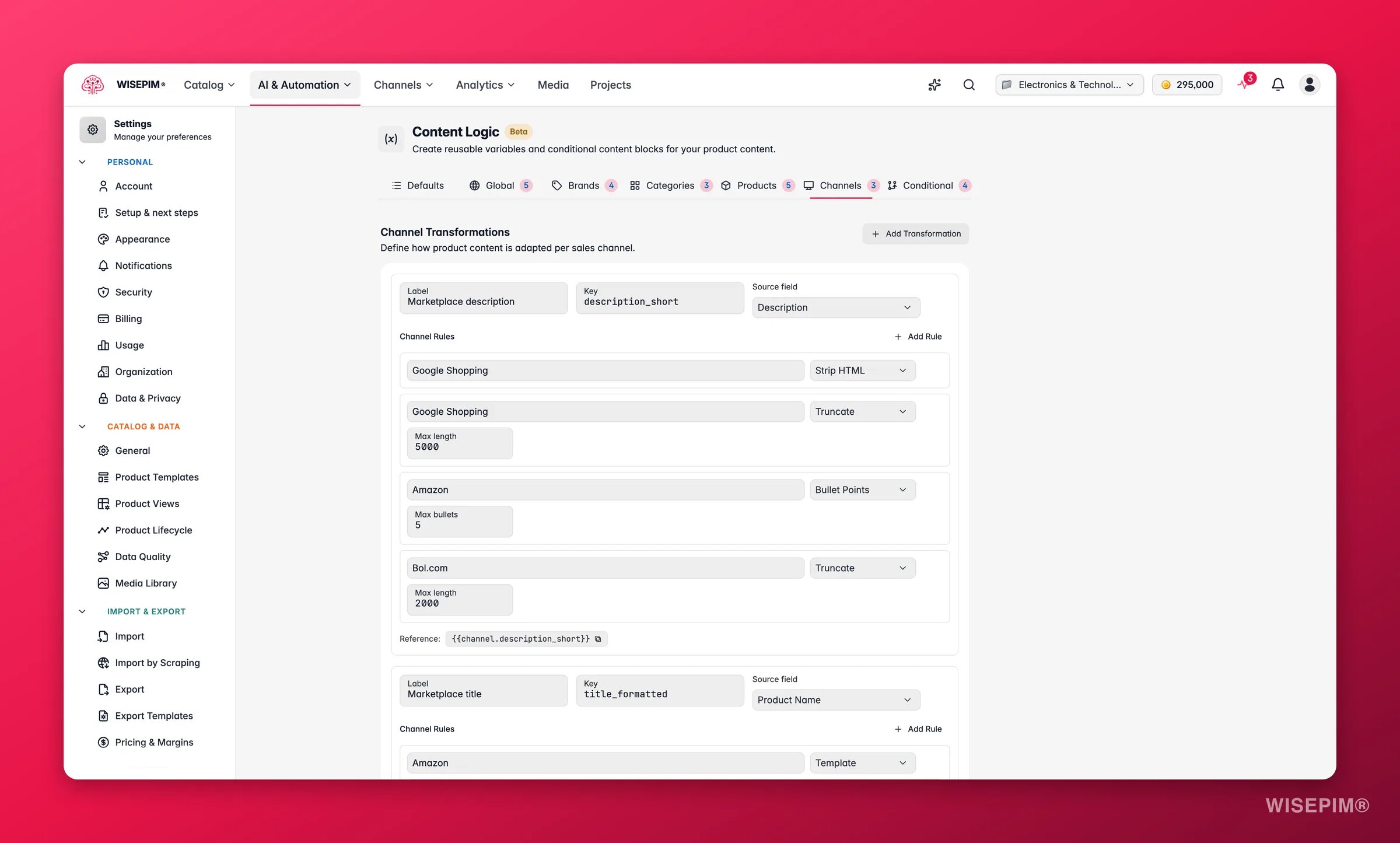
1
Add a variable
Give it a label and key, then pick the source field to transform.
2
Add transformation rules
Stack the rules you need. Each rule transforms the output of the one before it, so order matters.
3
Reference in content
Use
{{channel.your_key}} in export templates or any other formula-enabled field.Source fields
Description, Short Description, Product Name, Meta Title, Meta Description, and Features.Transformation rules
Channel recipes
Here are ready-to-use rule stacks for common channels. Each one starts from a source field and applies its rules in order.Amazon bullet-point description
Amazon bullet-point description
Amazon listings work best as bullet lists, not long paragraphs.
- Source: Description
- Rules: Strip HTML, then Bullet Points (max: 5), then Truncate (500)
Google Shopping title
Google Shopping title
Google Shopping caps titles at 150 characters and rewards structured naming.
- Source: Product Name
- Rules: Template
{{value}} - {{product.brand}} | {{global.company_name}}, then Truncate (150)
“Stainless Steel Hex Bolt M10x50 - Fischer | Industrial Supplies BV”
Marketplace plain-text description
Marketplace plain-text description
Many marketplaces do not support HTML in descriptions.
- Source: Description
- Rules: Strip HTML, then Truncate (2000)
Bol.com description
Bol.com description
Bol.com has specific character limits and prefers structured content.
- Source: Description
- Rules: Strip HTML, then Truncate (1500)
Price comparison feed title
Price comparison feed title
Price comparison sites need clean, attribute-rich titles.
- Source: Product Name
- Rules: Template
{{value}} - {{product.brand}} - {{product.sku}}, then Truncate (200)
“Stainless Steel Hex Bolt M10x50 - Fischer - SS-HB-M1050”
Email marketing description
Email marketing description
Short, compelling text for email campaigns.
- Source: Short Description
- Rules: Strip HTML, then Truncate (200), then Template
{{value}}\n\nOrder now at {{global.website_url}}
Internal catalog description
Internal catalog description
A clean, standardized version for internal use or PDF catalogs.
- Source: Description
- Rules: Strip HTML, then Template
{{product.sku}}: {{product.name}}\n\n{{value}}\n\nWeight: {{product.weight}} {{product.weight_unit}} | HS Code: {{product.hs_code}}
SEO meta description
SEO meta description
Generate meta descriptions under the 155-character Google display limit.
- Source: Description
- Rules: Strip HTML, then Truncate (155)
Tips
- Templates can reference any variable, such as
{{product.brand}}or{{global.company_name}}. Use{{value}}to insert the output of the previous rule. - Create a separate channel variable for each platform, so each one gets its own limits and formatting.
Related
Default Variables
The built-in
{{product.*}} variables you reference inside templates.Global Variables
Define company-wide values like company name and website.
Conditional Blocks
Show different content based on product data.
Brand Variables
Store content that differs per brand.
{{value}}... Shop now!