Keep Akeneo or your existing PIM as the system of record and put WISEPIM on top as the AI layer: import, enrich, gate, and send the results back.
You already have a PIM. It took a year to model, three departments agreed on the attribute tree, and your ERP writes into it every night. Nobody is going to sign off on replacing it, and honestly nobody should. What it cannot do is write two thousand product descriptions in four languages, or tell you which of them are too thin to sell.So don’t replace it. Put WISEPIM on top of it: pull the catalog in, let the AI do the writing and the checking, and send the result back. Your PIM stays the system of record and gains the one capability it was never built for.This is the deliberate alternative to migrating your catalog - read that one instead if the goal really is to leave your old platform behind. Budget about half a day for the first loop, most of it spent deciding who owns which field.
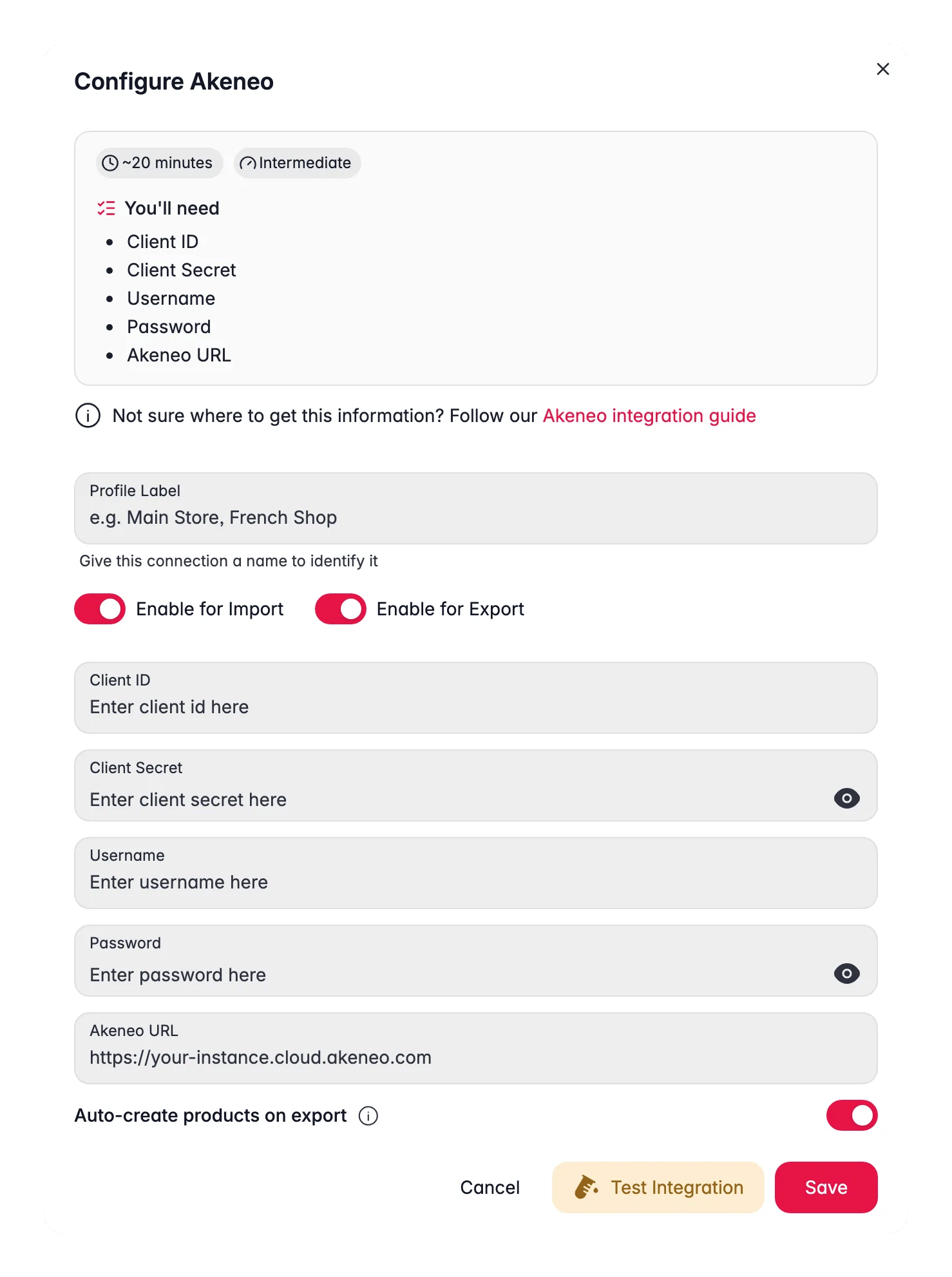
Before you start: you need admin access to your PIM so you can create a connection - for Akeneo that is a connection under System → Connections with read and edit permission on products, and a WISEPIM project you can fill with a copy of the catalog.
What you’ll get: a repeatable round trip where your PIM keeps the master data, WISEPIM writes the content, and only quality-checked products travel back - plus channels your PIM never served, fed straight from WISEPIM.
The loop runs in one direction and branches once, at the gate:
Do this before you connect anything. Every painful moment in a two-system setup comes from the same root cause: both systems believe they own the same field, and whichever one wrote last wins. Decide the split on paper first, and the rest of this guide is just configuration.A split that works for most teams, and the mechanism that keeps each side honest:
Data
Owner
What keeps the split intact
SKU, EAN, price, stock, supplier
Your PIM
Re-imported every cycle; nothing in WISEPIM generates them
Attribute model and category tree
Your PIM
Comes across with the products on your first platform import
Titles, descriptions, short descriptions
WISEPIM
Written by AI, and protected on the next import by Skip empty fields
SEO title and meta
WISEPIM
Generated here; check whether your PIM even has fields to receive them back
Translations
WISEPIM
Generated per language; test what your PIM accepts before you rely on the return trip
Quality rules and compliance
WISEPIM
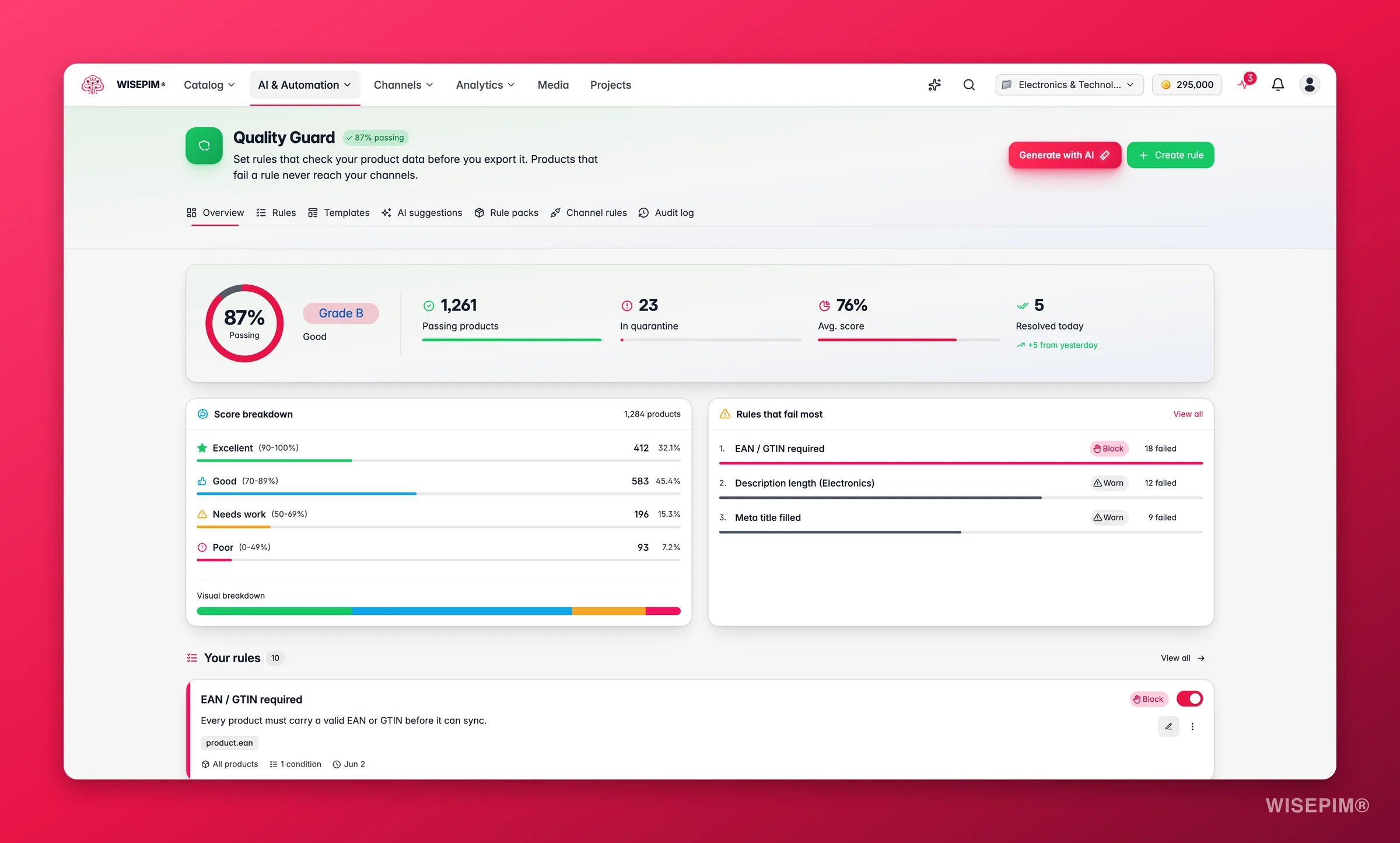
Quality Guard runs on every export, sync, or publish
1
Write the split down, field by field
A shared doc with two columns is enough. The rows that need the most thought are the ones your PIM technically has but nobody maintains - an empty meta_description in Akeneo is a field WISEPIM should own, not a field to keep syncing blank.
2
Connect your PIM
Follow the setup for Akeneo, or find yours on the supported platforms page. Connect it before anything else: only connected integrations appear in the import and export modals.
3
Run the connection test before you trust it
Use Test Connection on the integration and fix credentials now. A connection that authenticates but lacks edit permission on products imports happily and fails on the way back, which is the expensive place to find out.
4
If your PIM is custom, check the API route instead
No integration tile for your system? The WISEPIM REST API reads and writes products programmatically, which is the path for an in-house PIM. The rest of this guide still applies - only the transport changes.
The first import is easy. The second one is where catalogs get damaged: your PIM exports a product with an empty description field, WISEPIM already has a good description in it, and the wrong setting turns your enrichment into a blank. Set the defaults once, in Import settings, and every recurring pull behaves the same way.
1
Choose how duplicates are resolved
Conflict resolution decides what happens when an incoming product already exists in WISEPIM. This project-wide setting governs platform and integration imports, so it is the one that applies to every pull from your PIM. Overwrite replaces every field on the matched product - on a smart-layer setup that is the option that erases your AI content. Read the three options in Import settings and pick deliberately.
2
Set empty-field handling to skip
Skip empty fields keeps the existing WISEPIM value when the incoming field is blank. That single setting is what lets a sparse PIM export flow in every night without wiping the fields WISEPIM owns.
3
Import a small slice first
Add an import filter so the first run brings in a few hundred products rather than the whole catalog, then check them. You want to discover a mapping surprise on a sample, not on 40,000 records.
4
Verify structure, not just the product count
On a first platform import WISEPIM pulls your categories and attributes across alongside the products, so open the category tree and the attribute list and compare them to your PIM. A right-looking product count can still hide a branch that flattened. See importing products.
5
Let template defaults fill the rest
Fields your PIM does not send fall back to your Product Template defaults. Those defaults apply only when a product is created and never when one is updated, so a nightly re-import cannot quietly overwrite a real value with a default.
Imported the wrong store, or the wrong scope? Open the import task in the Process Tracker and choose Rollback, before you enrich on top of it.
Now the layer earns its keep. Two enrichment tools, and the choice between them is exactly the ownership question again: are you filling holes your PIM left, or replacing content your PIM holds?
1
Fill gaps with Auto-Fill
Auto-Fill writes only the fields that are empty and leaves existing content alone, which makes it the safe default when your PIM’s content is worth keeping. It runs on your project’s default prompts, so set those in Enrich Prompts settings first.
2
Use Bulk Enrich only where you have agreed to overwrite
Bulk Enrich always overwrites the fields you pick. That is right for a range whose copy nobody defends, and wrong for anything your PIM is still the author of - so run it on a filtered selection, never on “all products” out of habit.
3
Put Quality Guard in front of the return trip
Quality Guard runs automatically on every export, sync, or publish, so the rules you activate become the gate your PIM sits behind. Rules with Block severity hold failing products in quarantine instead of shipping them, which is exactly the behaviour you want when the destination is your system of record.
4
Push a handful back, and open them in the PIM
Filter to a few representative products, export them to your PIM, and read the result in the PIM itself. Confirm on that sample that the fields you expected to change changed, and the fields your PIM owns did not.
5
Then let skip-unchanged carry the routine
Skip unchanged is on by default for platform exports, so after the first full push every sync only sends products that actually changed. Save the setup as an export template so the recurring job is one click.
Field-level column selection is documented for CSV and Excel exports. If you need tight control over exactly which fields travel back into your PIM, a column-picked file export is the documented way to limit them - check what a direct platform push sends on a test batch before you run it at scale.
The round trip is only half the argument for a smart layer. The other half is everything you can publish from WISEPIM without involving your PIM at all - and this is usually where the setup pays for itself first, because it needs no round trip to be safe.
1
Publish a hosted feed for a channel your PIM cannot reach
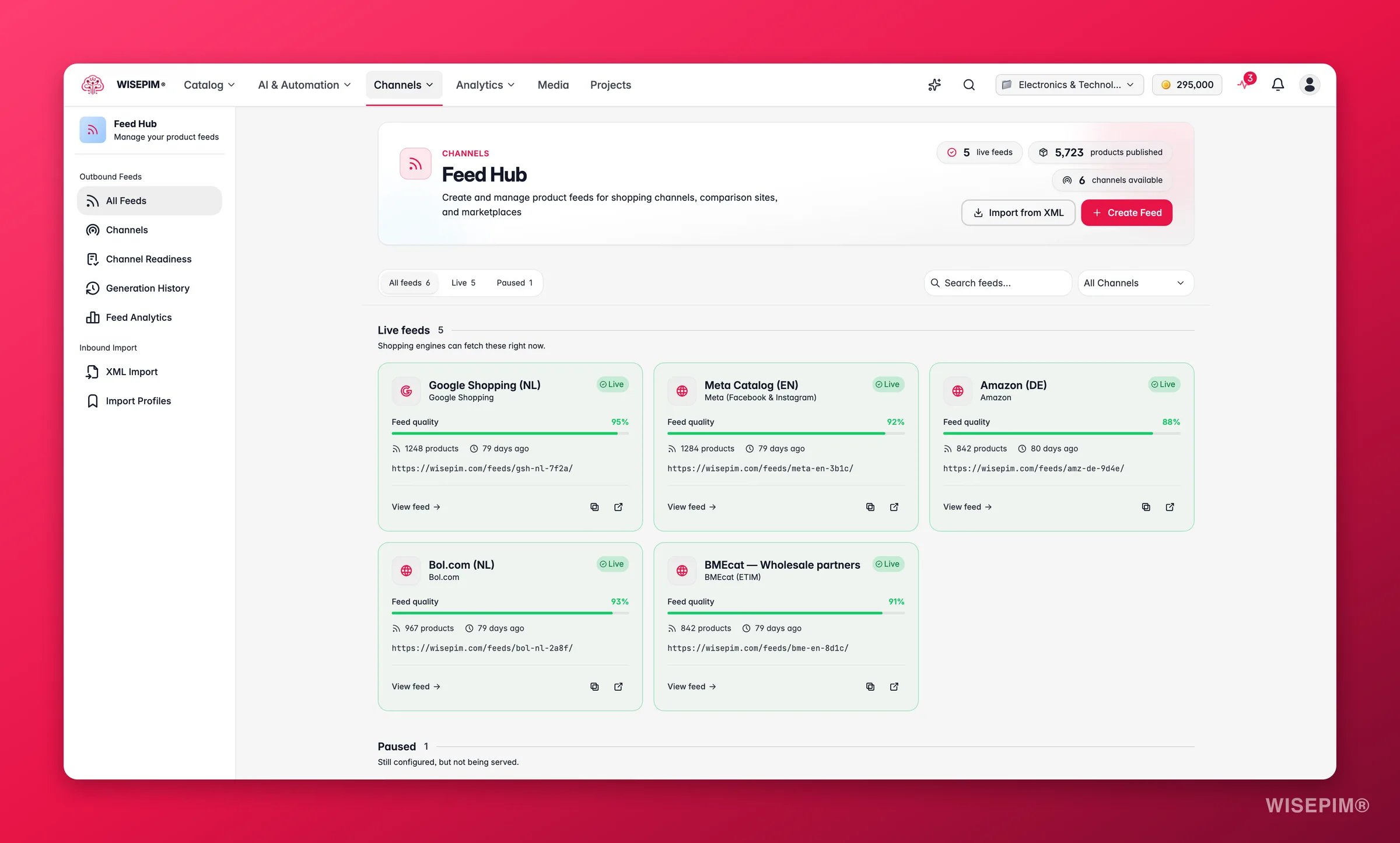
In Feed Hub, create a feed from a channel preset - Google Shopping, Meta, price comparison sites, affiliate networks, BMEcat for wholesalers, and more. Each feed gets a URL the channel fetches on its own schedule, so nothing has to travel back through your PIM to go live.
2
Exclude what is not ready, at the feed
Feed Hub’s filter rules drop products below a quality threshold, without a price, or without an image before they reach the channel. That is a second gate, independent of the one guarding your PIM.
3
Schedule the loop instead of remembering it
Build an automation with an After Importtrigger so a fresh pull from your PIM is enriched the moment it lands, and finish it with a notification. The full build is in Build a pipeline that runs itself.
4
Watch both directions from one board
Integration Health shows last sync, failure rate, and last error per channel over a rolling 30 days. In a two-system setup this is the page that tells you the loop broke, usually before anyone notices stale content.
Not for at least a month - it compares 30 days before against 30 after, and reads Low confidence until enough sales land
A healthy smart layer is quiet: imports that change only master data, exports that skip most products because nothing changed, and feeds your PIM team never had to think about.
The nightly import wiped the descriptions the AI wrote
Two settings decide this, both in Import settings: conflict resolution, where Overwrite replaces every field on a matched product, and empty-field handling, where Skip empty fields is what preserves an existing value against a blank incoming one. Fix the settings first, then restore the content with an enrichment run rather than by hand.
Half the products from my PIM never arrived
Check the validation mode. Strict rejects any row with missing required fields or invalid formats, which a real PIM export will trip over regularly; Standard imports the valid rows and reports what it skipped. Also check whether an import filter is narrowing the pull. Both live in Import settings.
The import works but pushing back is rejected
That pattern is almost always permissions rather than credentials: the connection can read but not write. For Akeneo, confirm the connection’s user group has permission to read and edit products and product attributes, then re-run Test Connection.
The export ran and reported that nothing was sent
With Skip unchanged on, products unchanged since the last export to that destination are skipped on purpose. Turn it off to force a full re-push, which is what you want after changing the destination’s settings. See exporting products.
Enriched products are stuck and never reach the PIM
A Quality Guard rule with Block severity quarantines a product instead of exporting it. Open quarantine, read the failure reason, fix the underlying field in bulk, and release the batch. On a large catalog a single blocking rule can hold up the whole return trip, so review the impact before you activate one.
Create the connection, add the credentials, and sync your catalog both ways.
Exporting products
Every destination, template, and the skip-unchanged option in full.
Migrate platforms without losing data
The other route: leave the old system instead of layering on top of it.
Build a pipeline that runs itself
Turn the import-enrich-export loop into an automation you never start by hand.
{"docsConfig":{"theme":"mint","$schema":"https://mintlify.com/docs.json","name":"WISEPIM Documentation","description":"Documentation for WISEPIM, the AI-powered product information management (PIM) platform: import, enrich, translate and publish product content, connect e-commerce platforms and marketplaces, automate catalog work, and build on the WISEPIM Public API.","colors":{"primary":"#E71447","light":"#E71447","dark":"#E71447"},"logo":{"light":"https://mintcdn.com/swiftsyncai/CpcHeNUil_YXkrs1/logo/wisepim-logo-horizontal-transparant-lightmode.png?fit=max\u0026auto=format\u0026n=CpcHeNUil_YXkrs1\u0026q=85\u0026s=fb18d37ec9d57e2050a1acb063cd8424","dark":"https://mintcdn.com/swiftsyncai/CpcHeNUil_YXkrs1/logo/wisepim-logo-horizontal-transparant-darkmode.png?fit=max\u0026auto=format\u0026n=CpcHeNUil_YXkrs1\u0026q=85\u0026s=f908843e7a886bf8143cb9bc525b7b86"},"favicon":"https://mintcdn.com/swiftsyncai/CpcHeNUil_YXkrs1/favicon.png?fit=max\u0026auto=format\u0026n=CpcHeNUil_YXkrs1\u0026q=85\u0026s=50f7573d74bc7da293b9931d815b2bb3","api":{"openapi":"openapi.json","playground":{"display":"interactive"},"examples":{"defaults":"required","languages":["curl","python","javascript"]}},"appearance":{"default":"system"},"background":{"decoration":"gradient"},"navbar":{"links":[{"href":"https://wisepim.com/contact","label":"Support"}],"primary":{"type":"button","label":"Go to WISEPIM","href":"https://wisepim.com/products"}},"footer":{"socials":{"youtube":"https://www.youtube.com/channel/UC5sQ48mV3sYEBme01xvVIXw","linkedin":"https://linkedin.com/company/wisepim"}},"search":{"prompt":"What are you looking for?"},"seo":{"metatags":{"og:site_name":"WISEPIM Documentation","og:type":"website","twitter:card":"summary_large_image"},"organization":{"name":"WISEPIM","legalName":"WISEPIM B.V.","url":"https://wisepim.com","logo":"https://docs.wisepim.com/logo/wisepim-logo-horizontal-transparant-lightmode.png","sameAs":["https://linkedin.com/company/wisepim","https://www.youtube.com/channel/UC5sQ48mV3sYEBme01xvVIXw"]},"indexing":"all"},"fonts":{"family":"Inter"},"icons":{"library":"lucide"},"styling":{"eyebrows":"breadcrumbs","latex":true},"integrations":{"ga4":{"measurementId":"G-6NXPFG6S4Z"}},"errors":{"404":{"redirect":false,"title":"This page moved or never existed","description":"No worries, use the search above (or press Cmd+K) to find what you were looking for, or head back to the [introduction](/en/introduction)."}},"contextual":{"options":[{"title":"Ask WISEPIM AI","description":"Open the WISEPIM AI chat with this page as the question","icon":"sparkles","href":{"base":"https://wisepim.com/chat","query":[{"key":"prompt","value":"I am reading the WISEPIM documentation page https://docs.wisepim.com$path and I have a question about it. Answer in the language of that page.\n\nMy question: "}]}},"copy","view","chatgpt","claude","perplexity","mcp"],"display":"header"},"thumbnails":{"appearance":"dark","background":"https://mintcdn.com/swiftsyncai/2_3RgILsRdlQxjn6/images/og-background.png?fit=max\u0026auto=format\u0026n=2_3RgILsRdlQxjn6\u0026q=85\u0026s=f55698f3b0dd04d58e5f67b096de1f26","fonts":{"family":"Inter"}},"navigation":{"global":{"anchors":[{"anchor":"Homepage","icon":"house","href":"https://wisepim.com"},{"anchor":"Latest changes","icon":"history","href":"https://wisepim.com/changelog"},{"anchor":"Blog","icon":"newspaper","href":"https://wisepim.com/blog"}]},"languages":[{"language":"en","href":"en/introduction"},{"language":"nl","href":"nl/introduction"},{"language":"de","href":"de/introduction"},{"language":"es","href":"es/introduction"}]}},"deployment":{"deploymentMetadataValue":{"subdomain":"swiftsyncai","hasAudioNarration":false,"actualSubdomain":"swiftsyncai","customDomains":["docs.wisepim.com"],"gitSource":{"type":"github","owner":"lldiegon","repo":"wisepim-docs","deployBranch":"main","contentDirectory":"","isPrivate":true,"mountPath":"","label":""},"chroma":{"liveDeploymentHistoryId":"6ae29ae907aeaf4d1afc5884","collectionId":"bbceb7eb-5a5b-4c95-b655-48d98646c6ca","schemaVersion":"v3","latestBuiltDeploymentHistoryId":"6ae29ae907aeaf4d1afc5884"},"entitlements":{},"buildId":"6ae29ae907aeaf4d1afc5884","clientVersion":"0.0.4043","searchFilterCounts":[{"language":"en","tag":"Documentation","count":283},{"language":"de","tag":"Dokumentation","count":183},{"language":"es","tag":"Documentación","count":183},{"language":"nl","tag":"Documentatie","count":183},{"language":"en","tag":"API Reference","count":100},{"language":"en","tag":"Products","count":67},{"language":"de","tag":"Produkte","count":61},{"language":"es","tag":"Productos","count":61},{"language":"nl","tag":"Producten","count":61},{"language":"de","tag":"Erstellen \u0026 Bearbeiten","count":41},{"language":"de","tag":"Einstellungen","count":41},{"language":"en","tag":"Creating \u0026 Editing","count":41},{"language":"en","tag":"Settings","count":41},{"language":"es","tag":"Crear y Editar","count":41},{"language":"es","tag":"Configuración","count":41},{"language":"nl","tag":"Aanmaken \u0026 Bewerken","count":41},{"language":"nl","tag":"Instellingen","count":41},{"language":"de","tag":"Analytics","count":38},{"language":"en","tag":"Analytics","count":38},{"language":"es","tag":"Analytics","count":38},{"language":"nl","tag":"Analytics","count":38},{"language":"de","tag":"Massenaktionen","count":34},{"language":"en","tag":"Bulk Actions","count":34},{"language":"es","tag":"Acciones Masivas","count":34},{"language":"nl","tag":"Bulkacties","count":34},{"language":"de","tag":"Integrationen","count":30},{"language":"en","tag":"Integrations","count":30},{"language":"es","tag":"Integraciones","count":30},{"language":"nl","tag":"Integraties","count":30},{"language":"de","tag":"Projekt","count":29},{"language":"en","tag":"Project","count":29},{"language":"es","tag":"Proyecto","count":29},{"language":"nl","tag":"Project","count":29},{"language":"de","tag":"Anleitungen","count":20},{"language":"en","tag":"Guides","count":20},{"language":"es","tag":"Guías","count":20},{"language":"nl","tag":"Handleidingen","count":20},{"language":"de","tag":"KI \u0026 Anreicherung","count":19},{"language":"es","tag":"IA y Enriquecimiento","count":19},{"language":"nl","tag":"AI \u0026 Verrijking","count":19}]},"assistantConfig":{},"basePath":"","hasChatPermissions":false,"hasWebMcpPermissions":false,"toggles":[{"name":"kill-isr","enabled":true,"variant":{"name":"disabled","enabled":false,"feature_enabled":true},"impressionData":false},{"name":"agent-mintlify-slack","enabled":true,"variant":{"name":"disabled","enabled":false,"feature_enabled":true},"impressionData":false},{"name":"agent-integrations-settings","enabled":true,"variant":{"name":"disabled","enabled":false,"feature_enabled":true},"impressionData":false},{"name":"automations-pr-grouping","enabled":true,"variant":{"name":"disabled","enabled":false,"feature_enabled":true},"impressionData":false},{"name":"custom-prefix","enabled":true,"variant":{"name":"disabled","enabled":false,"feature_enabled":true},"impressionData":false},{"name":"analytics-v7","enabled":true,"variant":{"name":"disabled","enabled":false,"feature_enabled":true},"impressionData":false},{"name":"user-flows-analytics","enabled":true,"variant":{"name":"disabled","enabled":false,"feature_enabled":true},"impressionData":false},{"name":"no-publish-flow","enabled":true,"variant":{"name":"disabled","enabled":false,"feature_enabled":true},"impressionData":false},{"name":"workos-onboarding","enabled":true,"variant":{"name":"disabled","enabled":false,"feature_enabled":true},"impressionData":false},{"name":"llms-txt-v2","enabled":true,"variant":{"name":"disabled","enabled":false,"feature_enabled":true},"impressionData":false},{"name":"snapshot-serving-live","enabled":true,"variant":{"name":"disabled","enabled":false,"feature_enabled":true},"impressionData":false},{"name":"stripTemperatureMiddleware","enabled":true,"variant":{"name":"disabled","enabled":false,"feature_enabled":true},"impressionData":false},{"name":"support-platform-pylon-zendesk","enabled":true,"variant":{"name":"disabled","enabled":false,"feature_enabled":true},"impressionData":false},{"name":"snapshot-serving","enabled":true,"variant":{"name":"disabled","enabled":false,"feature_enabled":true},"impressionData":false},{"name":"instant-rollback","enabled":true,"variant":{"name":"disabled","enabled":false,"feature_enabled":true},"impressionData":false},{"name":"granular-notifications-server","enabled":true,"variant":{"name":"disabled","enabled":false,"feature_enabled":true},"impressionData":false},{"name":"granular-notifications","enabled":true,"variant":{"name":"disabled","enabled":false,"feature_enabled":true},"impressionData":false},{"name":"automations-fable","enabled":true,"variant":{"name":"disabled","enabled":false,"feature_enabled":true},"impressionData":false},{"name":"fixed-ai-action-pricing","enabled":true,"variant":{"name":"disabled","enabled":false,"feature_enabled":true},"impressionData":false},{"name":"automation-resolve-merge-conflict","enabled":true,"variant":{"name":"disabled","enabled":false,"feature_enabled":true},"impressionData":false},{"name":"scoped-publishing","enabled":true,"variant":{"name":"disabled","enabled":false,"feature_enabled":true},"impressionData":false},{"name":"mintql","enabled":true,"variant":{"name":"disabled","enabled":false,"feature_enabled":true},"impressionData":false},{"name":"page-level-analytics","enabled":true,"variant":{"name":"disabled","enabled":false,"feature_enabled":true},"impressionData":false},{"name":"editor-version-history-v2","enabled":true,"variant":{"name":"disabled","enabled":false,"feature_enabled":true},"impressionData":false},{"name":"billing-page-v2","enabled":true,"variant":{"name":"disabled","enabled":false,"feature_enabled":true},"impressionData":false},{"name":"full-page-search","enabled":true,"variant":{"name":"disabled","enabled":false,"feature_enabled":true},"impressionData":false},{"name":"workspace-projects","enabled":true,"variant":{"name":"disabled","enabled":false,"feature_enabled":true},"impressionData":false},{"name":"assistant-v5","enabled":true,"variant":{"name":"disabled","enabled":false,"feature_enabled":true},"impressionData":false},{"name":"byok-sep-25","enabled":true,"variant":{"name":"disabled","enabled":false,"feature_enabled":true},"impressionData":false},{"name":"fork-pr-previews","enabled":true,"variant":{"name":"disabled","enabled":false,"feature_enabled":true},"impressionData":false},{"name":"revalidation-jwt","enabled":true,"variant":{"name":"disabled","enabled":false,"feature_enabled":true},"impressionData":false},{"name":"vite-origin","enabled":true,"variant":{"name":"disabled","enabled":false,"feature_enabled":true},"impressionData":false},{"name":"billing-updated-9-15","enabled":true,"variant":{"name":"disabled","enabled":false,"feature_enabled":true},"impressionData":false},{"name":"workos-sso-scim","enabled":true,"variant":{"name":"disabled","enabled":false,"feature_enabled":true},"impressionData":false},{"name":"hobby-abuse-scan","enabled":true,"variant":{"name":"disabled","enabled":false,"feature_enabled":true},"impressionData":false},{"name":"dashboard-inbox","enabled":true,"variant":{"name":"disabled","enabled":false,"feature_enabled":true},"impressionData":false},{"name":"workos-signup","enabled":true,"variant":{"name":"disabled","enabled":false,"feature_enabled":true},"impressionData":false},{"name":"turbopuffer-dual-write","enabled":true,"variant":{"name":"disabled","enabled":false,"feature_enabled":true},"impressionData":false},{"name":"workos-enabled","enabled":true,"variant":{"name":"disabled","enabled":false,"feature_enabled":true},"impressionData":false},{"name":"approve-review-flow","enabled":true,"variant":{"name":"disabled","enabled":false,"feature_enabled":true},"impressionData":false}],"googleFontsInlined":false},"customCss":[{"filePath":"style.css","content":"img.nav-logo{height:2rem}#theme-preference-menu-trigger{display:none!important}#wisepim-theme-toggle{position:relative;width:34px;height:34px;padding:0;display:flex;align-items:center;justify-content:center;border-radius:.5rem;cursor:pointer;background:0 0;border:0;color:rgb(107 114 128)}#wisepim-theme-toggle:hover{color:rgb(55 65 81);background:rgba(0,0,0,.05)}html.dark #wisepim-theme-toggle{color:rgb(156 163 175)}html.dark #wisepim-theme-toggle:hover{color:rgb(229 231 235);background:rgba(255,255,255,.08)}#wisepim-theme-toggle .wp-tt-icon{position:absolute;transition:transform .5s cubic-bezier(.4,0,.2,1),opacity .25s ease}html:not(.dark) #wisepim-theme-toggle .wp-tt-sun{opacity:1;transform:rotate(0deg) scale(1)}html:not(.dark) #wisepim-theme-toggle .wp-tt-moon{opacity:0;transform:rotate(90deg) scale(.4)}html.dark #wisepim-theme-toggle .wp-tt-sun{opacity:0;transform:rotate(-90deg) scale(.4)}html.dark #wisepim-theme-toggle .wp-tt-moon{opacity:1;transform:rotate(0deg) scale(1)}#wisepim-tooltip{position:fixed;z-index:60;max-width:20rem;padding:.4rem .6rem;border-radius:.5rem;font-size:.75rem;line-height:1.4;font-weight:500;text-align:center;color:rgb(243 244 246);background:rgb(24 24 27);box-shadow:0 6px 20px rgba(0,0,0,.18);pointer-events:none;opacity:0;transform:translateY(-3px) scale(.97);transition:opacity .14s ease,transform .18s cubic-bezier(.16,1,.3,1)}#wisepim-tooltip[data-visible=true]{opacity:1;transform:translateY(0) scale(1)}#wisepim-tooltip::before{content:'';position:absolute;top:-3px;left:var(--wp-tip-arrow, 50%);width:8px;height:8px;margin-left:-4px;border-radius:1px;background:inherit;transform:rotate(45deg)}html.dark #wisepim-tooltip{color:rgb(24 24 27);background:rgb(240 240 243);box-shadow:0 6px 20px rgba(0,0,0,.45)}@media (prefers-reduced-motion:reduce){#wisepim-tooltip{transition:opacity .01s linear;transform:none}#wisepim-tooltip[data-visible=true]{transform:none}}::view-transition-group(root),::view-transition-image-pair(root),::view-transition-new(root),::view-transition-old(root){animation:none;mix-blend-mode:normal}::view-transition-old(root){z-index:1}::view-transition-new(root){z-index:9999;will-change:clip-path}img[src^=\"/images/connectors/\"]{background:#fff;border-radius:4px;object-fit:contain}.connector-brand{display:inline-flex;align-items:center;justify-content:center;background:#fff;border:1px solid #e5e7eb;border-radius:16px;padding:16px;margin:0 0 16px}.connector-brand img{display:block;width:96px;height:64px;margin:0;object-fit:contain}"}],"page":{"pagePath":"en/guides/smart-layer-on-your-pim","slug":"/en/guides/smart-layer-on-your-pim","pageMetadata":{"title":"Use WISEPIM as a smart layer on your PIM","sidebarTitle":"Smart layer on your PIM","description":"Keep Akeneo or your existing PIM as the system of record and put WISEPIM on top as the AI layer: import, enrich, gate, and send the results back.","icon":"layers","keywords":["ai layer on top of pim","akeneo ai enrichment","enrich products without migrating","pim round trip sync","keep akeneo as system of record"],"tag":"New","href":"/en/guides/smart-layer-on-your-pim"},"description":{"compiledSource":"\"use strict\";\nconst {jsx: _jsx} = arguments[0];\nconst {useMDXComponents: _provideComponents} = arguments[0];\nfunction _createMdxContent(props) {\n const _components = {\n p: \"p\",\n ..._provideComponents(),\n ...props.components\n };\n return _jsx(_components.p, {\n children: \"Keep Akeneo or your existing PIM as the system of record and put WISEPIM on top as the AI layer: import, enrich, gate, and send the results back.\"\n });\n}\nfunction MDXContent(props = {}) {\n const {wrapper: MDXLayout} = {\n ..._provideComponents(),\n ...props.components\n };\n return MDXLayout ? _jsx(MDXLayout, {\n ...props,\n children: _jsx(_createMdxContent, {\n ...props\n })\n }) : _createMdxContent(props);\n}\nreturn {\n default: MDXContent\n};\n","frontmatter":{},"scope":{}},"pageType":"default","mdx":{"mdxSource":{"compiledSource":"\"use strict\";const{Fragment:_Fragment,jsx:_jsx,jsxs:_jsxs}=arguments[0];const{useMDXComponents:_provideComponents}=arguments[0];function _createMdxContent(props){const _components={a:`a`,code:`code`,em:`em`,p:`p`,strong:`strong`,tbody:`tbody`,td:`td`,th:`th`,thead:`thead`,tr:`tr`,..._provideComponents(),...props.components},{Accordion,AccordionGroup,Card,CardGroup,Check,Heading,Info,Mermaid,Note,OptimizedImage,Step,Steps,Table,Tip,Warning}=_components;if(!Accordion)_missingMdxReference(`Accordion`,true);if(!AccordionGroup)_missingMdxReference(`AccordionGroup`,true);if(!Card)_missingMdxReference(`Card`,true);if(!CardGroup)_missingMdxReference(`CardGroup`,true);if(!Check)_missingMdxReference(`Check`,true);if(!Heading)_missingMdxReference(`Heading`,true);if(!Info)_missingMdxReference(`Info`,true);if(!Mermaid)_missingMdxReference(`Mermaid`,true);if(!Note)_missingMdxReference(`Note`,true);if(!OptimizedImage)_missingMdxReference(`OptimizedImage`,true);if(!Step)_missingMdxReference(`Step`,true);if(!Steps)_missingMdxReference(`Steps`,true);if(!Table)_missingMdxReference(`Table`,true);if(!Tip)_missingMdxReference(`Tip`,true);if(!Warning)_missingMdxReference(`Warning`,true);return _jsxs(_Fragment,{children:[_jsx(_components.p,{children:`You already have a PIM. It took a year to model, three departments agreed on the attribute tree, and your ERP writes into it every night. Nobody is going to sign off on replacing it, and honestly nobody should. What it cannot do is write two thousand product descriptions in four languages, or tell you which of them are too thin to sell.`}),`\n`,_jsx(_components.p,{children:`So don’t replace it. Put WISEPIM on top of it: pull the catalog in, let the AI do the writing and the checking, and send the result back. Your PIM stays the system of record and gains the one capability it was never built for.`}),`\n`,_jsxs(_components.p,{children:[`This is the deliberate alternative to `,_jsx(_components.a,{href:`/en/guides/migrate-your-catalog`,children:`migrating your catalog`}),` - read that one instead if the goal really is to leave your old platform behind. Budget about half a day for the first loop, most of it spent deciding who owns which field.`]}),`\n`,_jsx(Info,{children:_jsxs(_components.p,{children:[_jsx(_components.strong,{children:`Before you start:`}),` you need admin access to your PIM so you can create a connection - for `,_jsx(_components.a,{href:`/en/integrations/akeneo`,children:`Akeneo`}),` that is a connection under `,_jsx(_components.strong,{children:`System → Connections`}),` with read and edit permission on products, and a WISEPIM project you can fill with a copy of the catalog.`]})}),`\n`,_jsx(Tip,{children:_jsxs(_components.p,{children:[_jsx(_components.strong,{children:`What you’ll get:`}),` a repeatable round trip where your PIM keeps the master data, WISEPIM writes the content, and only quality-checked products travel back - plus channels your PIM never served, fed straight from WISEPIM.`]})}),`\n`,_jsx(_components.p,{children:`The loop runs in one direction and branches once, at the gate:`}),`\n`,_jsx(Mermaid,{chart:`flowchart LR\n A[\"Your PIM\"] --> B[\"Import\"]\n B --> C[\"Enrich\"]\n C --> D[\"Quality gate\"]\n D --> E[\"Back to the PIM\"]\n D --> F[\"Feeds and channels\"]`}),`\n`,_jsx(Heading,{level:`2`,id:`agree-who-owns-which-field`,children:`Agree who owns which field`}),`\n`,_jsx(_components.p,{children:`Do this before you connect anything. Every painful moment in a two-system setup comes from the same root cause: both systems believe they own the same field, and whichever one wrote last wins. Decide the split on paper first, and the rest of this guide is just configuration.`}),`\n`,_jsx(OptimizedImage,{className:`mint-block dark:mint-hidden`,src:`https://mintcdn.com/swiftsyncai/RNPSmnJGt6Zn3KMY/images/marketing-screenshots/integrations/integration-configure-akeneo-light-transparent.webp?fit=max\u0026auto=format\u0026n=RNPSmnJGt6Zn3KMY\u0026q=85\u0026s=ca0210b7bf8cef951a02f7a54236be98`,alt:`Connecting Akeneo to WISEPIM, API credentials, locale mapping and a live connection test`,\"data-og-width\":`1478`,width:`1478`,\"data-og-height\":`1982`,height:`1982`,\"data-path\":`images/marketing-screenshots/integrations/integration-configure-akeneo-light-transparent.webp`,\"data-optimize\":`true`,\"data-opv\":`3`,srcset:`https://mintcdn.com/swiftsyncai/RNPSmnJGt6Zn3KMY/images/marketing-screenshots/integrations/integration-configure-akeneo-light-transparent.webp?w=280\u0026fit=max\u0026auto=format\u0026n=RNPSmnJGt6Zn3KMY\u0026q=85\u0026s=d311087ef29e280ad2b150b7bd1f89c8 280w, https://mintcdn.com/swiftsyncai/RNPSmnJGt6Zn3KMY/images/marketing-screenshots/integrations/integration-configure-akeneo-light-transparent.webp?w=560\u0026fit=max\u0026auto=format\u0026n=RNPSmnJGt6Zn3KMY\u0026q=85\u0026s=0318fe4b79ae6957ae1115e7bcb70a7e 560w, https://mintcdn.com/swiftsyncai/RNPSmnJGt6Zn3KMY/images/marketing-screenshots/integrations/integration-configure-akeneo-light-transparent.webp?w=840\u0026fit=max\u0026auto=format\u0026n=RNPSmnJGt6Zn3KMY\u0026q=85\u0026s=d5edecfd04dad049feffe472b1c1ecdd 840w, https://mintcdn.com/swiftsyncai/RNPSmnJGt6Zn3KMY/images/marketing-screenshots/integrations/integration-configure-akeneo-light-transparent.webp?w=1100\u0026fit=max\u0026auto=format\u0026n=RNPSmnJGt6Zn3KMY\u0026q=85\u0026s=10a44d2210301a57edbde1e51bf5307d 1100w, https://mintcdn.com/swiftsyncai/RNPSmnJGt6Zn3KMY/images/marketing-screenshots/integrations/integration-configure-akeneo-light-transparent.webp?w=1650\u0026fit=max\u0026auto=format\u0026n=RNPSmnJGt6Zn3KMY\u0026q=85\u0026s=b5436e104a44b2a96eace78603ea5562 1650w, https://mintcdn.com/swiftsyncai/RNPSmnJGt6Zn3KMY/images/marketing-screenshots/integrations/integration-configure-akeneo-light-transparent.webp?w=2500\u0026fit=max\u0026auto=format\u0026n=RNPSmnJGt6Zn3KMY\u0026q=85\u0026s=e5397dcd3074788a61d9acb2cceffd14 2500w`}),`\n`,_jsx(OptimizedImage,{className:`mint-hidden dark:mint-block`,src:`https://mintcdn.com/swiftsyncai/RNPSmnJGt6Zn3KMY/images/marketing-screenshots/integrations/integration-configure-akeneo-dark-transparent.webp?fit=max\u0026auto=format\u0026n=RNPSmnJGt6Zn3KMY\u0026q=85\u0026s=5b23d5d931639780dd217433b51fb587`,alt:`Connecting Akeneo to WISEPIM, API credentials, locale mapping and a live connection test`,\"data-og-width\":`1478`,width:`1478`,\"data-og-height\":`1982`,height:`1982`,\"data-path\":`images/marketing-screenshots/integrations/integration-configure-akeneo-dark-transparent.webp`,\"data-optimize\":`true`,\"data-opv\":`3`,srcset:`https://mintcdn.com/swiftsyncai/RNPSmnJGt6Zn3KMY/images/marketing-screenshots/integrations/integration-configure-akeneo-dark-transparent.webp?w=280\u0026fit=max\u0026auto=format\u0026n=RNPSmnJGt6Zn3KMY\u0026q=85\u0026s=356ede121866cd41c8f2549e834a187f 280w, https://mintcdn.com/swiftsyncai/RNPSmnJGt6Zn3KMY/images/marketing-screenshots/integrations/integration-configure-akeneo-dark-transparent.webp?w=560\u0026fit=max\u0026auto=format\u0026n=RNPSmnJGt6Zn3KMY\u0026q=85\u0026s=52d8098159328bcd5e0b860dfcdebee6 560w, https://mintcdn.com/swiftsyncai/RNPSmnJGt6Zn3KMY/images/marketing-screenshots/integrations/integration-configure-akeneo-dark-transparent.webp?w=840\u0026fit=max\u0026auto=format\u0026n=RNPSmnJGt6Zn3KMY\u0026q=85\u0026s=5301b980d4b9390714fd5fd5b8ec1d85 840w, https://mintcdn.com/swiftsyncai/RNPSmnJGt6Zn3KMY/images/marketing-screenshots/integrations/integration-configure-akeneo-dark-transparent.webp?w=1100\u0026fit=max\u0026auto=format\u0026n=RNPSmnJGt6Zn3KMY\u0026q=85\u0026s=01f8b44416152f3edb2019f49513c24a 1100w, https://mintcdn.com/swiftsyncai/RNPSmnJGt6Zn3KMY/images/marketing-screenshots/integrations/integration-configure-akeneo-dark-transparent.webp?w=1650\u0026fit=max\u0026auto=format\u0026n=RNPSmnJGt6Zn3KMY\u0026q=85\u0026s=5444816bc96d229d78461a8dfaf9def9 1650w, https://mintcdn.com/swiftsyncai/RNPSmnJGt6Zn3KMY/images/marketing-screenshots/integrations/integration-configure-akeneo-dark-transparent.webp?w=2500\u0026fit=max\u0026auto=format\u0026n=RNPSmnJGt6Zn3KMY\u0026q=85\u0026s=21d1e026d6c511c878664d57f439bc25 2500w`}),`\n`,_jsx(_components.p,{children:`A split that works for most teams, and the mechanism that keeps each side honest:`}),`\n`,_jsxs(Table,{children:[_jsx(_components.thead,{children:_jsxs(_components.tr,{children:[_jsx(_components.th,{children:`Data`}),_jsx(_components.th,{children:`Owner`}),_jsx(_components.th,{children:`What keeps the split intact`})]})}),_jsxs(_components.tbody,{children:[_jsxs(_components.tr,{children:[_jsx(_components.td,{children:`SKU, EAN, price, stock, supplier`}),_jsx(_components.td,{children:`Your PIM`}),_jsx(_components.td,{children:`Re-imported every cycle; nothing in WISEPIM generates them`})]}),_jsxs(_components.tr,{children:[_jsx(_components.td,{children:`Attribute model and category tree`}),_jsx(_components.td,{children:`Your PIM`}),_jsx(_components.td,{children:`Comes across with the products on your first platform import`})]}),_jsxs(_components.tr,{children:[_jsx(_components.td,{children:`Titles, descriptions, short descriptions`}),_jsx(_components.td,{children:`WISEPIM`}),_jsxs(_components.td,{children:[`Written by AI, and protected on the next import by `,_jsx(_components.strong,{children:`Skip empty fields`})]})]}),_jsxs(_components.tr,{children:[_jsx(_components.td,{children:`SEO title and meta`}),_jsx(_components.td,{children:`WISEPIM`}),_jsx(_components.td,{children:`Generated here; check whether your PIM even has fields to receive them back`})]}),_jsxs(_components.tr,{children:[_jsx(_components.td,{children:`Translations`}),_jsx(_components.td,{children:`WISEPIM`}),_jsx(_components.td,{children:`Generated per language; test what your PIM accepts before you rely on the return trip`})]}),_jsxs(_components.tr,{children:[_jsx(_components.td,{children:`Quality rules and compliance`}),_jsx(_components.td,{children:`WISEPIM`}),_jsxs(_components.td,{children:[_jsx(_components.a,{href:`/en/quality-guard/overview`,children:`Quality Guard`}),` runs on every export, sync, or publish`]})]})]})]}),`\n`,_jsxs(Steps,{children:[_jsx(Step,{title:`Write the split down, field by field`,children:_jsxs(_components.p,{children:[`A shared doc with two columns is enough. The rows that need the most thought are the ones your PIM technically has but nobody maintains - an empty `,_jsx(_components.code,{children:`meta_description`}),` in Akeneo is a field WISEPIM should own, not a field to keep syncing blank.`]})}),_jsx(Step,{title:`Connect your PIM`,children:_jsxs(_components.p,{children:[`Follow the setup for `,_jsx(_components.a,{href:`/en/integrations/akeneo`,children:`Akeneo`}),`, or find yours on the `,_jsx(_components.a,{href:`/en/integrations/supported-platforms`,children:`supported platforms`}),` page. Connect it before anything else: only connected integrations appear in the import and export modals.`]})}),_jsx(Step,{title:`Run the connection test before you trust it`,children:_jsxs(_components.p,{children:[`Use `,_jsx(_components.strong,{children:`Test Connection`}),` on the integration and fix credentials now. A connection that authenticates but lacks edit permission on products imports happily and fails on the way back, which is the expensive place to find out.`]})}),_jsx(Step,{title:`If your PIM is custom, check the API route instead`,children:_jsxs(_components.p,{children:[`No integration tile for your system? The `,_jsx(_components.a,{href:`/en/settings/api`,children:`WISEPIM REST API`}),` reads and writes products programmatically, which is the path for an in-house PIM. The rest of this guide still applies - only the transport changes.`]})})]}),`\n`,_jsx(Heading,{level:`2`,id:`import-so-the-pim-can-never-clobber-your-content`,children:`Import so the PIM can never clobber your content`}),`\n`,_jsxs(_components.p,{children:[`The first import is easy. The second one is where catalogs get damaged: your PIM exports a product with an empty description field, WISEPIM already has a good description in it, and the wrong setting turns your enrichment into a blank. Set the defaults once, in `,_jsx(_components.a,{href:`/en/settings/import`,children:`Import settings`}),`, and every recurring pull behaves the same way.`]}),`\n`,_jsx(OptimizedImage,{className:`mint-block dark:mint-hidden`,src:`https://mintcdn.com/swiftsyncai/yGorx_eDjcEZdv6B/images/marketing-screenshots/products/products-import-modal-light-transparent.webp?fit=max\u0026auto=format\u0026n=yGorx_eDjcEZdv6B\u0026q=85\u0026s=1c44de3c86a8a45d0a07b749d2eac9af`,alt:`Importing a product catalog into WISEPIM`,\"data-og-width\":`1972`,width:`1972`,\"data-og-height\":`2084`,height:`2084`,\"data-path\":`images/marketing-screenshots/products/products-import-modal-light-transparent.webp`,\"data-optimize\":`true`,\"data-opv\":`3`,srcset:`https://mintcdn.com/swiftsyncai/yGorx_eDjcEZdv6B/images/marketing-screenshots/products/products-import-modal-light-transparent.webp?w=280\u0026fit=max\u0026auto=format\u0026n=yGorx_eDjcEZdv6B\u0026q=85\u0026s=928964eb9f4085170cc25d095da4f6e5 280w, https://mintcdn.com/swiftsyncai/yGorx_eDjcEZdv6B/images/marketing-screenshots/products/products-import-modal-light-transparent.webp?w=560\u0026fit=max\u0026auto=format\u0026n=yGorx_eDjcEZdv6B\u0026q=85\u0026s=fc9c784a21cd6d2737518b9f62fb6c8c 560w, https://mintcdn.com/swiftsyncai/yGorx_eDjcEZdv6B/images/marketing-screenshots/products/products-import-modal-light-transparent.webp?w=840\u0026fit=max\u0026auto=format\u0026n=yGorx_eDjcEZdv6B\u0026q=85\u0026s=012087fecd972cb4f3e8cea0be43ca49 840w, https://mintcdn.com/swiftsyncai/yGorx_eDjcEZdv6B/images/marketing-screenshots/products/products-import-modal-light-transparent.webp?w=1100\u0026fit=max\u0026auto=format\u0026n=yGorx_eDjcEZdv6B\u0026q=85\u0026s=706fa39accb3c47ccca9e7918e84eba7 1100w, https://mintcdn.com/swiftsyncai/yGorx_eDjcEZdv6B/images/marketing-screenshots/products/products-import-modal-light-transparent.webp?w=1650\u0026fit=max\u0026auto=format\u0026n=yGorx_eDjcEZdv6B\u0026q=85\u0026s=201aefff85316a8a2ea32688d28d25d0 1650w, https://mintcdn.com/swiftsyncai/yGorx_eDjcEZdv6B/images/marketing-screenshots/products/products-import-modal-light-transparent.webp?w=2500\u0026fit=max\u0026auto=format\u0026n=yGorx_eDjcEZdv6B\u0026q=85\u0026s=2bac5d0305706a5a3304db8f9a64faf7 2500w`}),`\n`,_jsx(OptimizedImage,{className:`mint-hidden dark:mint-block`,src:`https://mintcdn.com/swiftsyncai/yGorx_eDjcEZdv6B/images/marketing-screenshots/products/products-import-modal-dark-transparent.webp?fit=max\u0026auto=format\u0026n=yGorx_eDjcEZdv6B\u0026q=85\u0026s=592faca86ddc1e2ad32c4e300d4e068d`,alt:`Importing a product catalog into WISEPIM`,\"data-og-width\":`1972`,width:`1972`,\"data-og-height\":`2084`,height:`2084`,\"data-path\":`images/marketing-screenshots/products/products-import-modal-dark-transparent.webp`,\"data-optimize\":`true`,\"data-opv\":`3`,srcset:`https://mintcdn.com/swiftsyncai/yGorx_eDjcEZdv6B/images/marketing-screenshots/products/products-import-modal-dark-transparent.webp?w=280\u0026fit=max\u0026auto=format\u0026n=yGorx_eDjcEZdv6B\u0026q=85\u0026s=d3c11e85488a9c1e449f5480ba7ff82c 280w, https://mintcdn.com/swiftsyncai/yGorx_eDjcEZdv6B/images/marketing-screenshots/products/products-import-modal-dark-transparent.webp?w=560\u0026fit=max\u0026auto=format\u0026n=yGorx_eDjcEZdv6B\u0026q=85\u0026s=5c3bd7c5117dbb8d52fabbd27f464127 560w, https://mintcdn.com/swiftsyncai/yGorx_eDjcEZdv6B/images/marketing-screenshots/products/products-import-modal-dark-transparent.webp?w=840\u0026fit=max\u0026auto=format\u0026n=yGorx_eDjcEZdv6B\u0026q=85\u0026s=970b11e21c0eb42ecae5d097909273ba 840w, https://mintcdn.com/swiftsyncai/yGorx_eDjcEZdv6B/images/marketing-screenshots/products/products-import-modal-dark-transparent.webp?w=1100\u0026fit=max\u0026auto=format\u0026n=yGorx_eDjcEZdv6B\u0026q=85\u0026s=151650a582252c529cbee35d62dc2cc9 1100w, https://mintcdn.com/swiftsyncai/yGorx_eDjcEZdv6B/images/marketing-screenshots/products/products-import-modal-dark-transparent.webp?w=1650\u0026fit=max\u0026auto=format\u0026n=yGorx_eDjcEZdv6B\u0026q=85\u0026s=6fbbf6c5c757d49a1cb8377934b186c1 1650w, https://mintcdn.com/swiftsyncai/yGorx_eDjcEZdv6B/images/marketing-screenshots/products/products-import-modal-dark-transparent.webp?w=2500\u0026fit=max\u0026auto=format\u0026n=yGorx_eDjcEZdv6B\u0026q=85\u0026s=1c63fc4b95055e6511007d3bda8170e8 2500w`}),`\n`,_jsxs(Steps,{children:[_jsx(Step,{title:`Choose how duplicates are resolved`,children:_jsxs(_components.p,{children:[`Conflict resolution decides what happens when an incoming product already exists in WISEPIM. This project-wide setting governs platform and integration imports, so it is the one that applies to every pull from your PIM. `,_jsx(_components.strong,{children:`Overwrite`}),` replaces every field on the matched product - on a smart-layer setup that is the option that erases your AI content. Read the three options in `,_jsx(_components.a,{href:`/en/settings/import`,children:`Import settings`}),` and pick deliberately.`]})}),_jsx(Step,{title:`Set empty-field handling to skip`,children:_jsxs(_components.p,{children:[_jsx(_components.strong,{children:`Skip empty fields`}),` keeps the existing WISEPIM value when the incoming field is blank. That single setting is what lets a sparse PIM export flow in every night without wiping the fields WISEPIM owns.`]})}),_jsx(Step,{title:`Import a small slice first`,children:_jsx(_components.p,{children:`Add an import filter so the first run brings in a few hundred products rather than the whole catalog, then check them. You want to discover a mapping surprise on a sample, not on 40,000 records.`})}),_jsx(Step,{title:`Verify structure, not just the product count`,children:_jsxs(_components.p,{children:[`On a first platform import WISEPIM pulls your categories and attributes across alongside the products, so open the category tree and the attribute list and compare them to your PIM. A right-looking product count can still hide a branch that flattened. See `,_jsx(_components.a,{href:`/en/essentials/importing-products`,children:`importing products`}),`.`]})}),_jsx(Step,{title:`Let template defaults fill the rest`,children:_jsxs(_components.p,{children:[`Fields your PIM does not send fall back to your `,_jsx(_components.a,{href:`/en/settings/templates`,children:`Product Template`}),` defaults. Those defaults apply only when a product is `,_jsx(_components.strong,{children:`created`}),` and never when one is updated, so a nightly re-import cannot quietly overwrite a real value with a default.`]})})]}),`\n`,_jsx(Note,{children:_jsxs(_components.p,{children:[`Imported the wrong store, or the wrong scope? Open the import task in the `,_jsx(_components.a,{href:`/en/other-features/process-tracker`,children:`Process Tracker`}),` and choose `,_jsx(_components.strong,{children:`Rollback`}),`, before you enrich on top of it.`]})}),`\n`,_jsx(Heading,{level:`2`,id:`enrich-gate-then-send-it-back`,children:`Enrich, gate, then send it back`}),`\n`,_jsx(_components.p,{children:`Now the layer earns its keep. Two enrichment tools, and the choice between them is exactly the ownership question again: are you filling holes your PIM left, or replacing content your PIM holds?`}),`\n`,_jsx(OptimizedImage,{className:`mint-block dark:mint-hidden`,src:`https://mintcdn.com/swiftsyncai/51gAGzJGtmEayInn/images/marketing-screenshots/quality-guard/quality-guard-light-branded.webp?fit=max\u0026auto=format\u0026n=51gAGzJGtmEayInn\u0026q=85\u0026s=1481c8daa250f30b4e73aa19278e8ed6`,alt:`WISEPIM Quality Guard dashboard with compliance rate and rule coverage`,\"data-og-width\":`2400`,width:`2400`,\"data-og-height\":`1445`,height:`1445`,\"data-path\":`images/marketing-screenshots/quality-guard/quality-guard-light-branded.webp`,\"data-optimize\":`true`,\"data-opv\":`3`,srcset:`https://mintcdn.com/swiftsyncai/51gAGzJGtmEayInn/images/marketing-screenshots/quality-guard/quality-guard-light-branded.webp?w=280\u0026fit=max\u0026auto=format\u0026n=51gAGzJGtmEayInn\u0026q=85\u0026s=bea21dd23c4b8d9d7068bc14ae9dc5bf 280w, https://mintcdn.com/swiftsyncai/51gAGzJGtmEayInn/images/marketing-screenshots/quality-guard/quality-guard-light-branded.webp?w=560\u0026fit=max\u0026auto=format\u0026n=51gAGzJGtmEayInn\u0026q=85\u0026s=6f470bde649656692e11c94237048003 560w, https://mintcdn.com/swiftsyncai/51gAGzJGtmEayInn/images/marketing-screenshots/quality-guard/quality-guard-light-branded.webp?w=840\u0026fit=max\u0026auto=format\u0026n=51gAGzJGtmEayInn\u0026q=85\u0026s=960b2f54ee0431dfca39932b2dfd6fce 840w, https://mintcdn.com/swiftsyncai/51gAGzJGtmEayInn/images/marketing-screenshots/quality-guard/quality-guard-light-branded.webp?w=1100\u0026fit=max\u0026auto=format\u0026n=51gAGzJGtmEayInn\u0026q=85\u0026s=86627e7ffd6c1ee490086fe39fd1de2b 1100w, https://mintcdn.com/swiftsyncai/51gAGzJGtmEayInn/images/marketing-screenshots/quality-guard/quality-guard-light-branded.webp?w=1650\u0026fit=max\u0026auto=format\u0026n=51gAGzJGtmEayInn\u0026q=85\u0026s=4ed5be2ae5decb602becdf7605427d81 1650w, https://mintcdn.com/swiftsyncai/51gAGzJGtmEayInn/images/marketing-screenshots/quality-guard/quality-guard-light-branded.webp?w=2500\u0026fit=max\u0026auto=format\u0026n=51gAGzJGtmEayInn\u0026q=85\u0026s=f768140b25b5b90e2ca94967cae71b8a 2500w`}),`\n`,_jsx(OptimizedImage,{className:`mint-hidden dark:mint-block`,src:`https://mintcdn.com/swiftsyncai/51gAGzJGtmEayInn/images/marketing-screenshots/quality-guard/quality-guard-dark-branded.webp?fit=max\u0026auto=format\u0026n=51gAGzJGtmEayInn\u0026q=85\u0026s=a7ffc3d33144adb8a02e04a9df293db0`,alt:`WISEPIM Quality Guard dashboard with compliance rate and rule coverage`,\"data-og-width\":`2400`,width:`2400`,\"data-og-height\":`1445`,height:`1445`,\"data-path\":`images/marketing-screenshots/quality-guard/quality-guard-dark-branded.webp`,\"data-optimize\":`true`,\"data-opv\":`3`,srcset:`https://mintcdn.com/swiftsyncai/51gAGzJGtmEayInn/images/marketing-screenshots/quality-guard/quality-guard-dark-branded.webp?w=280\u0026fit=max\u0026auto=format\u0026n=51gAGzJGtmEayInn\u0026q=85\u0026s=766e3196993e82fe21b420207d22669c 280w, https://mintcdn.com/swiftsyncai/51gAGzJGtmEayInn/images/marketing-screenshots/quality-guard/quality-guard-dark-branded.webp?w=560\u0026fit=max\u0026auto=format\u0026n=51gAGzJGtmEayInn\u0026q=85\u0026s=5c362eae2fcad3d403da8db72a65bc0d 560w, https://mintcdn.com/swiftsyncai/51gAGzJGtmEayInn/images/marketing-screenshots/quality-guard/quality-guard-dark-branded.webp?w=840\u0026fit=max\u0026auto=format\u0026n=51gAGzJGtmEayInn\u0026q=85\u0026s=81493606c6763f5cd596f1ebb13422b5 840w, https://mintcdn.com/swiftsyncai/51gAGzJGtmEayInn/images/marketing-screenshots/quality-guard/quality-guard-dark-branded.webp?w=1100\u0026fit=max\u0026auto=format\u0026n=51gAGzJGtmEayInn\u0026q=85\u0026s=ed743900e0fe07fee375910ac13a8ad1 1100w, https://mintcdn.com/swiftsyncai/51gAGzJGtmEayInn/images/marketing-screenshots/quality-guard/quality-guard-dark-branded.webp?w=1650\u0026fit=max\u0026auto=format\u0026n=51gAGzJGtmEayInn\u0026q=85\u0026s=6c3bbfe43a628d3af53869cf327be2da 1650w, https://mintcdn.com/swiftsyncai/51gAGzJGtmEayInn/images/marketing-screenshots/quality-guard/quality-guard-dark-branded.webp?w=2500\u0026fit=max\u0026auto=format\u0026n=51gAGzJGtmEayInn\u0026q=85\u0026s=f5e2e14b834b74c453279cb6036821ec 2500w`}),`\n`,_jsxs(Steps,{children:[_jsx(Step,{title:`Fill gaps with Auto-Fill`,children:_jsxs(_components.p,{children:[_jsx(_components.a,{href:`/en/ai/auto-fill`,children:`Auto-Fill`}),` writes only the fields that are empty and leaves existing content alone, which makes it the safe default when your PIM’s content is worth keeping. It runs on your project’s default prompts, so set those in `,_jsx(_components.a,{href:`/en/settings/enrich-defaults`,children:`Enrich Prompts settings`}),` first.`]})}),_jsx(Step,{title:`Use Bulk Enrich only where you have agreed to overwrite`,children:_jsxs(_components.p,{children:[_jsx(_components.a,{href:`/en/ai/bulk-enrich`,children:`Bulk Enrich`}),` always overwrites the fields you pick. That is right for a range whose copy nobody defends, and wrong for anything your PIM is still the author of - so run it on a filtered selection, never on “all products” out of habit.`]})}),_jsx(Step,{title:`Put Quality Guard in front of the return trip`,children:_jsxs(_components.p,{children:[_jsx(_components.a,{href:`/en/quality-guard/overview`,children:`Quality Guard`}),` runs automatically on every export, sync, or publish, so the rules you activate become the gate your PIM sits behind. Rules with `,_jsx(_components.strong,{children:`Block`}),` severity hold failing products in `,_jsx(_components.a,{href:`/en/quality-guard/quarantine`,children:`quarantine`}),` instead of shipping them, which is exactly the behaviour you want when the destination is your system of record.`]})}),_jsx(Step,{title:`Push a handful back, and open them in the PIM`,children:_jsxs(_components.p,{children:[`Filter to a few representative products, `,_jsx(_components.a,{href:`/en/essentials/exporting-products`,children:`export`}),` them to your PIM, and read the result in the PIM itself. Confirm on that sample that the fields you expected to change changed, and the fields your PIM owns did not.`]})}),_jsx(Step,{title:`Then let skip-unchanged carry the routine`,children:_jsxs(_components.p,{children:[_jsx(_components.strong,{children:`Skip unchanged`}),` is on by default for platform exports, so after the first full push every sync only sends products that actually changed. Save the setup as an `,_jsx(_components.a,{href:`/en/settings/export-templates`,children:`export template`}),` so the recurring job is one click.`]})})]}),`\n`,_jsx(Warning,{children:_jsx(_components.p,{children:`Field-level column selection is documented for CSV and Excel exports. If you need tight control over exactly which fields travel back into your PIM, a column-picked file export is the documented way to limit them - check what a direct platform push sends on a test batch before you run it at scale.`})}),`\n`,_jsx(Heading,{level:`2`,id:`serve-the-channels-your-pim-was-never-going-to`,children:`Serve the channels your PIM was never going to`}),`\n`,_jsx(_components.p,{children:`The round trip is only half the argument for a smart layer. The other half is everything you can publish from WISEPIM without involving your PIM at all - and this is usually where the setup pays for itself first, because it needs no round trip to be safe.`}),`\n`,_jsx(OptimizedImage,{className:`mint-block dark:mint-hidden`,src:`https://mintcdn.com/swiftsyncai/A33RHML1EfMeY4ZQ/images/marketing-screenshots/feed-hub/feed-hub-light-branded.webp?fit=max\u0026auto=format\u0026n=A33RHML1EfMeY4ZQ\u0026q=85\u0026s=152d695a0d82c6985f9068afa1d411d0`,alt:`WISEPIM Feed Hub with outbound channel feeds and sync status`,\"data-og-width\":`2400`,width:`2400`,\"data-og-height\":`1445`,height:`1445`,\"data-path\":`images/marketing-screenshots/feed-hub/feed-hub-light-branded.webp`,\"data-optimize\":`true`,\"data-opv\":`3`,srcset:`https://mintcdn.com/swiftsyncai/A33RHML1EfMeY4ZQ/images/marketing-screenshots/feed-hub/feed-hub-light-branded.webp?w=280\u0026fit=max\u0026auto=format\u0026n=A33RHML1EfMeY4ZQ\u0026q=85\u0026s=ed48932abb18c8a89f9a128b97f919eb 280w, https://mintcdn.com/swiftsyncai/A33RHML1EfMeY4ZQ/images/marketing-screenshots/feed-hub/feed-hub-light-branded.webp?w=560\u0026fit=max\u0026auto=format\u0026n=A33RHML1EfMeY4ZQ\u0026q=85\u0026s=78826f91a8603d8fe5f60c7126f1bf83 560w, https://mintcdn.com/swiftsyncai/A33RHML1EfMeY4ZQ/images/marketing-screenshots/feed-hub/feed-hub-light-branded.webp?w=840\u0026fit=max\u0026auto=format\u0026n=A33RHML1EfMeY4ZQ\u0026q=85\u0026s=4b95e3af76df0a1f0ae1bf7275b98585 840w, https://mintcdn.com/swiftsyncai/A33RHML1EfMeY4ZQ/images/marketing-screenshots/feed-hub/feed-hub-light-branded.webp?w=1100\u0026fit=max\u0026auto=format\u0026n=A33RHML1EfMeY4ZQ\u0026q=85\u0026s=27045db97fac21ae79e65370676e65dd 1100w, https://mintcdn.com/swiftsyncai/A33RHML1EfMeY4ZQ/images/marketing-screenshots/feed-hub/feed-hub-light-branded.webp?w=1650\u0026fit=max\u0026auto=format\u0026n=A33RHML1EfMeY4ZQ\u0026q=85\u0026s=ea3b7ac748004fedd5d42caa649195d0 1650w, https://mintcdn.com/swiftsyncai/A33RHML1EfMeY4ZQ/images/marketing-screenshots/feed-hub/feed-hub-light-branded.webp?w=2500\u0026fit=max\u0026auto=format\u0026n=A33RHML1EfMeY4ZQ\u0026q=85\u0026s=755ee38e452b6b8d6a262dc64b8e5ee2 2500w`}),`\n`,_jsx(OptimizedImage,{className:`mint-hidden dark:mint-block`,src:`https://mintcdn.com/swiftsyncai/A33RHML1EfMeY4ZQ/images/marketing-screenshots/feed-hub/feed-hub-dark-branded.webp?fit=max\u0026auto=format\u0026n=A33RHML1EfMeY4ZQ\u0026q=85\u0026s=9f136eda2b1782796f51424fdc4f6a40`,alt:`WISEPIM Feed Hub with outbound channel feeds and sync status`,\"data-og-width\":`2400`,width:`2400`,\"data-og-height\":`1445`,height:`1445`,\"data-path\":`images/marketing-screenshots/feed-hub/feed-hub-dark-branded.webp`,\"data-optimize\":`true`,\"data-opv\":`3`,srcset:`https://mintcdn.com/swiftsyncai/A33RHML1EfMeY4ZQ/images/marketing-screenshots/feed-hub/feed-hub-dark-branded.webp?w=280\u0026fit=max\u0026auto=format\u0026n=A33RHML1EfMeY4ZQ\u0026q=85\u0026s=184cb9ad1000aff8d8b184bd655182ad 280w, https://mintcdn.com/swiftsyncai/A33RHML1EfMeY4ZQ/images/marketing-screenshots/feed-hub/feed-hub-dark-branded.webp?w=560\u0026fit=max\u0026auto=format\u0026n=A33RHML1EfMeY4ZQ\u0026q=85\u0026s=176e3bcd95299d2ee671f879a8878f41 560w, https://mintcdn.com/swiftsyncai/A33RHML1EfMeY4ZQ/images/marketing-screenshots/feed-hub/feed-hub-dark-branded.webp?w=840\u0026fit=max\u0026auto=format\u0026n=A33RHML1EfMeY4ZQ\u0026q=85\u0026s=c36265530fee0b7ac72e72070ad86073 840w, https://mintcdn.com/swiftsyncai/A33RHML1EfMeY4ZQ/images/marketing-screenshots/feed-hub/feed-hub-dark-branded.webp?w=1100\u0026fit=max\u0026auto=format\u0026n=A33RHML1EfMeY4ZQ\u0026q=85\u0026s=a762e99a29502aaa6db386a34f35fce0 1100w, https://mintcdn.com/swiftsyncai/A33RHML1EfMeY4ZQ/images/marketing-screenshots/feed-hub/feed-hub-dark-branded.webp?w=1650\u0026fit=max\u0026auto=format\u0026n=A33RHML1EfMeY4ZQ\u0026q=85\u0026s=6d59290456826ee344252776d78247b8 1650w, https://mintcdn.com/swiftsyncai/A33RHML1EfMeY4ZQ/images/marketing-screenshots/feed-hub/feed-hub-dark-branded.webp?w=2500\u0026fit=max\u0026auto=format\u0026n=A33RHML1EfMeY4ZQ\u0026q=85\u0026s=ec7856c8d6be8d824287aee38e8f39b5 2500w`}),`\n`,_jsxs(Steps,{children:[_jsx(Step,{title:`Publish a hosted feed for a channel your PIM cannot reach`,children:_jsxs(_components.p,{children:[`In `,_jsx(_components.a,{href:`/en/essentials/feed-hub`,children:`Feed Hub`}),`, create a feed from a channel preset - Google Shopping, Meta, price comparison sites, affiliate networks, BMEcat for wholesalers, and more. Each feed gets a URL the channel fetches on its own schedule, so nothing has to travel back through your PIM to go live.`]})}),_jsx(Step,{title:`Exclude what is not ready, at the feed`,children:_jsx(_components.p,{children:`Feed Hub’s filter rules drop products below a quality threshold, without a price, or without an image before they reach the channel. That is a second gate, independent of the one guarding your PIM.`})}),_jsx(Step,{title:`Schedule the loop instead of remembering it`,children:_jsxs(_components.p,{children:[`Build an `,_jsx(_components.a,{href:`/en/automations/overview`,children:`automation`}),` with an `,_jsx(_components.strong,{children:`After Import`}),` `,_jsx(_components.a,{href:`/en/automations/triggers`,children:`trigger`}),` so a fresh pull from your PIM is enriched the moment it lands, and finish it with a notification. The full build is in `,_jsx(_components.a,{href:`/en/guides/automate-your-enrichment-pipeline`,children:`Build a pipeline that runs itself`}),`.`]})}),_jsx(Step,{title:`Watch both directions from one board`,children:_jsxs(_components.p,{children:[_jsx(_components.a,{href:`/en/analytics/integration-health`,children:`Integration Health`}),` shows last sync, failure rate, and last error per channel over a rolling 30 days. In a two-system setup this is the page that tells you the loop broke, usually before anyone notices stale content.`]})})]}),`\n`,_jsx(Heading,{level:`2`,id:`how-to-tell-it-worked`,children:`How to tell it worked`}),`\n`,_jsxs(Table,{children:[_jsx(_components.thead,{children:_jsxs(_components.tr,{children:[_jsx(_components.th,{children:`Signal`}),_jsx(_components.th,{children:`Where to look`}),_jsx(_components.th,{children:`When it moves`})]})}),_jsxs(_components.tbody,{children:[_jsxs(_components.tr,{children:[_jsx(_components.td,{children:`The import is not eating your content`}),_jsx(_components.td,{children:`Spot-check enriched products after the second import from your PIM`}),_jsx(_components.td,{children:`On the next scheduled pull - this is the check that matters most in month one`})]}),_jsxs(_components.tr,{children:[_jsx(_components.td,{children:`Content is export-ready`}),_jsxs(_components.td,{children:[_jsx(_components.a,{href:`/en/quality-guard/overview`,children:`Quality Guard`}),` compliance rate, quarantine count near zero`]}),_jsx(_components.td,{children:`On the next check after a rule change or a data fix`})]}),_jsxs(_components.tr,{children:[_jsx(_components.td,{children:`The return trip lands`}),_jsxs(_components.td,{children:[`Your PIM’s own product screen, on a spot-check, plus the job result in the `,_jsx(_components.a,{href:`/en/other-features/process-tracker`,children:`Process Tracker`})]}),_jsx(_components.td,{children:`As each export job completes`})]}),_jsxs(_components.tr,{children:[_jsx(_components.td,{children:`The loop stays healthy`}),_jsxs(_components.td,{children:[_jsx(_components.a,{href:`/en/analytics/integration-health`,children:`Integration Health`}),`: failure rate under 3 % is green, 3–10 % is worth investigating`]}),_jsx(_components.td,{children:`Rolling 30-day window`})]}),_jsxs(_components.tr,{children:[_jsx(_components.td,{children:`The layer is paying for itself`}),_jsxs(_components.td,{children:[_jsx(_components.a,{href:`/en/analytics/enrichment-impact`,children:`Enrichment Impact`}),` net lift`]}),_jsxs(_components.td,{children:[`Not for at least a month - it compares 30 days before against 30 after, and reads `,_jsx(_components.strong,{children:`Low`}),` confidence until enough sales land`]})]})]})]}),`\n`,_jsx(Check,{children:_jsx(_components.p,{children:`A healthy smart layer is quiet: imports that change only master data, exports that skip most products because nothing changed, and feeds your PIM team never had to think about.`})}),`\n`,_jsx(Heading,{level:`2`,id:`when-it-doesn’t-work`,children:`When it doesn’t work`}),`\n`,_jsxs(AccordionGroup,{children:[_jsx(Accordion,{icon:`circle-alert`,title:`The nightly import wiped the descriptions the AI wrote`,id:`the-nightly-import-wiped-the-descriptions-the-ai-wrote`,children:_jsxs(_components.p,{children:[`Two settings decide this, both in `,_jsx(_components.a,{href:`/en/settings/import`,children:`Import settings`}),`: conflict resolution, where `,_jsx(_components.strong,{children:`Overwrite`}),` replaces every field on a matched product, and empty-field handling, where `,_jsx(_components.strong,{children:`Skip empty fields`}),` is what preserves an existing value against a blank incoming one. Fix the settings first, then restore the content with an enrichment run rather than by hand.`]})}),_jsx(Accordion,{icon:`circle-alert`,title:`Half the products from my PIM never arrived`,id:`half-the-products-from-my-pim-never-arrived`,children:_jsxs(_components.p,{children:[`Check the validation mode. `,_jsx(_components.strong,{children:`Strict`}),` rejects any row with missing required fields or invalid formats, which a real PIM export will trip over regularly; `,_jsx(_components.strong,{children:`Standard`}),` imports the valid rows and reports what it skipped. Also check whether an import filter is narrowing the pull. Both live in `,_jsx(_components.a,{href:`/en/settings/import`,children:`Import settings`}),`.`]})}),_jsx(Accordion,{icon:`circle-alert`,title:`The import works but pushing back is rejected`,id:`the-import-works-but-pushing-back-is-rejected`,children:_jsxs(_components.p,{children:[`That pattern is almost always permissions rather than credentials: the connection can read but not write. For `,_jsx(_components.a,{href:`/en/integrations/akeneo`,children:`Akeneo`}),`, confirm the connection’s user group has permission to read `,_jsx(_components.em,{children:`and edit`}),` products and product attributes, then re-run `,_jsx(_components.strong,{children:`Test Connection`}),`.`]})}),_jsx(Accordion,{icon:`circle-alert`,title:`The export ran and reported that nothing was sent`,id:`the-export-ran-and-reported-that-nothing-was-sent`,children:_jsxs(_components.p,{children:[`With `,_jsx(_components.strong,{children:`Skip unchanged`}),` on, products unchanged since the last export to that destination are skipped on purpose. Turn it off to force a full re-push, which is what you want after changing the destination’s settings. See `,_jsx(_components.a,{href:`/en/essentials/exporting-products`,children:`exporting products`}),`.`]})}),_jsx(Accordion,{icon:`circle-alert`,title:`Enriched products are stuck and never reach the PIM`,id:`enriched-products-are-stuck-and-never-reach-the-pim`,children:_jsxs(_components.p,{children:[`A `,_jsx(_components.a,{href:`/en/quality-guard/overview`,children:`Quality Guard`}),` rule with `,_jsx(_components.strong,{children:`Block`}),` severity quarantines a product instead of exporting it. Open `,_jsx(_components.a,{href:`/en/quality-guard/quarantine`,children:`quarantine`}),`, read the failure reason, fix the underlying field in bulk, and release the batch. On a large catalog a single blocking rule can hold up the whole return trip, so review the impact before you activate one.`]})})]}),`\n`,_jsx(Heading,{level:`2`,id:`related`,children:`Related`}),`\n`,_jsxs(CardGroup,{cols:2,children:[_jsx(Card,{title:`Akeneo integration`,icon:`https://mintcdn.com/swiftsyncai/gdqcV6PUZbBy2l0x/images/connectors/akeneo.webp?fit=max\u0026auto=format\u0026n=gdqcV6PUZbBy2l0x\u0026q=85\u0026s=fa2f6e51628756e6120e0f8e0c02cfaa`,href:`/en/integrations/akeneo`,\"data-og-width\":`480`,width:`480`,\"data-og-height\":`480`,height:`480`,\"data-path\":`images/connectors/akeneo.webp`,\"data-optimize\":`true`,\"data-opv\":`3`,srcset:`https://mintcdn.com/swiftsyncai/gdqcV6PUZbBy2l0x/images/connectors/akeneo.webp?w=280\u0026fit=max\u0026auto=format\u0026n=gdqcV6PUZbBy2l0x\u0026q=85\u0026s=fcb914768fecfbfe0e6eb22d7518bf26 280w, https://mintcdn.com/swiftsyncai/gdqcV6PUZbBy2l0x/images/connectors/akeneo.webp?w=560\u0026fit=max\u0026auto=format\u0026n=gdqcV6PUZbBy2l0x\u0026q=85\u0026s=76dcb4e276abd9fdb7f4892bcfef9a9d 560w, https://mintcdn.com/swiftsyncai/gdqcV6PUZbBy2l0x/images/connectors/akeneo.webp?w=840\u0026fit=max\u0026auto=format\u0026n=gdqcV6PUZbBy2l0x\u0026q=85\u0026s=e47ebb981593c849c4228126a0d717c7 840w, https://mintcdn.com/swiftsyncai/gdqcV6PUZbBy2l0x/images/connectors/akeneo.webp?w=1100\u0026fit=max\u0026auto=format\u0026n=gdqcV6PUZbBy2l0x\u0026q=85\u0026s=bb0fe6a2162758500317df8bf7b16641 1100w, https://mintcdn.com/swiftsyncai/gdqcV6PUZbBy2l0x/images/connectors/akeneo.webp?w=1650\u0026fit=max\u0026auto=format\u0026n=gdqcV6PUZbBy2l0x\u0026q=85\u0026s=f72823d3db2bc9ca723d7015604ed19f 1650w, https://mintcdn.com/swiftsyncai/gdqcV6PUZbBy2l0x/images/connectors/akeneo.webp?w=2500\u0026fit=max\u0026auto=format\u0026n=gdqcV6PUZbBy2l0x\u0026q=85\u0026s=9df9fbe45129a60eb4a2c19d52ea68ca 2500w`,children:_jsx(_components.p,{children:`Create the connection, add the credentials, and sync your catalog both ways.`})}),_jsx(Card,{title:`Exporting products`,icon:`upload`,href:`/en/essentials/exporting-products`,children:_jsx(_components.p,{children:`Every destination, template, and the skip-unchanged option in full.`})}),_jsx(Card,{title:`Migrate platforms without losing data`,icon:`arrow-right-left`,href:`/en/guides/migrate-your-catalog`,children:_jsx(_components.p,{children:`The other route: leave the old system instead of layering on top of it.`})}),_jsx(Card,{title:`Build a pipeline that runs itself`,icon:`workflow`,href:`/en/guides/automate-your-enrichment-pipeline`,children:_jsx(_components.p,{children:`Turn the import-enrich-export loop into an automation you never start by hand.`})})]})]})}function MDXContent(props={}){const{wrapper:MDXLayout}={..._provideComponents(),...props.components};return MDXLayout?_jsx(MDXLayout,{...props,children:_jsx(_createMdxContent,{...props})}):_createMdxContent(props)}return{default:MDXContent};function _missingMdxReference(id,component){throw new Error(`Expected `+(component?`component`:`object`)+\" `\"+id+\"` to be defined: you likely forgot to import, pass, or provide it.\")}","frontmatter":{},"scope":{"config":{},"pageMetadata":{"title":"Use WISEPIM as a smart layer on your PIM","sidebarTitle":"Smart layer on your PIM","description":"Keep Akeneo or your existing PIM as the system of record and put WISEPIM on top as the AI layer: import, enrich, gate, and send the results back.","icon":"layers","keywords":["ai layer on top of pim","akeneo ai enrichment","enrich products without migrating","pim round trip sync","keep akeneo as system of record"],"tag":"New","href":"/en/guides/smart-layer-on-your-pim"}}},"mdxSourceWithNoJs":null},"mdxExtracts":{"tableOfContents":[{"title":"Agree who owns which field","slug":"agree-who-owns-which-field","depth":2,"children":[]},{"title":"Import so the PIM can never clobber your content","slug":"import-so-the-pim-can-never-clobber-your-content","depth":2,"children":[]},{"title":"Enrich, gate, then send it back","slug":"enrich-gate-then-send-it-back","depth":2,"children":[]},{"title":"Serve the channels your PIM was never going to","slug":"serve-the-channels-your-pim-was-never-going-to","depth":2,"children":[]},{"title":"How to tell it worked","slug":"how-to-tell-it-worked","depth":2,"children":[]},{"title":"When it doesn’t work","slug":"when-it-doesn’t-work","depth":2,"children":[]},{"title":"Related","slug":"related","depth":2,"children":[]}],"codeExamples":{}},"jsLinks":["/_mintlify/custom/swiftsyncai/9986cf3b3b72f587/theme-toggle.js","/_mintlify/custom/swiftsyncai/1bff8e31282c4d8f/hreflang.js","/_mintlify/custom/swiftsyncai/aa53ad39d1d4d71d/ask-ai.js","/_mintlify/custom/swiftsyncai/97fb2aa691253ef4/app-link.js","/_mintlify/custom/swiftsyncai/504d556d6549322a/i18n.js","/_mintlify/custom/swiftsyncai/55d6dc74327601f8/tooltips.js","/_mintlify/custom/swiftsyncai/a12705721d8951a9/webmcp.js"],"dynamicCss":".mint-block {\n display: block\n}\n.mint-hidden {\n display: none\n}\n.dark\\:mint-block:is(.dark *) {\n display: block\n}\n.dark\\:mint-hidden:is(.dark *) {\n display: none\n}","subdomain":"swiftsyncai","siteName":"WISEPIM Documentation","title":"Use WISEPIM as a smart layer on your PIM - WISEPIM Documentation","navMaps":{"firstHrefInVersion":{},"firstHrefInLanguage":{"en":{"href":"/en/guides/smart-layer-on-your-pim","matchLevel":0},"nl":{"href":"/nl/guides/smart-layer-on-your-pim","matchLevel":1},"de":{"href":"/de/guides/smart-layer-on-your-pim","matchLevel":1},"es":{"href":"/es/guides/smart-layer-on-your-pim","matchLevel":1}}},"lastModified":"2026-10-29T01:02:08.707Z","originalFileLocation":"en/guides/smart-layer-on-your-pim.mdx","locale":"en"},"headHtml":"\u003cscript data-mint-head>(function(){var d=document.documentElement,p=null;if(!p){try{p=localStorage.getItem(\"isDarkMode\")}catch(e){}if(p==='true')p='dark';else if(p==='false')p='light';if(p!=='light'\u0026\u0026p!=='dark'\u0026\u0026p!=='system')p=\"system\"}var r=p==='system'?(matchMedia(\"(prefers-color-scheme: dark)\").matches?'dark':'light'):p;d.classList.remove(r==='dark'?'light':'dark');d.classList.add(r);d.setAttribute(\"data-theme-preference\",p)})();\u003c/script>\u003cmeta data-mint-head name=\"description\" content=\"Keep Akeneo or your existing PIM as the system of record and put WISEPIM on top as the AI layer: import, enrich, gate, and send the results back.\">\u003cmeta data-mint-head name=\"application-name\" content=\"WISEPIM Documentation\">\u003cmeta data-mint-head name=\"generator\" content=\"Mintlify\">\u003clink data-mint-head rel=\"icon\" type=\"image/png\" sizes=\"192x192\" href=\"/mintlify-assets/_mintlify/favicons/swiftsyncai/prPmMl6ADGPl2x5Q/_generated/favicon/android-chrome-192x192.png\" media=\"(prefers-color-scheme: light)\">\u003clink data-mint-head rel=\"apple-touch-icon\" type=\"image/png\" sizes=\"180x180\" href=\"/mintlify-assets/_mintlify/favicons/swiftsyncai/prPmMl6ADGPl2x5Q/_generated/favicon/apple-touch-icon.png\">\u003clink data-mint-head rel=\"icon\" type=\"image/png\" sizes=\"16x16\" href=\"/mintlify-assets/_mintlify/favicons/swiftsyncai/prPmMl6ADGPl2x5Q/_generated/favicon/favicon-16x16.png\" media=\"(prefers-color-scheme: light)\">\u003clink data-mint-head rel=\"icon\" type=\"image/png\" sizes=\"32x32\" href=\"/mintlify-assets/_mintlify/favicons/swiftsyncai/prPmMl6ADGPl2x5Q/_generated/favicon/favicon-32x32.png\" media=\"(prefers-color-scheme: light)\">\u003clink data-mint-head rel=\"shortcut icon\" type=\"image/x-icon\" href=\"/mintlify-assets/_mintlify/favicons/swiftsyncai/prPmMl6ADGPl2x5Q/_generated/favicon/favicon.ico\" media=\"(prefers-color-scheme: light)\">\u003clink data-mint-head rel=\"icon\" type=\"image/png\" sizes=\"192x192\" href=\"/mintlify-assets/_mintlify/favicons/swiftsyncai/prPmMl6ADGPl2x5Q/_generated/favicon-dark/android-chrome-192x192.png\" media=\"(prefers-color-scheme: dark)\">\u003clink data-mint-head rel=\"icon\" type=\"image/png\" sizes=\"16x16\" href=\"/mintlify-assets/_mintlify/favicons/swiftsyncai/prPmMl6ADGPl2x5Q/_generated/favicon-dark/favicon-16x16.png\" media=\"(prefers-color-scheme: dark)\">\u003clink data-mint-head rel=\"icon\" type=\"image/png\" sizes=\"32x32\" href=\"/mintlify-assets/_mintlify/favicons/swiftsyncai/prPmMl6ADGPl2x5Q/_generated/favicon-dark/favicon-32x32.png\" media=\"(prefers-color-scheme: dark)\">\u003clink data-mint-head rel=\"shortcut icon\" type=\"image/x-icon\" href=\"/mintlify-assets/_mintlify/favicons/swiftsyncai/prPmMl6ADGPl2x5Q/_generated/favicon-dark/favicon.ico\" media=\"(prefers-color-scheme: dark)\">\u003cmeta data-mint-head property=\"og:title\" content=\"Use WISEPIM as a smart layer on your PIM - WISEPIM Documentation\">\u003cmeta data-mint-head property=\"og:description\" content=\"Keep Akeneo or your existing PIM as the system of record and put WISEPIM on top as the AI layer: import, enrich, gate, and send the results back.\">\u003cmeta data-mint-head property=\"og:site_name\" content=\"WISEPIM Documentation\">\u003cmeta data-mint-head property=\"og:url\" content=\"https://docs.wisepim.com/en/guides/smart-layer-on-your-pim\">\u003cmeta data-mint-head property=\"og:type\" content=\"website\">\u003cmeta data-mint-head property=\"og:image\" content=\"https://swiftsyncai.mintlify.app/_mintlify/api/og/v2?division=Get+started+%26+migrate\u0026amp;title=Use+WISEPIM+as+a+smart+layer+on+your+PIM\u0026amp;description=Keep+Akeneo+or+your+existing+PIM+as+the+system+of+record+and+put+WISEPIM+on+top+as+the+AI+layer%3A+import%2C+enrich%2C+gate%2C+and+send+the+results+back.\u0026amp;theme=7db21e91a519f8adccd39f40\u0026amp;signature=497824c2706118624463ff6d79b056392cd0e1d020648151f69c55a7e9f27466\">\u003cmeta data-mint-head property=\"og:image:width\" content=\"1200\">\u003cmeta data-mint-head property=\"og:image:height\" content=\"630\">\u003cmeta data-mint-head name=\"twitter:card\" content=\"summary_large_image\">\u003cmeta data-mint-head name=\"twitter:title\" content=\"Use WISEPIM as a smart layer on your PIM - WISEPIM Documentation\">\u003cmeta data-mint-head name=\"twitter:description\" content=\"Keep Akeneo or your existing PIM as the system of record and put WISEPIM on top as the AI layer: import, enrich, gate, and send the results back.\">\u003cmeta data-mint-head name=\"twitter:image\" content=\"https://swiftsyncai.mintlify.app/_mintlify/api/og/v2?division=Get+started+%26+migrate\u0026amp;title=Use+WISEPIM+as+a+smart+layer+on+your+PIM\u0026amp;description=Keep+Akeneo+or+your+existing+PIM+as+the+system+of+record+and+put+WISEPIM+on+top+as+the+AI+layer%3A+import%2C+enrich%2C+gate%2C+and+send+the+results+back.\u0026amp;theme=7db21e91a519f8adccd39f40\u0026amp;signature=497824c2706118624463ff6d79b056392cd0e1d020648151f69c55a7e9f27466\">\u003cmeta data-mint-head name=\"twitter:image:width\" content=\"1200\">\u003cmeta data-mint-head name=\"twitter:image:height\" content=\"630\">\u003cmeta data-mint-head name=\"msapplication-config\" content=\"/mintlify-assets/_mintlify/favicons/swiftsyncai/prPmMl6ADGPl2x5Q/_generated/favicon/browserconfig.xml\">\u003cmeta data-mint-head name=\"apple-mobile-web-app-title\" content=\"WISEPIM Documentation\">\u003cmeta data-mint-head name=\"msapplication-TileColor\" content=\"#E71447\">\u003clink data-mint-head rel=\"canonical\" href=\"https://docs.wisepim.com/en/guides/smart-layer-on-your-pim\">\u003clink data-mint-head rel=\"alternate\" type=\"application/xml\" href=\"/sitemap.xml\">\u003clink data-mint-head rel=\"alternate\" type=\"text/markdown\" href=\"/en/guides/smart-layer-on-your-pim.md\">\u003clink data-mint-head rel=\"alternate\" hreflang=\"en\" href=\"https://docs.wisepim.com/en/guides/smart-layer-on-your-pim\">\u003clink data-mint-head rel=\"alternate\" hreflang=\"nl\" href=\"https://docs.wisepim.com/nl/guides/smart-layer-on-your-pim\">\u003clink data-mint-head rel=\"alternate\" hreflang=\"de\" href=\"https://docs.wisepim.com/de/guides/smart-layer-on-your-pim\">\u003clink data-mint-head rel=\"alternate\" hreflang=\"es\" href=\"https://docs.wisepim.com/es/guides/smart-layer-on-your-pim\">\u003clink data-mint-head rel=\"alternate\" hreflang=\"x-default\" href=\"https://docs.wisepim.com/en/guides/smart-layer-on-your-pim\">\u003cscript data-mint-head type=\"application/ld+json\">{\"@context\":\"https://schema.org\",\"@graph\":[{\"@type\":\"Organization\",\"@id\":\"https://wisepim.com/#organization\",\"name\":\"WISEPIM\",\"legalName\":\"WISEPIM B.V.\",\"url\":\"https://wisepim.com\",\"logo\":{\"@type\":\"ImageObject\",\"url\":\"https://docs.wisepim.com/logo/wisepim-logo-horizontal-transparant-lightmode.png\"},\"sameAs\":[\"https://linkedin.com/company/wisepim\",\"https://www.youtube.com/channel/UC5sQ48mV3sYEBme01xvVIXw\"]},{\"@type\":\"WebSite\",\"@id\":\"https://docs.wisepim.com#website\",\"name\":\"WISEPIM Documentation\",\"url\":\"https://docs.wisepim.com\",\"publisher\":{\"@id\":\"https://wisepim.com/#organization\"}},{\"@type\":\"WebPage\",\"@id\":\"https://docs.wisepim.com/en/guides/smart-layer-on-your-pim#webpage\",\"url\":\"https://docs.wisepim.com/en/guides/smart-layer-on-your-pim\",\"name\":\"Use WISEPIM as a smart layer on your PIM\",\"description\":\"Keep Akeneo or your existing PIM as the system of record and put WISEPIM on top as the AI layer: import, enrich, gate, and send the results back.\",\"dateModified\":\"2026-10-29T01:02:08.707Z\",\"isPartOf\":{\"@id\":\"https://docs.wisepim.com#website\"},\"breadcrumb\":{\"@id\":\"https://docs.wisepim.com/en/guides/smart-layer-on-your-pim#breadcrumb\"}},{\"@type\":\"BreadcrumbList\",\"@id\":\"https://docs.wisepim.com/en/guides/smart-layer-on-your-pim#breadcrumb\",\"itemListElement\":[{\"@type\":\"ListItem\",\"position\":1,\"name\":\"Get started \u0026 migrate\",\"item\":\"https://docs.wisepim.com/en/guides/first-catalog/set-up\"},{\"@type\":\"ListItem\",\"position\":2,\"name\":\"Use WISEPIM as a smart layer on your PIM\",\"item\":\"https://docs.wisepim.com/en/guides/smart-layer-on-your-pim\"}]},{\"@type\":[\"Article\",\"TechArticle\"],\"@id\":\"https://docs.wisepim.com/en/guides/smart-layer-on-your-pim#article\",\"headline\":\"Use WISEPIM as a smart layer on your PIM\",\"name\":\"Use WISEPIM as a smart layer on your PIM\",\"description\":\"Keep Akeneo or your existing PIM as the system of record and put WISEPIM on top as the AI layer: import, enrich, gate, and send the results back.\",\"url\":\"https://docs.wisepim.com/en/guides/smart-layer-on-your-pim\",\"mainEntityOfPage\":{\"@id\":\"https://docs.wisepim.com/en/guides/smart-layer-on-your-pim#webpage\"},\"dateModified\":\"2026-10-29T01:02:08.707Z\",\"keywords\":\"ai layer on top of pim, akeneo ai enrichment, enrich products without migrating, pim round trip sync, keep akeneo as system of record\",\"publisher\":{\"@id\":\"https://wisepim.com/#organization\"},\"isPartOf\":{\"@id\":\"https://docs.wisepim.com#website\"}}]}\u003c/script>\u003cscript data-mint-head type=\"application/ld+json\">{\"@context\":\"https://schema.org\",\"@type\":\"WebSite\",\"name\":\"WISEPIM Documentation\",\"creator\":{\"@type\":\"Organization\",\"name\":\"Mintlify\",\"url\":\"https://mintlify.com\"}}\u003c/script>","siteName":"WISEPIM Documentation","nav":{"global":{"anchors":[{"anchor":"Homepage","icon":"house","href":"https://wisepim.com"},{"anchor":"Latest changes","icon":"history","href":"https://wisepim.com/changelog"},{"anchor":"Blog","icon":"newspaper","href":"https://wisepim.com/blog"}]},"languages":[{"language":"en","tabs":[{"tab":"Documentation","pages":[{"title":"Documentation","href":"/en/introduction"}]},{"tab":"Guides","groups":[{"group":"Overview","pages":[{"title":"Guides","sidebarTitle":"Overview","icon":"map","tag":"New","href":"/en/guides/overview"}]},{"group":"Get started \u0026 migrate","pages":[{"group":"Your first catalog","icon":"rocket","pages":[{"title":"Set up WISEPIM before you import","sidebarTitle":"1. Set up","icon":"settings-2","tag":"New","href":"/en/guides/first-catalog/set-up"},{"title":"Import your catalog safely","sidebarTitle":"2. Import","icon":"download","tag":"New","href":"/en/guides/first-catalog/import"},{"title":"Clean and structure what you imported","sidebarTitle":"3. Clean","icon":"eraser","tag":"New","href":"/en/guides/first-catalog/clean"},{"title":"Enrich your catalog with AI","sidebarTitle":"4. Enrich","icon":"wand-sparkles","tag":"New","href":"/en/guides/first-catalog/enrich"},{"title":"Publish your first enriched catalog","sidebarTitle":"5. Publish","icon":"upload","tag":"New","href":"/en/guides/first-catalog/publish"}]},{"title":"Migrate platforms without losing data","sidebarTitle":"Migrate your catalog","description":"Replatforming without losing product data: use WISEPIM as the middle layer, rehearse the move on a copy, and land on the new store with better content.","icon":"arrow-right-left","tag":"New","href":"/en/guides/migrate-your-catalog"},{"title":"Use WISEPIM as a smart layer on your PIM","sidebarTitle":"Smart layer on your PIM","icon":"layers","tag":"New","href":"/en/guides/smart-layer-on-your-pim"},{"title":"Onboard a supplier catalog end to end","sidebarTitle":"Supplier onboarding","description":"Turn a supplier CSV, XML feed, or bare website into classified, researched, sellable products in your own structure, without retyping a single spec.","icon":"truck","tag":"New","href":"/en/guides/onboard-a-supplier-catalog"}]},{"group":"Clean up your data","pages":[{"title":"Clean up a catalog you inherited","sidebarTitle":"Inherited catalog","icon":"brush-cleaning","tag":"New","href":"/en/guides/clean-up-an-inherited-catalog"},{"title":"Make brand names and terms consistent","sidebarTitle":"Consistent terminology","icon":"spell-check","tag":"New","href":"/en/guides/make-terminology-consistent"}]},{"group":"Grow sales","pages":[{"title":"Turn impressions into clicks","sidebarTitle":"Win more clicks","icon":"mouse-pointer-click","tag":"New","href":"/en/guides/win-clicks-you-already-rank-for"},{"title":"Teach WISEPIM your house style","sidebarTitle":"House style","icon":"palette","tag":"New","href":"/en/guides/teach-wisepim-your-house-style"},{"title":"Launch a new market language you trust","sidebarTitle":"New language","icon":"languages","tag":"New","href":"/en/guides/launch-a-new-language"}]},{"group":"Reduce returns","pages":[{"title":"Cut your return rate with better data","sidebarTitle":"Cut returns","icon":"package-x","tag":"New","href":"/en/guides/cut-your-return-rate"}]},{"group":"Sell on more channels","pages":[{"title":"Launch on a channel without rejections","sidebarTitle":"New channel launch","icon":"store","tag":"New","href":"/en/guides/launch-on-a-new-channel"},{"title":"Send a different price per channel","sidebarTitle":"Per-channel pricing","icon":"coins","tag":"New","href":"/en/guides/price-per-channel"},{"title":"Sell to wholesalers with ETIM and BMEcat","sidebarTitle":"Wholesale \u0026 B2B","icon":"warehouse","tag":"New","href":"/en/guides/sell-to-wholesalers"}]},{"group":"Operate at scale","pages":[{"title":"Build a pipeline that runs itself","sidebarTitle":"Automate enrichment","icon":"workflow","tag":"New","href":"/en/guides/automate-your-enrichment-pipeline"},{"title":"Run a weekly catalog health routine","sidebarTitle":"Weekly routine","icon":"calendar-check","tag":"New","href":"/en/guides/weekly-maintenance-routine"}]}]},{"tab":"Integrations","pages":[{"title":"Integrations","href":"/en/integrations/supported-platforms"}]}]},{"language":"nl","pages":[{"title":"nl","href":"/nl/guides/smart-layer-on-your-pim"}]},{"language":"de","pages":[{"title":"de","href":"/de/guides/smart-layer-on-your-pim"}]},{"language":"es","pages":[{"title":"es","href":"/es/guides/smart-layer-on-your-pim"}]}]},"basePath":"","title":"Use WISEPIM as a smart layer on your PIM - WISEPIM Documentation","buildId":"dpl_G9nrg4qeJSZtah1Ziwbc2n6WkLch","deploymentId":"dpl_G9nrg4qeJSZtah1Ziwbc2n6WkLch","dynamics":["a74be98ba7"],"chunks":["zoom-image-lightbox-DL4wrF0w.js","lightbox-handle-r17bVUz3.js"]}