

Picqer is an import-only integration. WISEPIM reads products and stock from Picqer but does not push changes back to it. Use one of the e-commerce platform integrations to export your enriched content to a store.
You need access to your Picqer account settings and a WISEPIM account with an active project.
Get your API key from Picqer
1
Open the API settings
Log in to Picqer. Go to Settings > API (Instellingen > API).
2
Create an API key
Create a new API key, or copy an existing one.
3
Note your subdomain
Your subdomain is the part before
.picqer.com. If your Picqer is at acme.picqer.com, your subdomain is acme.4
Find your Warehouse ID (optional)
If you want stock from a single warehouse, note its Warehouse ID. Leave it empty to total stock across every warehouse.
Add your credentials to WISEPIM
Enter the values from Picqer to finish the connection.1
Open Integrations
Log in to WISEPIM and go to Settings > Integrations.
2
Select Picqer
Find and click the Picqer integration tile.
3
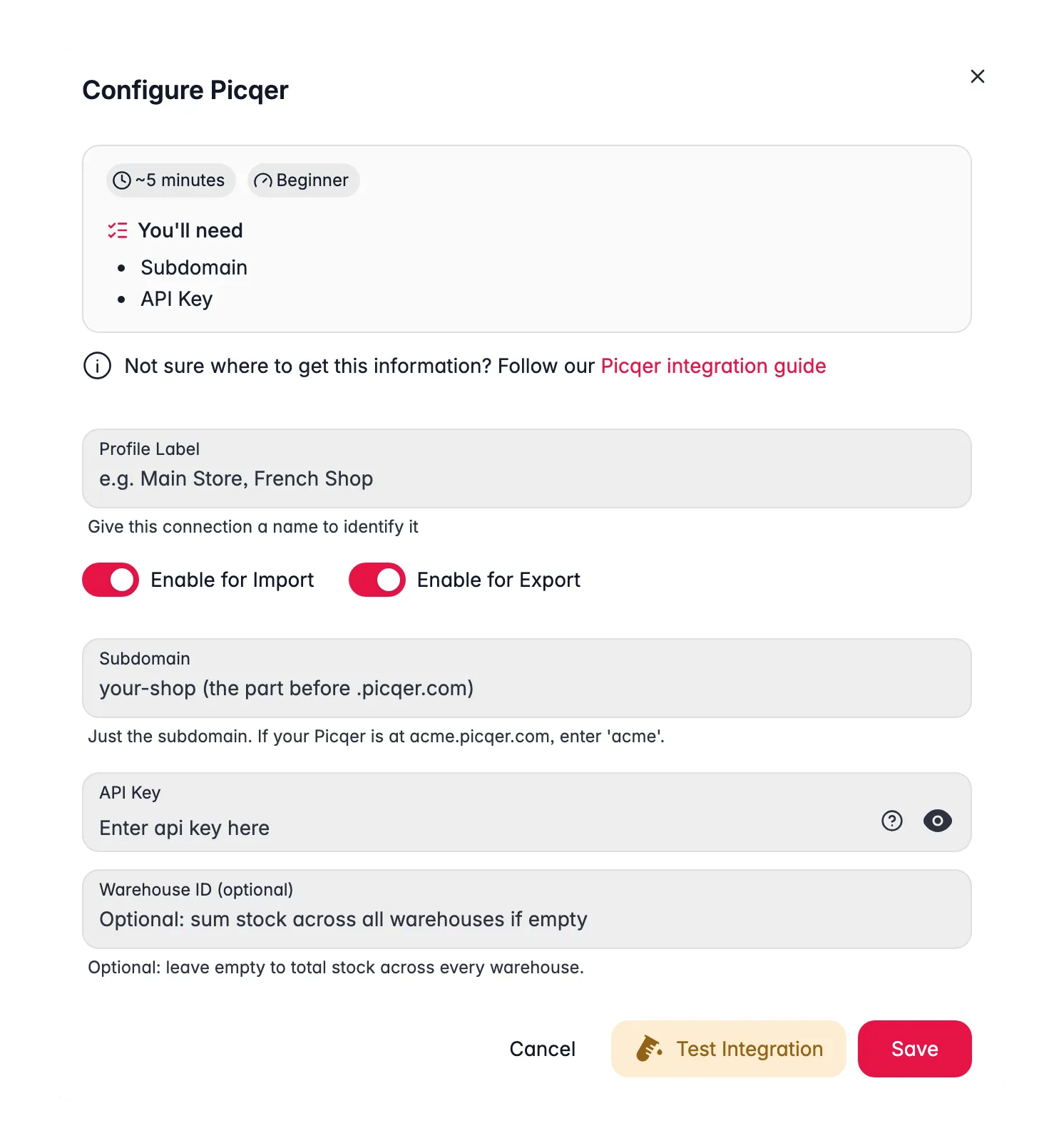
Enter your credentials
Fill in the following fields:
- Subdomain: just the subdomain, for example
acmeforacme.picqer.com - API Key: the key from your Picqer settings
- Warehouse ID: optional, leave empty to total stock across every warehouse
4
Test the connection
Click Test Connection to confirm your credentials work.
5
Save
If the test succeeds, click Save.
Your Picqer warehouse is now connected. You can import products and stock.
Use Picqer in the Automation Builder
Picqer is available as a step in the Automation Builder. Instead of importing by hand, you can let an automation pull your products and stock on a schedule, then continue with the rest of your flow.Sync stock to your other projects
The Picqer step can also push stock into your other WISEPIM projects. This is useful when the same articles are sold from several projects, for example one project per shop or per market. You keep one warehouse as the source of truth. Pick the extra projects in the step, and after each run WISEPIM copies the stock values to products with the same SKU in those projects. Only these three values travel across:Matching is done on SKU. A product in another project only gets the update if its SKU matches exactly. You can only sync to projects that belong to the same account.
Nothing else is copied. Names, descriptions, prices and images in your other projects stay untouched.
Troubleshooting
The connection test fails
The connection test fails
Check your subdomain first, enter only the part before
.picqer.com, with no https:// and no full domain. Then confirm you copied the API key exactly, with no extra spaces.Stock numbers look wrong
Stock numbers look wrong
If you set a Warehouse ID, WISEPIM only counts stock in that warehouse. Clear the field to total stock across all of your warehouses.
Related
Import products
Pull your products and stock from Picqer into WISEPIM.
Enrich products
Improve titles, descriptions, and SEO with AI.
Export products
Send the enriched content to your store platform.
All platforms
See every platform WISEPIM connects to.