> ## Documentation Index
> Fetch the complete documentation index at: https://docs.wisepim.com/llms.txt
> Use this file to discover all available pages before exploring further.
# SEO & Sitemap
> Control the URLs, slug structures, and topic clusters that shape how search engines crawl and rank your catalog.
SEO & Sitemap settings define how your store's URLs are built and which pages search engines should discover. Set them once at the project level and every sitemap, slug, and topic cluster follows the same rules.
These are **project-level** settings. Pick a project first. Without one selected, the page shows a prompt instead of the editor and there is nothing to configure.
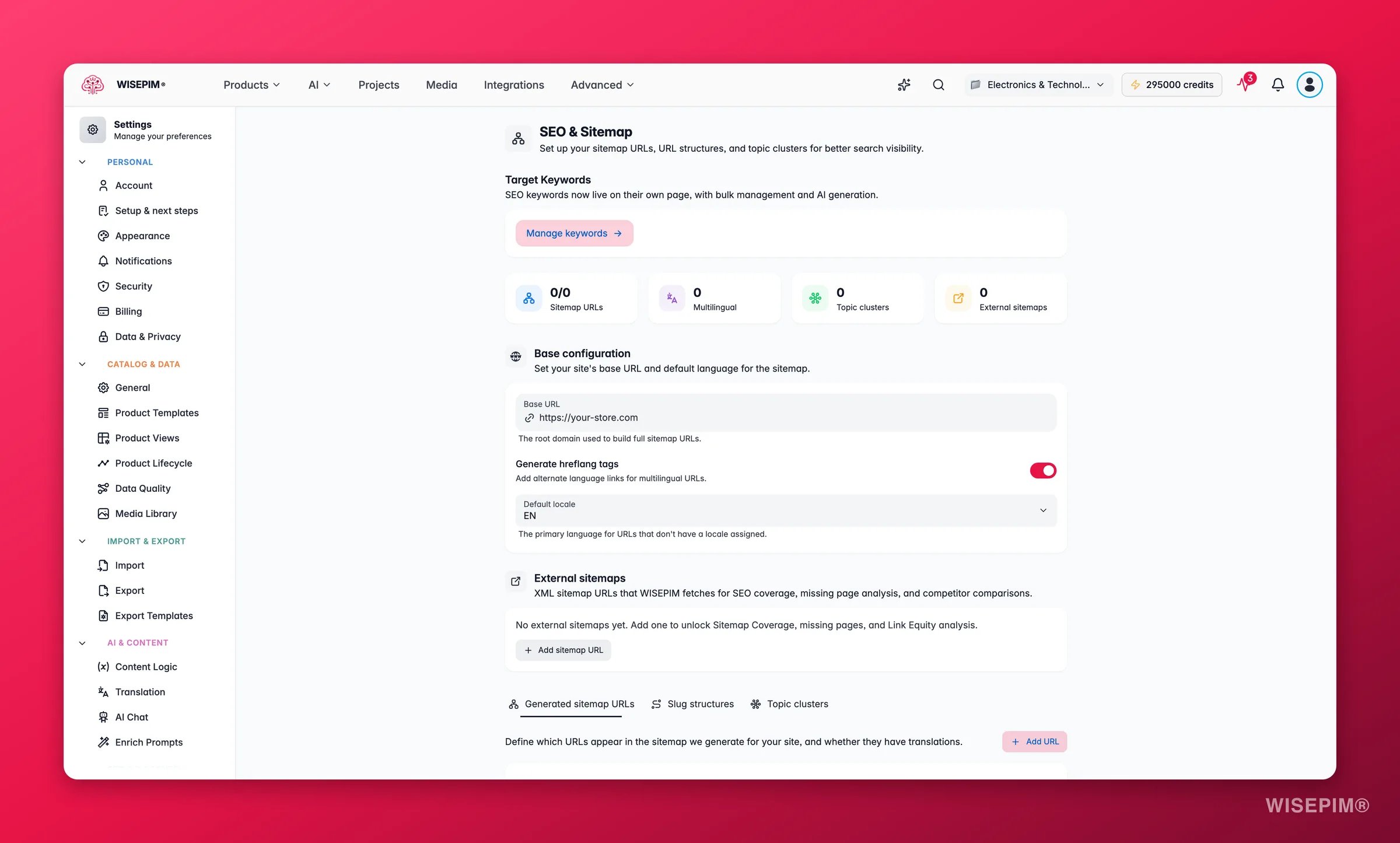
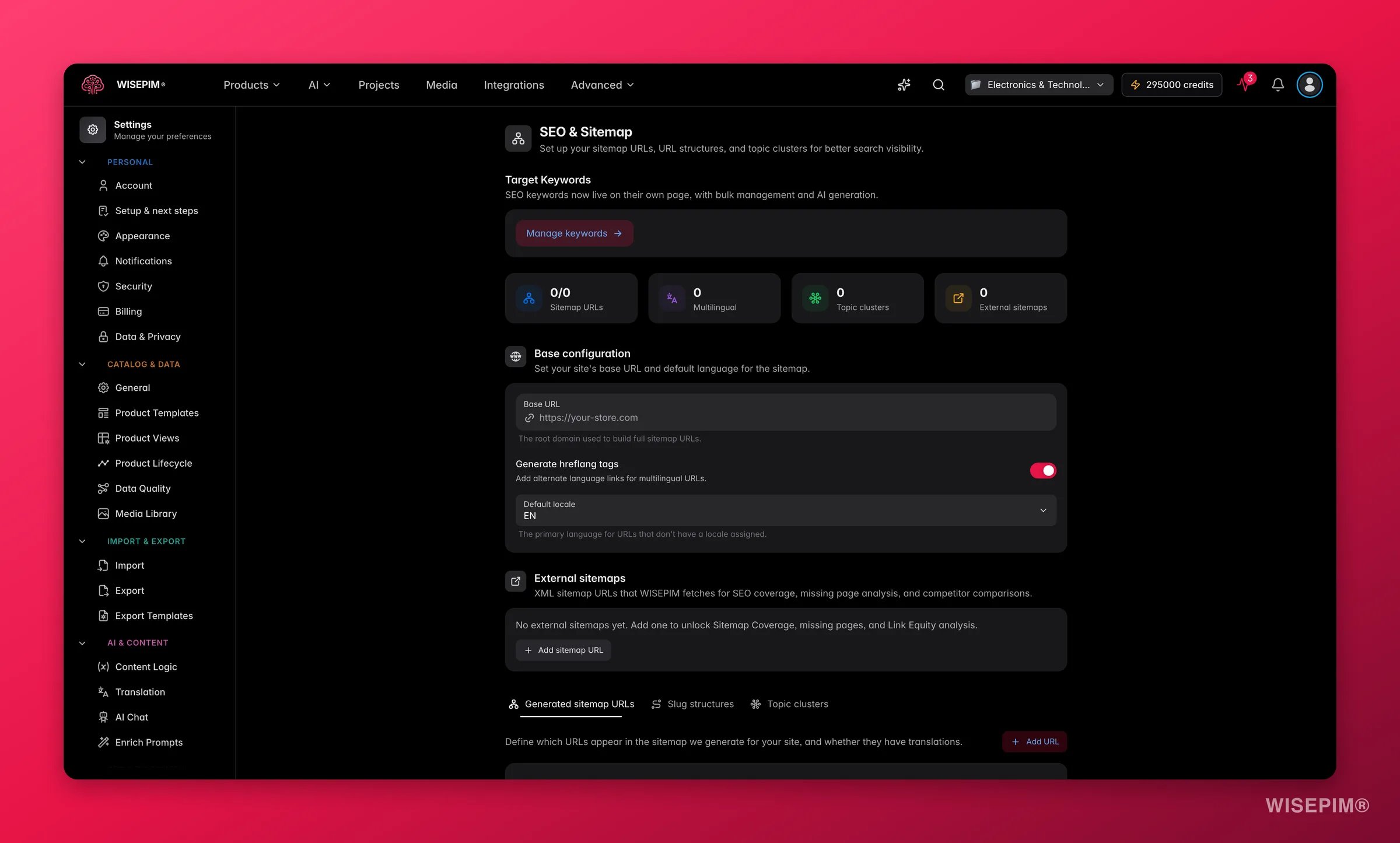 At the top of the page, four insight cards summarize your setup at a glance: how many sitemap URLs are enabled, how many are multilingual, how many topic clusters you run, and how many external sitemaps you track. They update live as you edit, so you always know the shape of your configuration.
## Keywords
The page opens with a shortcut to **Keyword Management**. SEO and keywords work together: your slugs, clusters, and meta content all lean on the keywords you target. Click the button to jump straight to the keyword workspace, then come back here to wire those keywords into your URL structure.
## Base configuration
This section sets the foundation every other URL is built from.
| Control | What it does | Why it matters |
| -------------------------- | --------------------------------------------------------------------------------------------------------------- | --------------------------------------------------------------------------------------------------------------------- |
| **Base URL** | Your store's root domain, like `https://your-store.com`. | Every sitemap entry and slug preview is built on top of it, so links resolve to the live site. |
| **Generate hreflang tags** | Toggle that adds `hreflang` annotations for each language version of a page. On by default. | Tells search engines which language and region a page targets, preventing duplicate-content penalties across locales. |
| **Default locale** | The primary language used when a URL has no locale prefix. Appears only when your project has multiple locales. | Sets which language search engines treat as the canonical default for your catalog. |
Set the **Base URL** before anything else. Slug and sitemap previews use it to show the exact link a search engine will see, so a correct base means accurate previews everywhere on this page.
## External sitemaps
Add the full XML sitemap URLs of sites you already publish, such as `https://example.com/sitemap.xml`. WISEPIM crawls these to power **coverage and gap analysis** in SEO analytics: it compares what is in your catalog against what is actually indexed, so you can spot pages that are missing or under-optimized.
A new input row appears.
Use the complete `.xml` address, not just the domain.
Add a row per sitemap you want to track. Remove any row with the trash icon.
External sitemaps are read-only references for analysis. Tracking one here never changes the site it points to.
## Sitemap URLs
The **Sitemap URLs** tab lists the pages WISEPIM includes in your generated sitemap. Each row is one page you want search engines to crawl, and you control exactly how it is described.
Click **Add URL** to create a new entry, then set:
* **Enabled**: the switch on the left includes or excludes the page from the sitemap without deleting the row.
* **Label**: a friendly name so your team knows what the page is.
* **Multilingual**: the language icon marks a page that exists in every locale, so WISEPIM emits one sitemap entry per language.
Expand a row to fine-tune how search engines treat it:
| Field | What it controls |
| -------------------- | ----------------------------------------------------------------------------------------------------------- |
| **Path** | The page path appended to your Base URL. The live preview underneath shows the full resulting URL. |
| **Change frequency** | A hint to crawlers on how often the page changes: always, hourly, daily, weekly, monthly, yearly, or never. |
| **Priority** | How important this page is relative to others, from highest (1.0) down to lowest (0.1). |
Give your most valuable pages, like the homepage and top category pages, a high priority and a realistic change frequency. This guides crawlers toward what matters and keeps your sitemap honest.
## Slug structures
The **Slugs** tab defines the URL pattern for each type of content: **Products**, **Categories**, and **Pages**. A pattern uses placeholder variables wrapped in braces, like `/{slug}`, that WISEPIM fills in per item.
Each row offers a set of variables you can use, shown as clickable chips. Click a chip to append it to the pattern:
* **Products**: `{slug}`, `{sku}`, `{category}`, `{id}`, `{name}`
* **Categories**: `{slug}`, `{parent}`, `{id}`, `{name}`
* **Pages**: `{slug}`, `{id}`, `{title}`
As you edit a pattern, a live preview shows a sample URL built from your Base URL, so you can see the real result before saving. For example, a product pattern of `/{category}/{slug}` previews as `https://your-store.com/electronics/example-item`.
Keep slugs short, readable, and keyword-rich. A pattern like `/{slug}` produces clean URLs that both shoppers and search engines prefer over ID-based links.
## Topic clusters
The **Clusters** tab lets you model topic clusters: a content strategy where one authoritative **pillar page** links out to several related **cluster pages** around a shared theme. This structure signals topical depth to search engines and helps you rank for a whole subject, not just single keywords.
Click **Add cluster** to create one, then build it out:
* **Name**: the theme the cluster covers, such as "Wireless Audio."
* **Pillar page**: the main URL that anchors the cluster. Mark it with the crown so it is clear which page is the hub.
* **Cluster pages**: the supporting URLs that link back to the pillar. Add one per row, or remove any you no longer need.
* **Keywords**: the search terms this cluster targets, added as chips you can remove individually.
Start with one cluster around your strongest category. List the pillar page, add the supporting articles or sub-categories as cluster pages, and tag the keywords you want to own. Expand to more clusters as your content grows.
## Save your changes
Edit any setting on this page and a save bar appears in the bottom corner with an unsaved-changes indicator:
* **Save changes**: stores your full SEO and sitemap configuration on the project.
* **Reset**: discards every change since your last save.
Changes apply to future sitemap generation and URL building. Existing live URLs are not rewritten until you regenerate.
## Related
Manage the target keywords your slugs and clusters build on.
See coverage, gaps, and rankings powered by your sitemap setup.
Set default meta and content values for every new product.
Browse every personal and project setting in one place.
At the top of the page, four insight cards summarize your setup at a glance: how many sitemap URLs are enabled, how many are multilingual, how many topic clusters you run, and how many external sitemaps you track. They update live as you edit, so you always know the shape of your configuration.
## Keywords
The page opens with a shortcut to **Keyword Management**. SEO and keywords work together: your slugs, clusters, and meta content all lean on the keywords you target. Click the button to jump straight to the keyword workspace, then come back here to wire those keywords into your URL structure.
## Base configuration
This section sets the foundation every other URL is built from.
| Control | What it does | Why it matters |
| -------------------------- | --------------------------------------------------------------------------------------------------------------- | --------------------------------------------------------------------------------------------------------------------- |
| **Base URL** | Your store's root domain, like `https://your-store.com`. | Every sitemap entry and slug preview is built on top of it, so links resolve to the live site. |
| **Generate hreflang tags** | Toggle that adds `hreflang` annotations for each language version of a page. On by default. | Tells search engines which language and region a page targets, preventing duplicate-content penalties across locales. |
| **Default locale** | The primary language used when a URL has no locale prefix. Appears only when your project has multiple locales. | Sets which language search engines treat as the canonical default for your catalog. |
Set the **Base URL** before anything else. Slug and sitemap previews use it to show the exact link a search engine will see, so a correct base means accurate previews everywhere on this page.
## External sitemaps
Add the full XML sitemap URLs of sites you already publish, such as `https://example.com/sitemap.xml`. WISEPIM crawls these to power **coverage and gap analysis** in SEO analytics: it compares what is in your catalog against what is actually indexed, so you can spot pages that are missing or under-optimized.
A new input row appears.
Use the complete `.xml` address, not just the domain.
Add a row per sitemap you want to track. Remove any row with the trash icon.
External sitemaps are read-only references for analysis. Tracking one here never changes the site it points to.
## Sitemap URLs
The **Sitemap URLs** tab lists the pages WISEPIM includes in your generated sitemap. Each row is one page you want search engines to crawl, and you control exactly how it is described.
Click **Add URL** to create a new entry, then set:
* **Enabled**: the switch on the left includes or excludes the page from the sitemap without deleting the row.
* **Label**: a friendly name so your team knows what the page is.
* **Multilingual**: the language icon marks a page that exists in every locale, so WISEPIM emits one sitemap entry per language.
Expand a row to fine-tune how search engines treat it:
| Field | What it controls |
| -------------------- | ----------------------------------------------------------------------------------------------------------- |
| **Path** | The page path appended to your Base URL. The live preview underneath shows the full resulting URL. |
| **Change frequency** | A hint to crawlers on how often the page changes: always, hourly, daily, weekly, monthly, yearly, or never. |
| **Priority** | How important this page is relative to others, from highest (1.0) down to lowest (0.1). |
Give your most valuable pages, like the homepage and top category pages, a high priority and a realistic change frequency. This guides crawlers toward what matters and keeps your sitemap honest.
## Slug structures
The **Slugs** tab defines the URL pattern for each type of content: **Products**, **Categories**, and **Pages**. A pattern uses placeholder variables wrapped in braces, like `/{slug}`, that WISEPIM fills in per item.
Each row offers a set of variables you can use, shown as clickable chips. Click a chip to append it to the pattern:
* **Products**: `{slug}`, `{sku}`, `{category}`, `{id}`, `{name}`
* **Categories**: `{slug}`, `{parent}`, `{id}`, `{name}`
* **Pages**: `{slug}`, `{id}`, `{title}`
As you edit a pattern, a live preview shows a sample URL built from your Base URL, so you can see the real result before saving. For example, a product pattern of `/{category}/{slug}` previews as `https://your-store.com/electronics/example-item`.
Keep slugs short, readable, and keyword-rich. A pattern like `/{slug}` produces clean URLs that both shoppers and search engines prefer over ID-based links.
## Topic clusters
The **Clusters** tab lets you model topic clusters: a content strategy where one authoritative **pillar page** links out to several related **cluster pages** around a shared theme. This structure signals topical depth to search engines and helps you rank for a whole subject, not just single keywords.
Click **Add cluster** to create one, then build it out:
* **Name**: the theme the cluster covers, such as "Wireless Audio."
* **Pillar page**: the main URL that anchors the cluster. Mark it with the crown so it is clear which page is the hub.
* **Cluster pages**: the supporting URLs that link back to the pillar. Add one per row, or remove any you no longer need.
* **Keywords**: the search terms this cluster targets, added as chips you can remove individually.
Start with one cluster around your strongest category. List the pillar page, add the supporting articles or sub-categories as cluster pages, and tag the keywords you want to own. Expand to more clusters as your content grows.
## Save your changes
Edit any setting on this page and a save bar appears in the bottom corner with an unsaved-changes indicator:
* **Save changes**: stores your full SEO and sitemap configuration on the project.
* **Reset**: discards every change since your last save.
Changes apply to future sitemap generation and URL building. Existing live URLs are not rewritten until you regenerate.
## Related
Manage the target keywords your slugs and clusters build on.
See coverage, gaps, and rankings powered by your sitemap setup.
Set default meta and content values for every new product.
Browse every personal and project setting in one place.