> ## Documentation Index
> Fetch the complete documentation index at: https://docs.wisepim.com/llms.txt
> Use this file to discover all available pages before exploring further.
# Audit Log
> See who changed what and when in Quality Guard. A searchable, read-only history of every quality action for full compliance visibility.
The Audit Log answers one question fast: who did what, and when? It records every Quality Guard action in a searchable timeline. Use it to review decisions, investigate quality issues, and prove compliance.
The Audit Log is read-only. You cannot edit or delete entries. That keeps the record tamper-proof.
## Read an entry
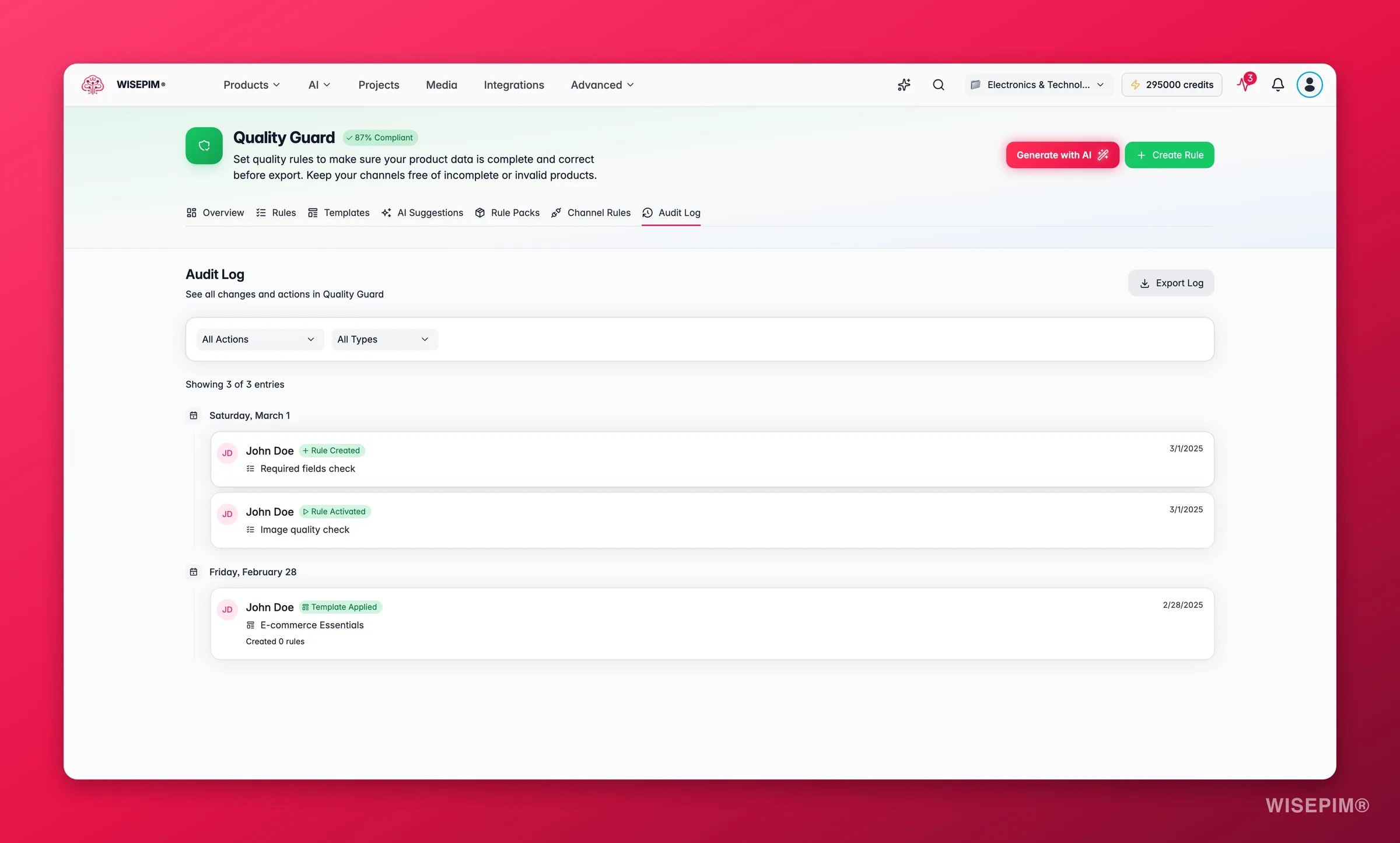
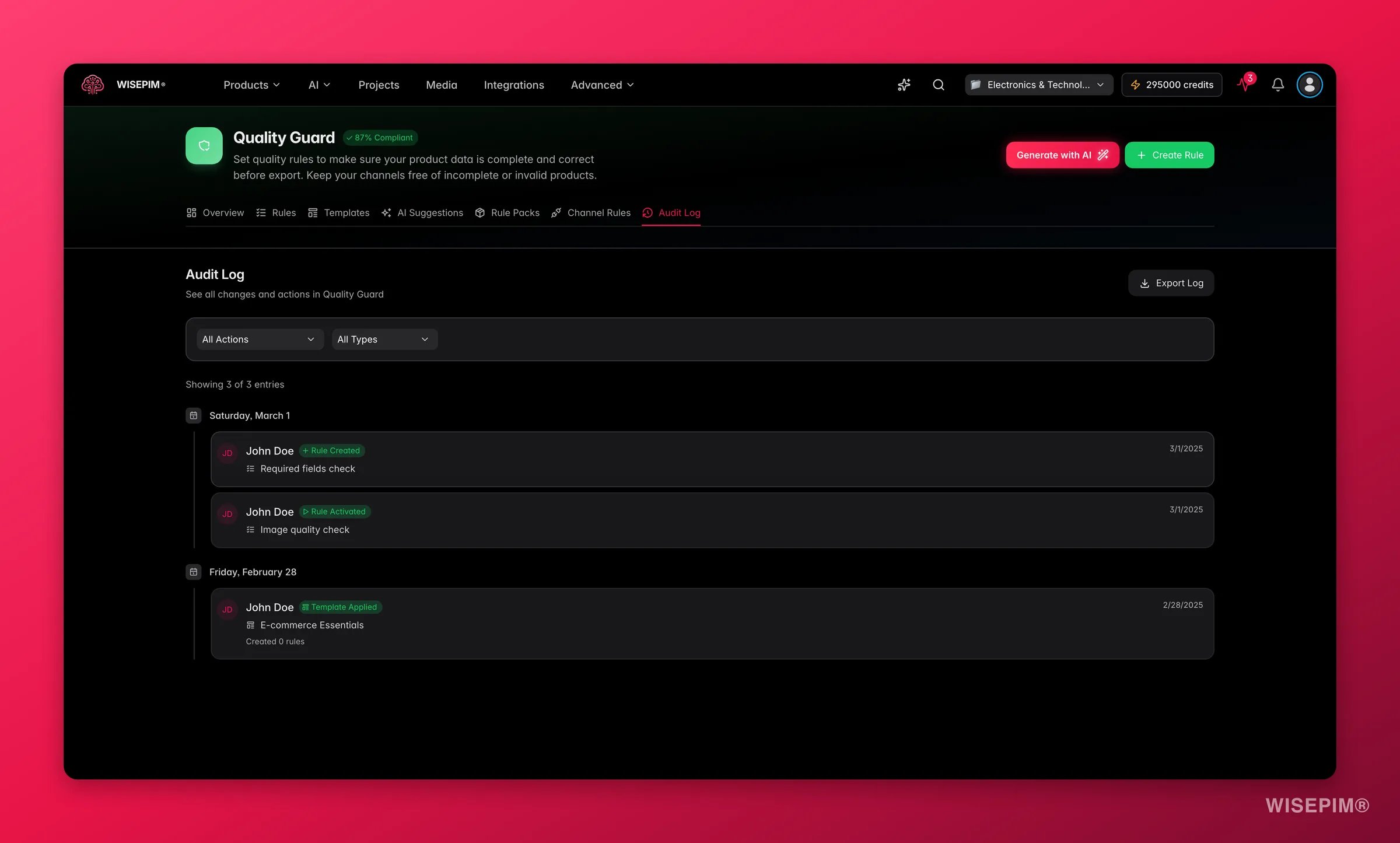 The log shows entries in a timeline, grouped by date. Each entry includes:
* **User**: who performed the action, with an avatar and username.
* **Action**: what they did, such as "Rule Created" or "Quarantine Resolved".
* **Entity**: the rule, quarantine item, or template involved.
* **Timestamp**: when it happened. Hover for the full date.
* **Details**: extra context that depends on the action.
## Find what you need
Use the two filter dropdowns to narrow the log. Combine them to drill down fast.
**Filter by action type** to see one kind of event. Pick "Quarantine Bypassed" to review every bypass, or "Rule Created" to see new rules.
**Filter by entity type** to focus on one area:
* **Rules**: actions on quality rules.
* **Quarantine**: resolutions and bypasses.
* **Templates**: template applications.
* **Pre-flight**: pre-flight check results.
* **Channel Rules**: channel-specific rule updates.
Combine both filters to cut the noise. Filter by "Rule Updated" and "Rules" to see only rule changes, with no quarantine or template activity in the way.
Click **Clear filters** to reset the view at any time.
## Tracked actions
The log captures these events:
| Action | What it records |
| ------------------------- | ----------------------------------------------------------------------------------- |
| **Rule Created** | A new quality rule was added to the project. |
| **Rule Updated** | A rule was changed. Shows which fields changed, with old and new values. |
| **Rule Deleted** | A quality rule was permanently removed. |
| **Rule Activated** | A rule was turned on and is now enforced during checks. |
| **Rule Deactivated** | A rule was turned off and is no longer enforced. |
| **Quarantine Resolved** | A quarantined product was fixed and marked resolved. |
| **Quarantine Bypassed** | A quarantined product was released without a fix. Includes the bypass reason. |
| **Pre-flight Check** | A quality check ran before an export. Shows products checked, blocked, and skipped. |
| **Bulk Fix Applied** | A bulk fix ran across many products. Shows success and failure counts. |
| **Template Applied** | A rule template created one or more rules. Shows how many. |
| **Channel Rules Updated** | Channel-specific rules were added or removed. Shows the counts. |
## What each action shows
Different actions carry different details. Expand the ones you want to understand.
Shows the exact fields that changed, with old and new values. For example: `severity: warn -> block`.
Shows how many products were checked, and how many were blocked, skipped, or warned. This is a snapshot of your catalog's quality at that moment.
Shows how many products were fixed versus how many failed. Use it to judge how well a bulk action worked.
Shows the reason the user gave when they approved the bypass. This builds an accountability trail for every override.
Shows how many rules the template created when it was applied.
Shows how many rules were added and removed for the channel.
## Export the log
Click **Export Log** to download the audit trail as a CSV file. The export respects your active filters, so you can export a focused subset.
Common reasons to export:
* **Compliance audits**: export the full log for internal or external reviews.
* **Bypass reviews**: export only bypass actions to check overrides.
* **Change tracking**: export rule changes over a period to document process improvements.
The CSV includes every visible field: timestamp, user, action, entity type, entity name, and action-specific details.
## Navigate large logs
The log is paginated to stay fast. Move between pages at the bottom. The current page and total entry count sit above the timeline.
## Best practices
* **Review bypasses regularly.** Each bypass is an intentional override. Check them now and then to confirm they are still justified.
* **Export before big changes.** Save the current log before a major rule change so you have a baseline.
* **Filter for investigations.** When you diagnose a quality issue, filter by the rule or entity type to see its full history.
* **Track team activity.** The log shows who made each change, so you can coordinate and understand the context.
* **Watch pre-flight trends.** Compare pre-flight results over time to see if catalog quality is improving.
The log records all activity automatically and you cannot delete entries selectively. This protects the integrity of your quality audit trail.
## Related
Create and manage the rules whose changes appear in the log.
Resolve or bypass products that fail your rules.
Set channel-specific requirements for each sales platform.
See how quality control fits together in WISEPIM.
The log shows entries in a timeline, grouped by date. Each entry includes:
* **User**: who performed the action, with an avatar and username.
* **Action**: what they did, such as "Rule Created" or "Quarantine Resolved".
* **Entity**: the rule, quarantine item, or template involved.
* **Timestamp**: when it happened. Hover for the full date.
* **Details**: extra context that depends on the action.
## Find what you need
Use the two filter dropdowns to narrow the log. Combine them to drill down fast.
**Filter by action type** to see one kind of event. Pick "Quarantine Bypassed" to review every bypass, or "Rule Created" to see new rules.
**Filter by entity type** to focus on one area:
* **Rules**: actions on quality rules.
* **Quarantine**: resolutions and bypasses.
* **Templates**: template applications.
* **Pre-flight**: pre-flight check results.
* **Channel Rules**: channel-specific rule updates.
Combine both filters to cut the noise. Filter by "Rule Updated" and "Rules" to see only rule changes, with no quarantine or template activity in the way.
Click **Clear filters** to reset the view at any time.
## Tracked actions
The log captures these events:
| Action | What it records |
| ------------------------- | ----------------------------------------------------------------------------------- |
| **Rule Created** | A new quality rule was added to the project. |
| **Rule Updated** | A rule was changed. Shows which fields changed, with old and new values. |
| **Rule Deleted** | A quality rule was permanently removed. |
| **Rule Activated** | A rule was turned on and is now enforced during checks. |
| **Rule Deactivated** | A rule was turned off and is no longer enforced. |
| **Quarantine Resolved** | A quarantined product was fixed and marked resolved. |
| **Quarantine Bypassed** | A quarantined product was released without a fix. Includes the bypass reason. |
| **Pre-flight Check** | A quality check ran before an export. Shows products checked, blocked, and skipped. |
| **Bulk Fix Applied** | A bulk fix ran across many products. Shows success and failure counts. |
| **Template Applied** | A rule template created one or more rules. Shows how many. |
| **Channel Rules Updated** | Channel-specific rules were added or removed. Shows the counts. |
## What each action shows
Different actions carry different details. Expand the ones you want to understand.
Shows the exact fields that changed, with old and new values. For example: `severity: warn -> block`.
Shows how many products were checked, and how many were blocked, skipped, or warned. This is a snapshot of your catalog's quality at that moment.
Shows how many products were fixed versus how many failed. Use it to judge how well a bulk action worked.
Shows the reason the user gave when they approved the bypass. This builds an accountability trail for every override.
Shows how many rules the template created when it was applied.
Shows how many rules were added and removed for the channel.
## Export the log
Click **Export Log** to download the audit trail as a CSV file. The export respects your active filters, so you can export a focused subset.
Common reasons to export:
* **Compliance audits**: export the full log for internal or external reviews.
* **Bypass reviews**: export only bypass actions to check overrides.
* **Change tracking**: export rule changes over a period to document process improvements.
The CSV includes every visible field: timestamp, user, action, entity type, entity name, and action-specific details.
## Navigate large logs
The log is paginated to stay fast. Move between pages at the bottom. The current page and total entry count sit above the timeline.
## Best practices
* **Review bypasses regularly.** Each bypass is an intentional override. Check them now and then to confirm they are still justified.
* **Export before big changes.** Save the current log before a major rule change so you have a baseline.
* **Filter for investigations.** When you diagnose a quality issue, filter by the rule or entity type to see its full history.
* **Track team activity.** The log shows who made each change, so you can coordinate and understand the context.
* **Watch pre-flight trends.** Compare pre-flight results over time to see if catalog quality is improving.
The log records all activity automatically and you cannot delete entries selectively. This protects the integrity of your quality audit trail.
## Related
Create and manage the rules whose changes appear in the log.
Resolve or bypass products that fail your rules.
Set channel-specific requirements for each sales platform.
See how quality control fits together in WISEPIM.