> ## Documentation Index
> Fetch the complete documentation index at: https://docs.wisepim.com/llms.txt
> Use this file to discover all available pages before exploring further.
# Squarespace Integration
> Connect your Squarespace store to WISEPIM. Create a Commerce API key, add it in WISEPIM, and start syncing your catalog.
Connect your Squarespace store to WISEPIM to manage your whole catalog from one place. Once connected, you can import products, enrich them with AI, and push the improved content back to Squarespace.
Setup takes two steps: create an API key in Squarespace, then add it in WISEPIM.
You need a Squarespace Commerce plan with API access and a WISEPIM account with an active project.
## Create an API key in Squarespace
 Squarespace issues an API key with the permissions you choose.
Log in to Squarespace. Go to **Settings** > **Advanced** > **Developer API Keys**.
Click **Generate Key**, name it WISEPIM, and grant **Products** permission with read and write access.
Copy the generated API key now. It is only shown once.
Your Site ID appears in your Squarespace account settings, or in the URL of your site's admin. Copy it for the next step.
## Add your credentials to WISEPIM
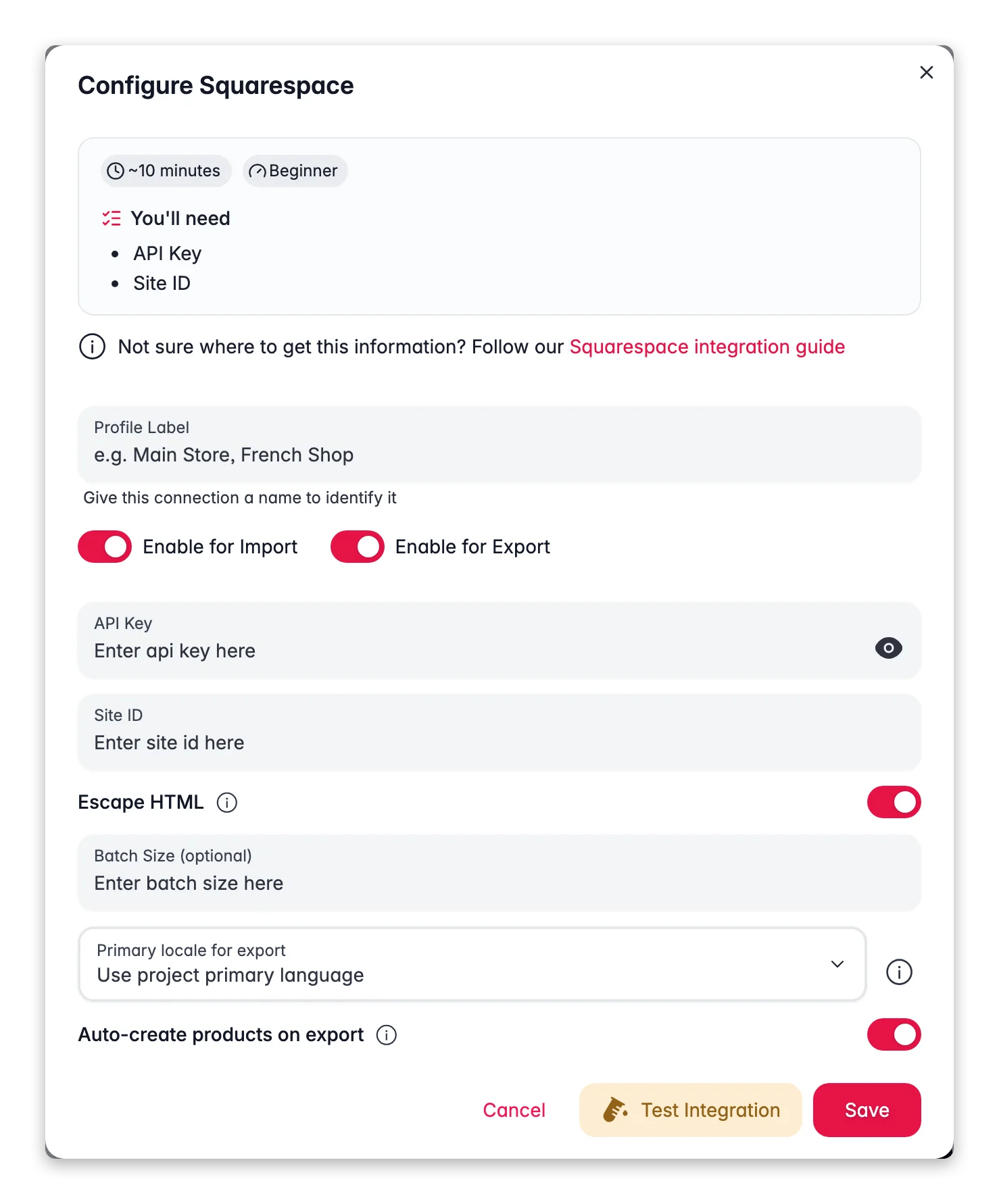
Enter the values from Squarespace to finish the connection.
Log in to WISEPIM and go to **Settings** > **Integrations**.
Find and click the **Squarespace** integration tile.
Fill in the following fields:
* **API Key**: the key you generated in Squarespace
* **Site ID**: your Squarespace site identifier
Click **Test Connection** to confirm your credentials work.
If the test succeeds, click **Save**.
Your Squarespace store is now connected. You can start importing products.
Your API key gives access to the resources you granted it. Never share it publicly or commit it to version control. If you think it is exposed, revoke it in Squarespace and create a new one.
## Troubleshooting
Confirm you copied the API key exactly, with no extra spaces, and that the key has **Products** read and write permission. Then check that your Site ID is correct.
Squarespace scopes each key to specific resources. Generate a new key and make sure **Products** is selected before saving.
## Related
Pull your catalog from Squarespace into WISEPIM.
Improve titles, descriptions, and SEO with AI.
Push the improved content back to Squarespace.
See every platform WISEPIM connects to.
Squarespace issues an API key with the permissions you choose.
Log in to Squarespace. Go to **Settings** > **Advanced** > **Developer API Keys**.
Click **Generate Key**, name it WISEPIM, and grant **Products** permission with read and write access.
Copy the generated API key now. It is only shown once.
Your Site ID appears in your Squarespace account settings, or in the URL of your site's admin. Copy it for the next step.
## Add your credentials to WISEPIM
Enter the values from Squarespace to finish the connection.
Log in to WISEPIM and go to **Settings** > **Integrations**.
Find and click the **Squarespace** integration tile.
Fill in the following fields:
* **API Key**: the key you generated in Squarespace
* **Site ID**: your Squarespace site identifier
Click **Test Connection** to confirm your credentials work.
If the test succeeds, click **Save**.
Your Squarespace store is now connected. You can start importing products.
Your API key gives access to the resources you granted it. Never share it publicly or commit it to version control. If you think it is exposed, revoke it in Squarespace and create a new one.
## Troubleshooting
Confirm you copied the API key exactly, with no extra spaces, and that the key has **Products** read and write permission. Then check that your Site ID is correct.
Squarespace scopes each key to specific resources. Generate a new key and make sure **Products** is selected before saving.
## Related
Pull your catalog from Squarespace into WISEPIM.
Improve titles, descriptions, and SEO with AI.
Push the improved content back to Squarespace.
See every platform WISEPIM connects to.