> ## Documentation Index
> Fetch the complete documentation index at: https://docs.wisepim.com/llms.txt
> Use this file to discover all available pages before exploring further.
# Linguistic Review
> Have AI proofread your translations like a native-speaking editor: score each locale across six linguistic criteria, catch inconsistent terms, and fix them in one click.
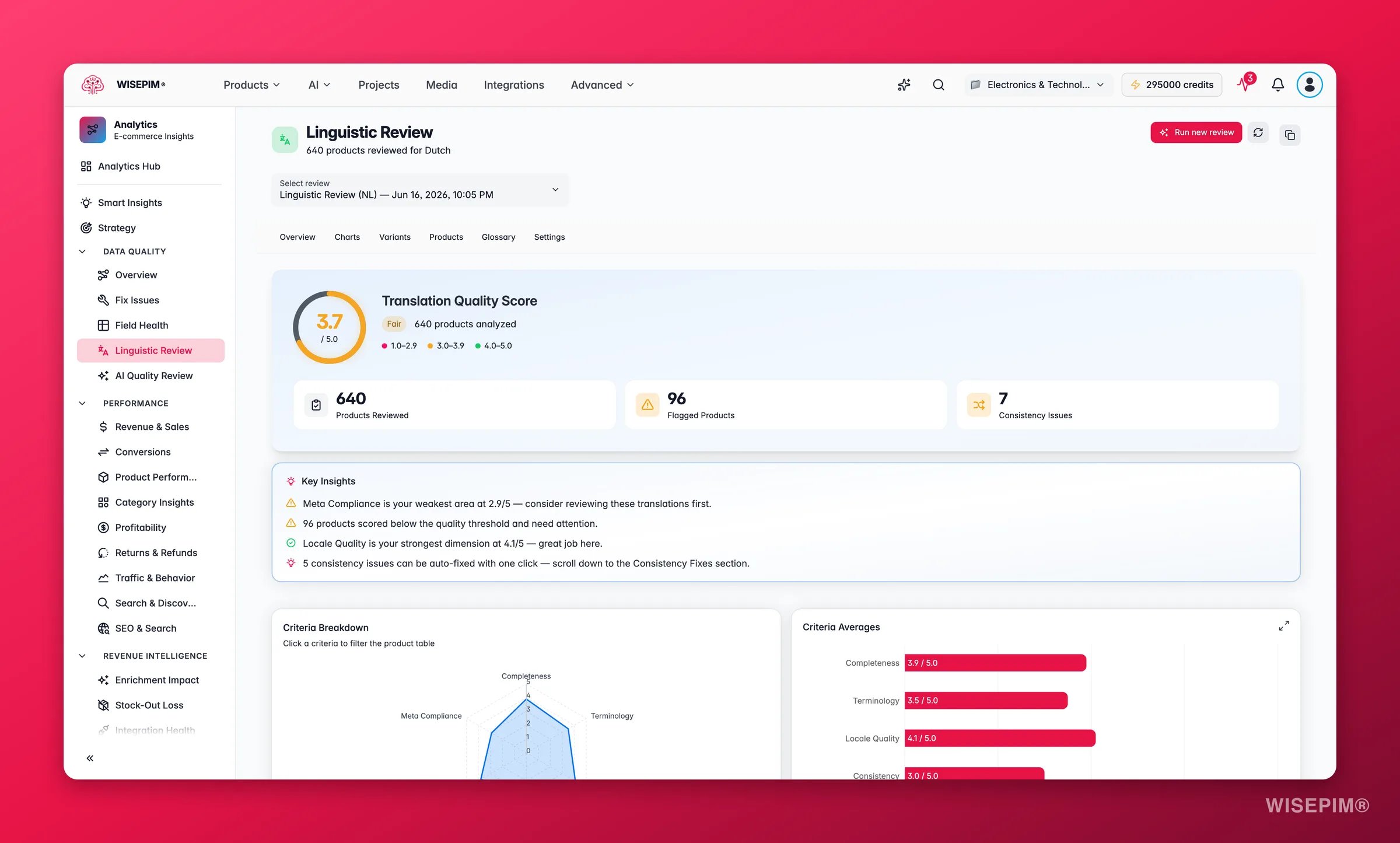
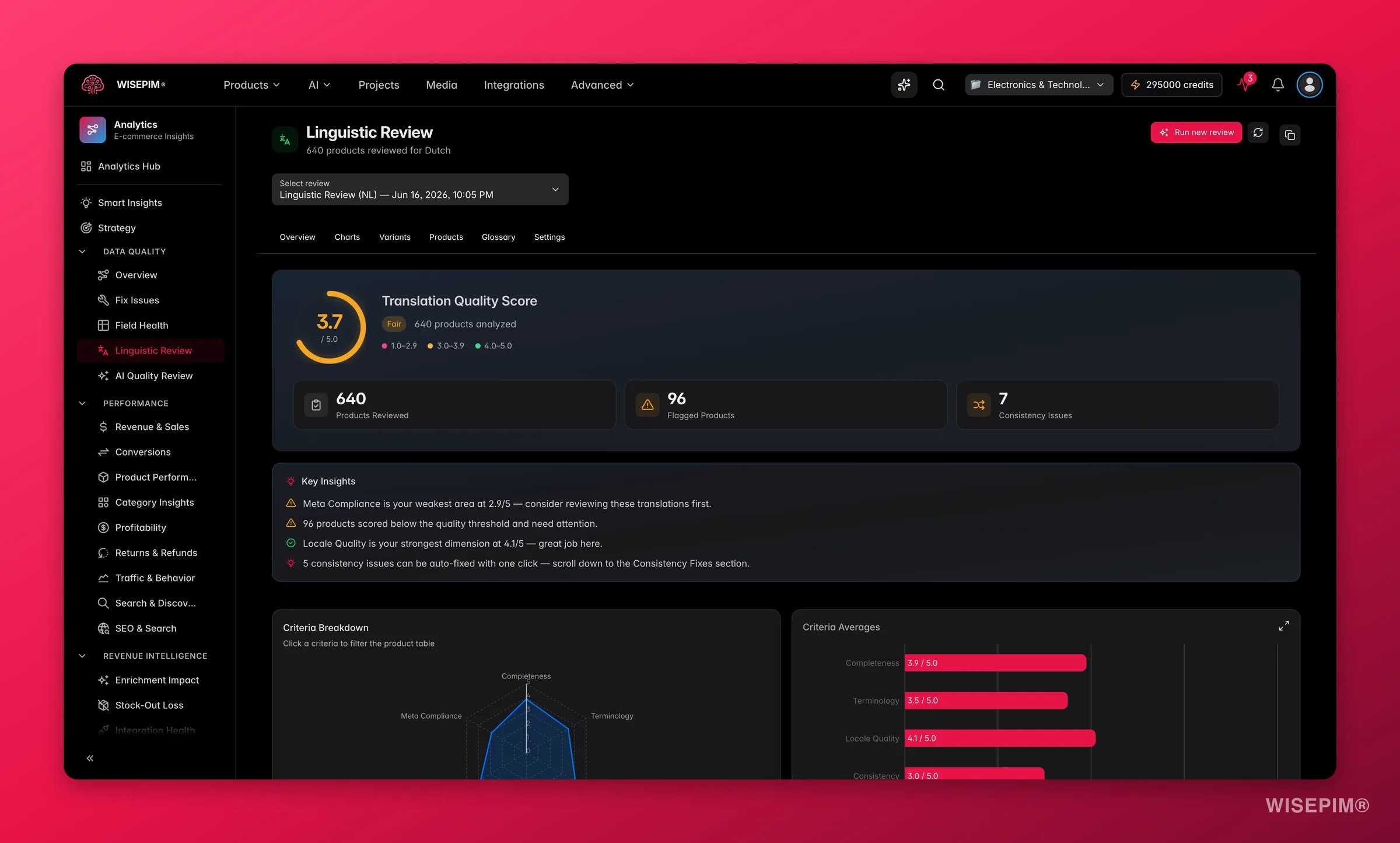 Machine translation is fast, but it drifts: the same term gets translated three different ways, meta descriptions blow past their character limit, and the tone reads slightly off for the local market. **Linguistic Review** is the editor that catches all of it. It evaluates your translations for one target locale across six criteria, flags the products that fall short, and offers one-click fixes for the inconsistencies.
**What acting on it enables:** launch a new language with confidence, catch translation errors before customers (or a channel) do, and keep terminology and brand voice consistent across the whole catalog.
A review runs for **one target locale at a time**, so add your locales first in [Translation settings](/en/settings/translation) (the "Run review" button stays disabled until at least one target locale exists). Reviews run in the background and are ready in a few minutes.
## Run a review
Find it in the Analytics sidebar, or run it straight from a product selection after [translating products](/en/products/translating-products).
Choose which language to review. The review compares each translation against its source and the expectations for that locale.
Set the flagging threshold (products scoring below it are flagged) and the meta-description character limit for SEO compliance.
Your current selection or everything matching your filters.
The review processes in the background. When it finishes, the dashboard fills with your scores, charts, term variants, and per-product results.
## The six criteria
| Criterion | What it measures |
| --------------------- | -------------------------------------------------------------------------------------- |
| **Completeness** | Are all translatable fields (name, description, meta) filled in for the target locale? |
| **Terminology** | Are industry terms and product-specific vocabulary translated accurately? |
| **Locale Quality** | Does the translation sound natural for the locale (spelling, grammar, tone)? |
| **Consistency** | Are the same terms translated the same way across all products? |
| **Format & Keywords** | Are formatting rules followed and important keywords preserved? |
| **Meta Compliance** | Do meta titles and descriptions meet character limits and SEO requirements? |
### What the scores mean
| Score | Status | Read it as |
| --------- | -------------- | --------------------------------------------- |
| 4.0 – 5.0 | **Good** | Ready to publish. |
| 3.0 – 3.9 | **Fair** | Usable, but worth a polish before a big push. |
| Below 3.0 | **Needs work** | Fix before this locale goes live. |
The overall score is the average across all six criteria. Each product also gets a **priority** (Critical to Pass), and the summary counts your **flagged products** and **consistency issues** so you know the size of the job at a glance.
## Reading the results
* **Overview** gives you the headline score, plus how many products are flagged and how many consistency issues were found, with auto-generated plain-language insights (your strongest and weakest criteria).
* **Charts** show the criteria radar, the score distribution, a priority breakdown, and (once you have two or more reviews) a trend line so you can see whether quality is improving over time.
* **Term Variants** is where the consistency fixes live: each inconsistent term lists how it was translated and how many products use each variant, with the recommended one highlighted.
* **Products** is a searchable, sortable table; open any row to see per-criterion scores, the reviewer's notes, and the key terms extracted from that product.
* **Term Glossary** is a quick reference of the most-used source-to-translation pairs across the reviewed products.
* **Recommended Settings** lists AI suggestions for tightening your project's translation settings.
## One-click fixes
* **Apply a term variant** to standardize an inconsistent translation across every affected product, and optionally **add it to the dictionary** so future AI translations always use the approved term.
* **Fix All** applies every auto-fixable consistency issue at once.
* **Apply** a recommended setting to update your project's translation rules.
* **Copy summary** puts the score breakdown on your clipboard for a Slack or email update, and **Excel report** downloads the full review.
## Act on what you find
Open Term Variants. Each issue shows the competing translations and how many products use each. Pick the recommended variant, toggle **Add to dictionary**, and apply. **Outcome:** terminology is unified now, and the dictionary keeps every future translation consistent, so the problem does not come back.
Translated meta descriptions often blow past the character limit or get truncated. Apply the recommended setting to align the locale's meta limit, then fix the flagged products. **Outcome:** your translated pages keep their full meta text in search results, protecting click-through in the local market.
Grammar, tone, or spelling reads off for native speakers. Open the flagged products, read the reviewer's per-criterion notes, and either edit the translation directly or re-run AI translation with a clearer instruction. **Outcome:** the copy reads like it was written for the market, not machine-translated into it.
Run a review on the full catalog for that locale, fix the flagged products and the consistency issues, and confirm the overall score is comfortably above 4 before you publish. **Outcome:** the new market launches on polished, consistent copy instead of raw machine output.
Use the review as a quality gate: run it right after the batch to see how the machine output scored, then fix the lowest-priority products before anything syncs to a channel. **Outcome:** translation errors are caught in-house instead of by a customer or a channel rejection.
## How it relates to the other quality tools
Linguistic Review is the language-quality counterpart to the **[AI Quality Review](/en/analytics/quality-review)**. Where AI Quality Review judges your *product data* (completeness, images, pricing, conversion signals), Linguistic Review judges the *translated copy* itself. A product can have perfect data and still read awkwardly in Dutch or French, so the two work best together: review the data, then review the language.
## Related
The product-data counterpart: 12 dimensions, one-click fixes and guard rules.
Translate your catalog with AI before (and after) you review it.
Manage target locales and the terminology dictionary the review writes to.
Track overall product-data health alongside translation quality.
Machine translation is fast, but it drifts: the same term gets translated three different ways, meta descriptions blow past their character limit, and the tone reads slightly off for the local market. **Linguistic Review** is the editor that catches all of it. It evaluates your translations for one target locale across six criteria, flags the products that fall short, and offers one-click fixes for the inconsistencies.
**What acting on it enables:** launch a new language with confidence, catch translation errors before customers (or a channel) do, and keep terminology and brand voice consistent across the whole catalog.
A review runs for **one target locale at a time**, so add your locales first in [Translation settings](/en/settings/translation) (the "Run review" button stays disabled until at least one target locale exists). Reviews run in the background and are ready in a few minutes.
## Run a review
Find it in the Analytics sidebar, or run it straight from a product selection after [translating products](/en/products/translating-products).
Choose which language to review. The review compares each translation against its source and the expectations for that locale.
Set the flagging threshold (products scoring below it are flagged) and the meta-description character limit for SEO compliance.
Your current selection or everything matching your filters.
The review processes in the background. When it finishes, the dashboard fills with your scores, charts, term variants, and per-product results.
## The six criteria
| Criterion | What it measures |
| --------------------- | -------------------------------------------------------------------------------------- |
| **Completeness** | Are all translatable fields (name, description, meta) filled in for the target locale? |
| **Terminology** | Are industry terms and product-specific vocabulary translated accurately? |
| **Locale Quality** | Does the translation sound natural for the locale (spelling, grammar, tone)? |
| **Consistency** | Are the same terms translated the same way across all products? |
| **Format & Keywords** | Are formatting rules followed and important keywords preserved? |
| **Meta Compliance** | Do meta titles and descriptions meet character limits and SEO requirements? |
### What the scores mean
| Score | Status | Read it as |
| --------- | -------------- | --------------------------------------------- |
| 4.0 – 5.0 | **Good** | Ready to publish. |
| 3.0 – 3.9 | **Fair** | Usable, but worth a polish before a big push. |
| Below 3.0 | **Needs work** | Fix before this locale goes live. |
The overall score is the average across all six criteria. Each product also gets a **priority** (Critical to Pass), and the summary counts your **flagged products** and **consistency issues** so you know the size of the job at a glance.
## Reading the results
* **Overview** gives you the headline score, plus how many products are flagged and how many consistency issues were found, with auto-generated plain-language insights (your strongest and weakest criteria).
* **Charts** show the criteria radar, the score distribution, a priority breakdown, and (once you have two or more reviews) a trend line so you can see whether quality is improving over time.
* **Term Variants** is where the consistency fixes live: each inconsistent term lists how it was translated and how many products use each variant, with the recommended one highlighted.
* **Products** is a searchable, sortable table; open any row to see per-criterion scores, the reviewer's notes, and the key terms extracted from that product.
* **Term Glossary** is a quick reference of the most-used source-to-translation pairs across the reviewed products.
* **Recommended Settings** lists AI suggestions for tightening your project's translation settings.
## One-click fixes
* **Apply a term variant** to standardize an inconsistent translation across every affected product, and optionally **add it to the dictionary** so future AI translations always use the approved term.
* **Fix All** applies every auto-fixable consistency issue at once.
* **Apply** a recommended setting to update your project's translation rules.
* **Copy summary** puts the score breakdown on your clipboard for a Slack or email update, and **Excel report** downloads the full review.
## Act on what you find
Open Term Variants. Each issue shows the competing translations and how many products use each. Pick the recommended variant, toggle **Add to dictionary**, and apply. **Outcome:** terminology is unified now, and the dictionary keeps every future translation consistent, so the problem does not come back.
Translated meta descriptions often blow past the character limit or get truncated. Apply the recommended setting to align the locale's meta limit, then fix the flagged products. **Outcome:** your translated pages keep their full meta text in search results, protecting click-through in the local market.
Grammar, tone, or spelling reads off for native speakers. Open the flagged products, read the reviewer's per-criterion notes, and either edit the translation directly or re-run AI translation with a clearer instruction. **Outcome:** the copy reads like it was written for the market, not machine-translated into it.
Run a review on the full catalog for that locale, fix the flagged products and the consistency issues, and confirm the overall score is comfortably above 4 before you publish. **Outcome:** the new market launches on polished, consistent copy instead of raw machine output.
Use the review as a quality gate: run it right after the batch to see how the machine output scored, then fix the lowest-priority products before anything syncs to a channel. **Outcome:** translation errors are caught in-house instead of by a customer or a channel rejection.
## How it relates to the other quality tools
Linguistic Review is the language-quality counterpart to the **[AI Quality Review](/en/analytics/quality-review)**. Where AI Quality Review judges your *product data* (completeness, images, pricing, conversion signals), Linguistic Review judges the *translated copy* itself. A product can have perfect data and still read awkwardly in Dutch or French, so the two work best together: review the data, then review the language.
## Related
The product-data counterpart: 12 dimensions, one-click fixes and guard rules.
Translate your catalog with AI before (and after) you review it.
Manage target locales and the terminology dictionary the review writes to.
Track overall product-data health alongside translation quality.