> ## Documentation Index
> Fetch the complete documentation index at: https://docs.wisepim.com/llms.txt
> Use this file to discover all available pages before exploring further.
# Competitor Intelligence
> Add up to 10 rivals, let WISEPIM scrape them, and see exactly where they beat you on specs, product copy, languages and search visibility. Then close each gap with one click.
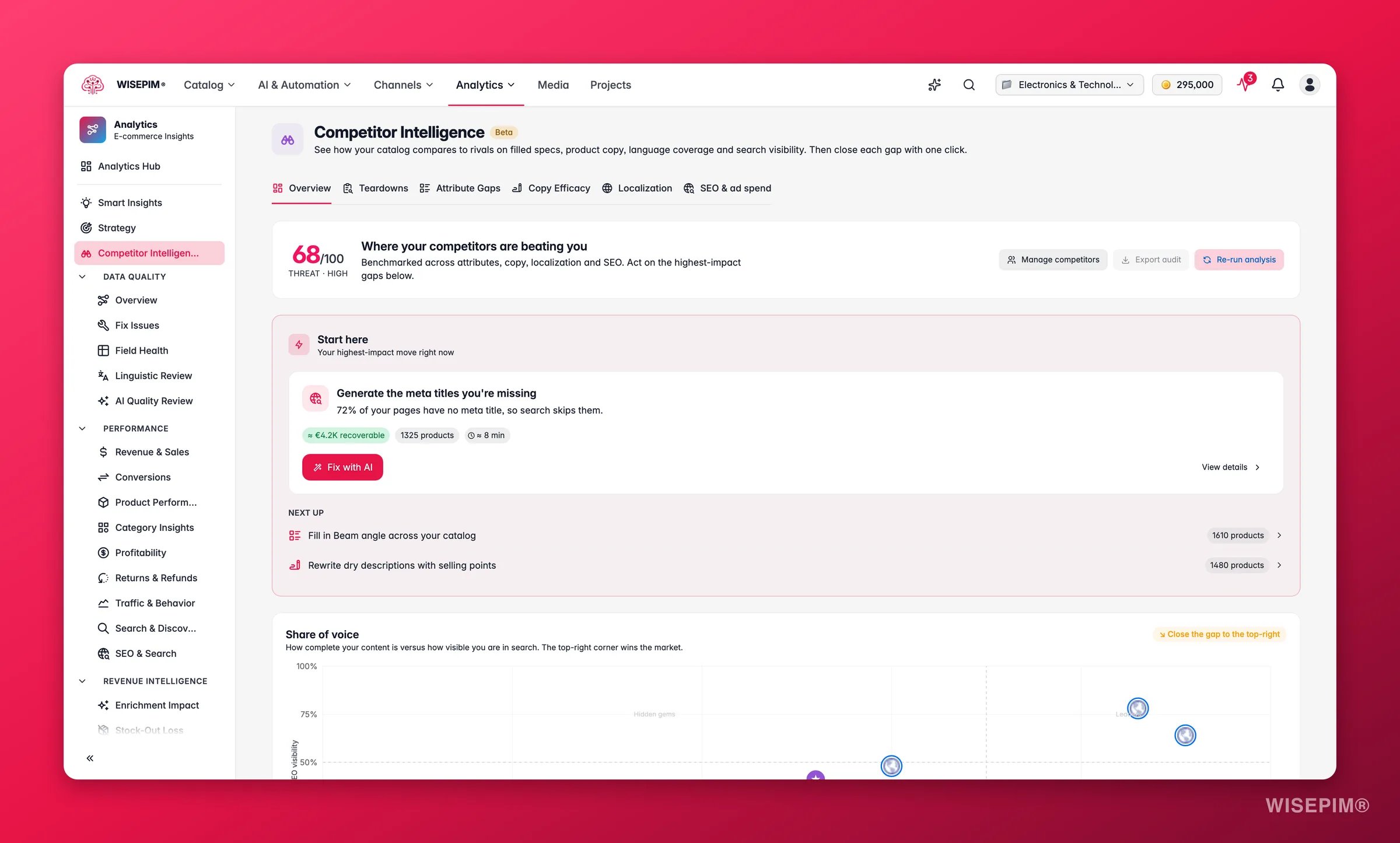
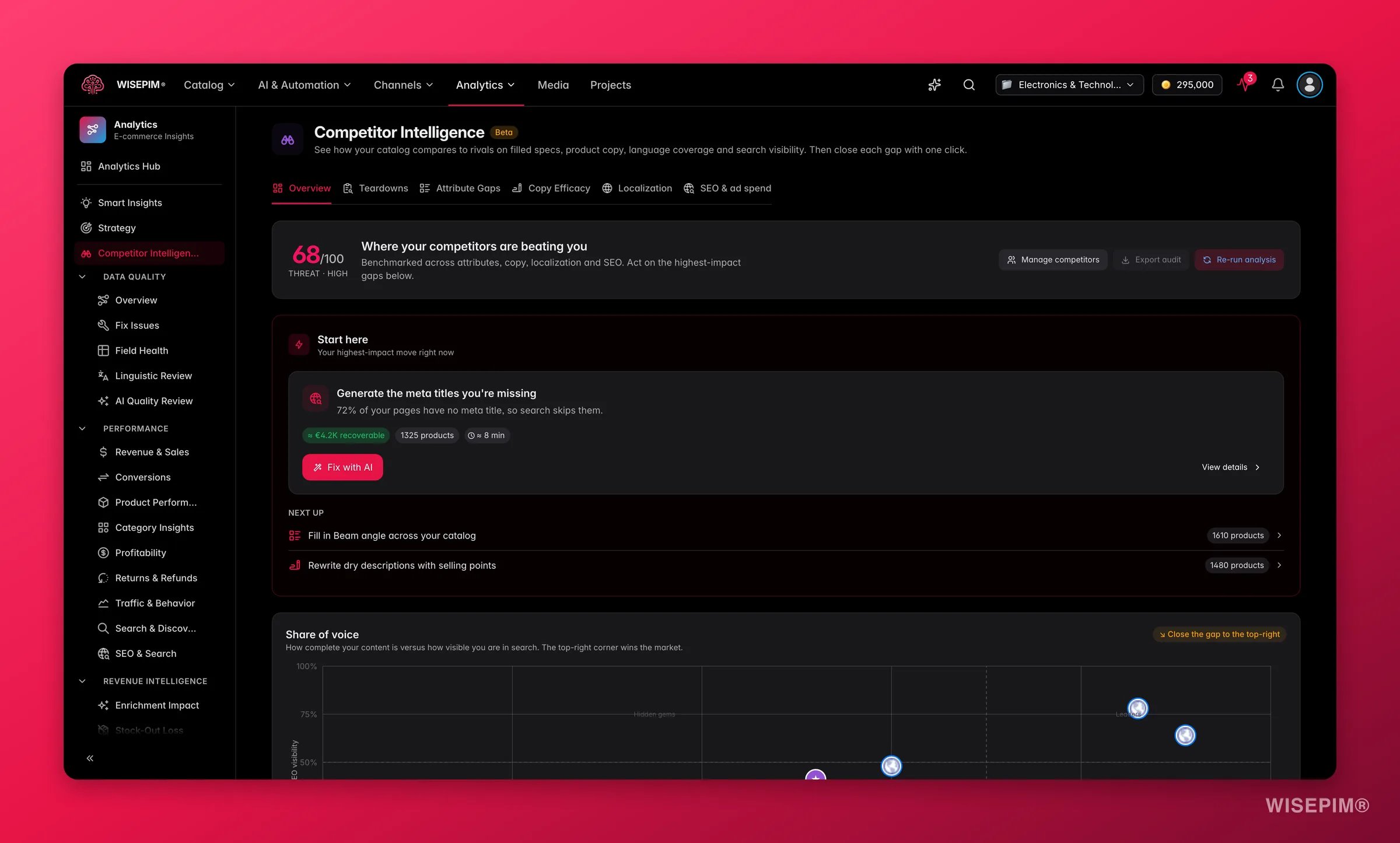 You know who your rivals are. What you usually do not know is *where* they are actually beating you. Competitor Intelligence answers that. You name up to 10 competitors, WISEPIM scrapes their shops, and it compares them to your catalog on four things you can control: filled specs, product copy, language coverage, and search visibility.
Every finding comes with a button. You do not leave the page with a report to read, you leave it with fixes applied.
**What acting on it enables:** match the specs shoppers filter on, replace flat copy with selling points, open the markets your rivals already serve, and stop losing clicks on keywords they own.
Competitor Intelligence is part of Analytics and needs the **Growth** plan or higher. You can add up to **10 competitors** per project.
Finding, scraping, and analyzing competitors costs **no AI credits**. Credits are only used when you apply an AI fix, at the normal enrichment rate for whatever is being written.
The date-range picker at the top of the page is switched off here. Competitor analysis always reflects the latest scrape, not a historical window.
## Add your competitors
Find **Competitor Intelligence** in the Analytics sidebar. Before your first run you see the starting screen: "Know exactly where your competitors beat you".
Click **Suggest my competitors**. WISEPIM researches the web and comes back with suggested shops, each with a short reason why it thinks that shop competes with you. Click **Add** on the ones you agree with, ignore the rest.
Click **Add a competitor manually**, paste the shop's address (for example `competitor.com`), and click **Add**.
**Your competitors** shows everyone you have added with an n/10 counter, so you always know how much room is left.
Click **Run competitor analysis**.
Ten slots go fast. Spend them on the shops you actually lose deals to, not the biggest names in your market. A giant marketplace will always look strong and will not tell you much you can act on.
## Run and re-run the analysis
Scraping several shops takes time, so the analysis runs in the background. You see "Analyzing your competitors" and a progress bar, and the page updates itself while it works. A full run usually takes a few minutes, and can take up to about ten for larger sets.
You can leave the page and come back. When it finishes, the tabs appear: **Overview · Teardowns · Attribute Gaps · Copy Efficacy · Localization · SEO & ad spend**.
Use **Re-run analysis** in the Overview header whenever you have changed your catalog or added a competitor.
If a competitor blocks scraping, you still get results for the rest and a "Partial results" message telling you which shops could not be read. Try that competitor again on the next run, or replace it.
## The Overview
The Overview is the page you read first. It answers one question: what should I do today?
* **Threat score** sits at the top, from 0 to 100, with a **Threat · High / Moderate / Low** label. Higher means your competitors are further ahead of you on the things measured here. Treat it as a single number to watch, not a verdict on your business.
* **Start here** is the card that matters most. It names your highest-impact move right now, with an impact chip and an effort chip so you can judge it in a second, then gives you **Fix with AI** and **View details**. **Next up** shows what comes after it.
* **What changed since last analysis** lists the moves your rivals made since your previous run.
* **Share of voice** is a scatter chart. Content completeness runs along the bottom, SEO visibility up the side, which splits the field into four quadrants: **Leaders**, **Hidden gems**, **Vulnerable**, and **At risk**. Click any marker to open that competitor's teardown.
* **Threat trend** plots your score over time. It needs at least two completed runs before it appears.
* **Assortment white space** shows product areas your rivals cover and you do not.
* **Price positioning** places you and each rival in **Budget**, **Mid-market**, or **Premium**, so you can see whether you are priced where you think you are.
* **Competitors at a glance** is the roster. Click a row to open its teardown.
* **Four pillar cards** summarize the deep tabs: **Attribute gaps**, **Copy efficacy**, **Localization gaps**, and **SEO & wasted ad spend**. Each one carries **Fix with AI** and **View details**.
Also in the header: **Manage competitors** to add or remove shops, and **Re-run analysis**. **Export audit** is visible but not active yet, a downloadable PDF audit is on the way.
If you only have five minutes, use the **Start here** card and stop. It is picked for impact against effort, so it is almost always a better use of your time than browsing the tabs.
## Teardowns
You know who your rivals are. What you usually do not know is *where* they are actually beating you. Competitor Intelligence answers that. You name up to 10 competitors, WISEPIM scrapes their shops, and it compares them to your catalog on four things you can control: filled specs, product copy, language coverage, and search visibility.
Every finding comes with a button. You do not leave the page with a report to read, you leave it with fixes applied.
**What acting on it enables:** match the specs shoppers filter on, replace flat copy with selling points, open the markets your rivals already serve, and stop losing clicks on keywords they own.
Competitor Intelligence is part of Analytics and needs the **Growth** plan or higher. You can add up to **10 competitors** per project.
Finding, scraping, and analyzing competitors costs **no AI credits**. Credits are only used when you apply an AI fix, at the normal enrichment rate for whatever is being written.
The date-range picker at the top of the page is switched off here. Competitor analysis always reflects the latest scrape, not a historical window.
## Add your competitors
Find **Competitor Intelligence** in the Analytics sidebar. Before your first run you see the starting screen: "Know exactly where your competitors beat you".
Click **Suggest my competitors**. WISEPIM researches the web and comes back with suggested shops, each with a short reason why it thinks that shop competes with you. Click **Add** on the ones you agree with, ignore the rest.
Click **Add a competitor manually**, paste the shop's address (for example `competitor.com`), and click **Add**.
**Your competitors** shows everyone you have added with an n/10 counter, so you always know how much room is left.
Click **Run competitor analysis**.
Ten slots go fast. Spend them on the shops you actually lose deals to, not the biggest names in your market. A giant marketplace will always look strong and will not tell you much you can act on.
## Run and re-run the analysis
Scraping several shops takes time, so the analysis runs in the background. You see "Analyzing your competitors" and a progress bar, and the page updates itself while it works. A full run usually takes a few minutes, and can take up to about ten for larger sets.
You can leave the page and come back. When it finishes, the tabs appear: **Overview · Teardowns · Attribute Gaps · Copy Efficacy · Localization · SEO & ad spend**.
Use **Re-run analysis** in the Overview header whenever you have changed your catalog or added a competitor.
If a competitor blocks scraping, you still get results for the rest and a "Partial results" message telling you which shops could not be read. Try that competitor again on the next run, or replace it.
## The Overview
The Overview is the page you read first. It answers one question: what should I do today?
* **Threat score** sits at the top, from 0 to 100, with a **Threat · High / Moderate / Low** label. Higher means your competitors are further ahead of you on the things measured here. Treat it as a single number to watch, not a verdict on your business.
* **Start here** is the card that matters most. It names your highest-impact move right now, with an impact chip and an effort chip so you can judge it in a second, then gives you **Fix with AI** and **View details**. **Next up** shows what comes after it.
* **What changed since last analysis** lists the moves your rivals made since your previous run.
* **Share of voice** is a scatter chart. Content completeness runs along the bottom, SEO visibility up the side, which splits the field into four quadrants: **Leaders**, **Hidden gems**, **Vulnerable**, and **At risk**. Click any marker to open that competitor's teardown.
* **Threat trend** plots your score over time. It needs at least two completed runs before it appears.
* **Assortment white space** shows product areas your rivals cover and you do not.
* **Price positioning** places you and each rival in **Budget**, **Mid-market**, or **Premium**, so you can see whether you are priced where you think you are.
* **Competitors at a glance** is the roster. Click a row to open its teardown.
* **Four pillar cards** summarize the deep tabs: **Attribute gaps**, **Copy efficacy**, **Localization gaps**, and **SEO & wasted ad spend**. Each one carries **Fix with AI** and **View details**.
Also in the header: **Manage competitors** to add or remove shops, and **Re-run analysis**. **Export audit** is visible but not active yet, a downloadable PDF audit is on the way.
If you only have five minutes, use the **Start here** card and stop. It is picked for impact against effort, so it is almost always a better use of your time than browsing the tabs.
## Teardowns
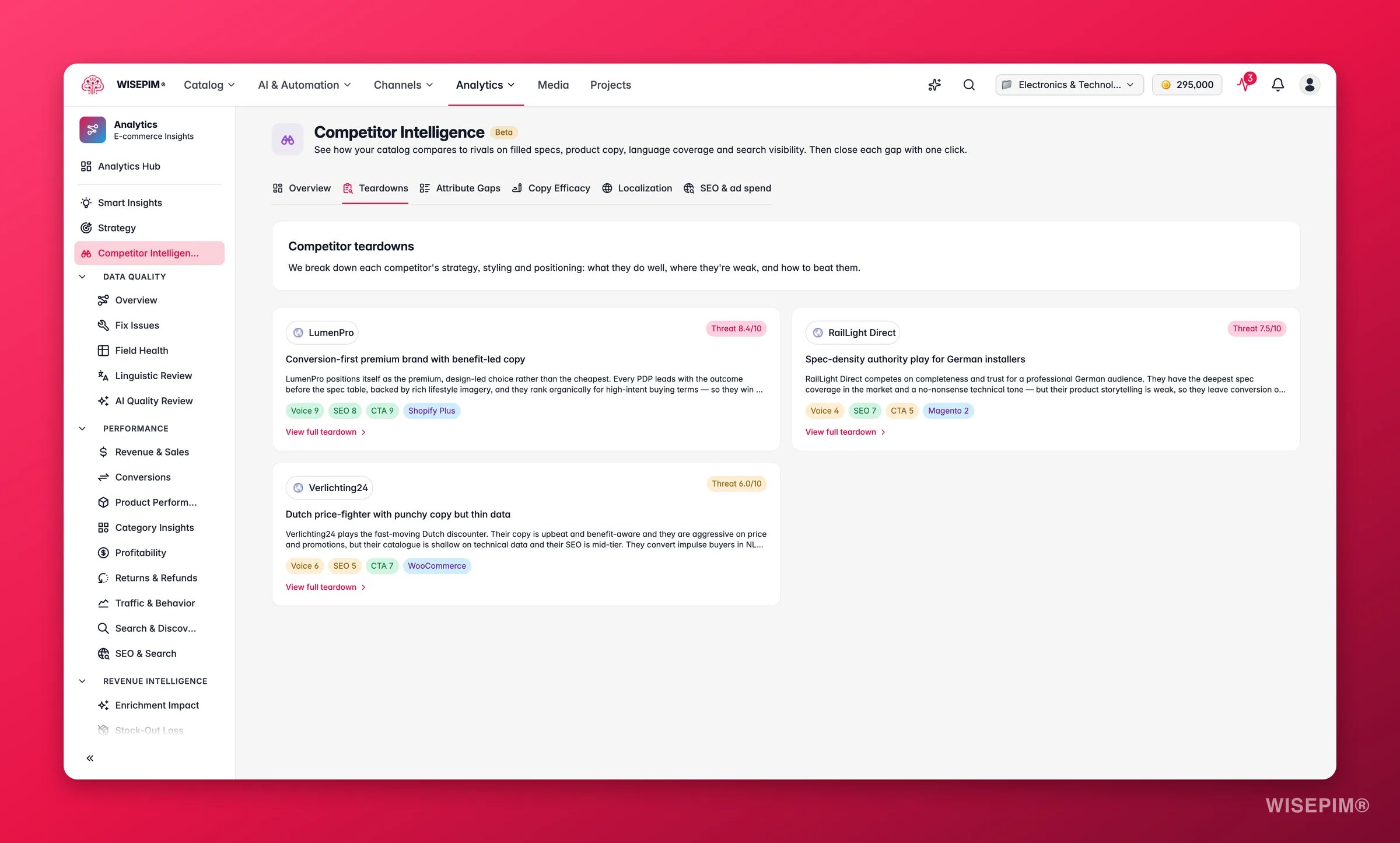
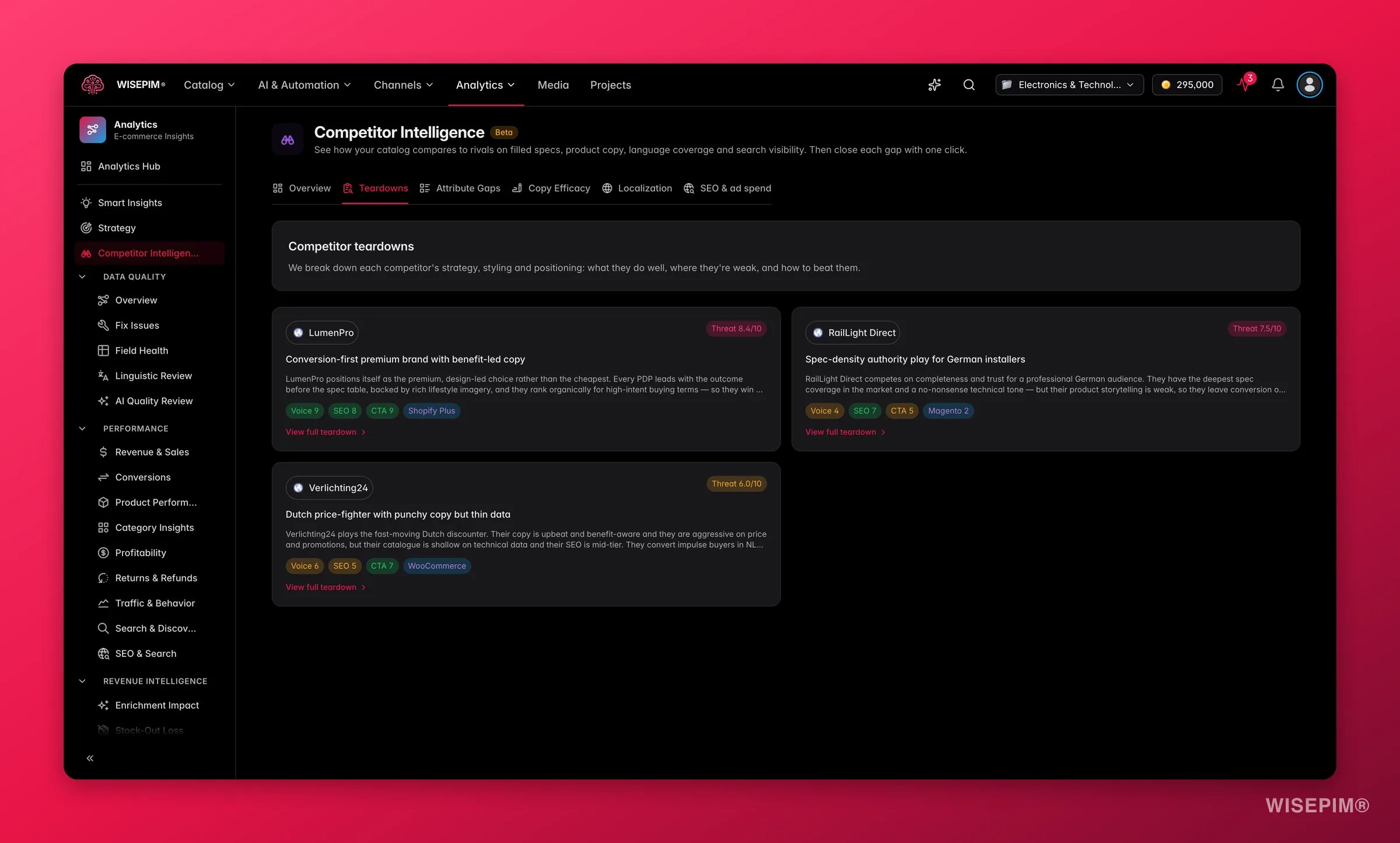 A teardown is a full read of one competitor: how they position themselves, who they sell to, and what they are good and bad at. Open one from a teardown card, a roster row in **Competitors at a glance**, or a marker in the **Share of voice** chart.
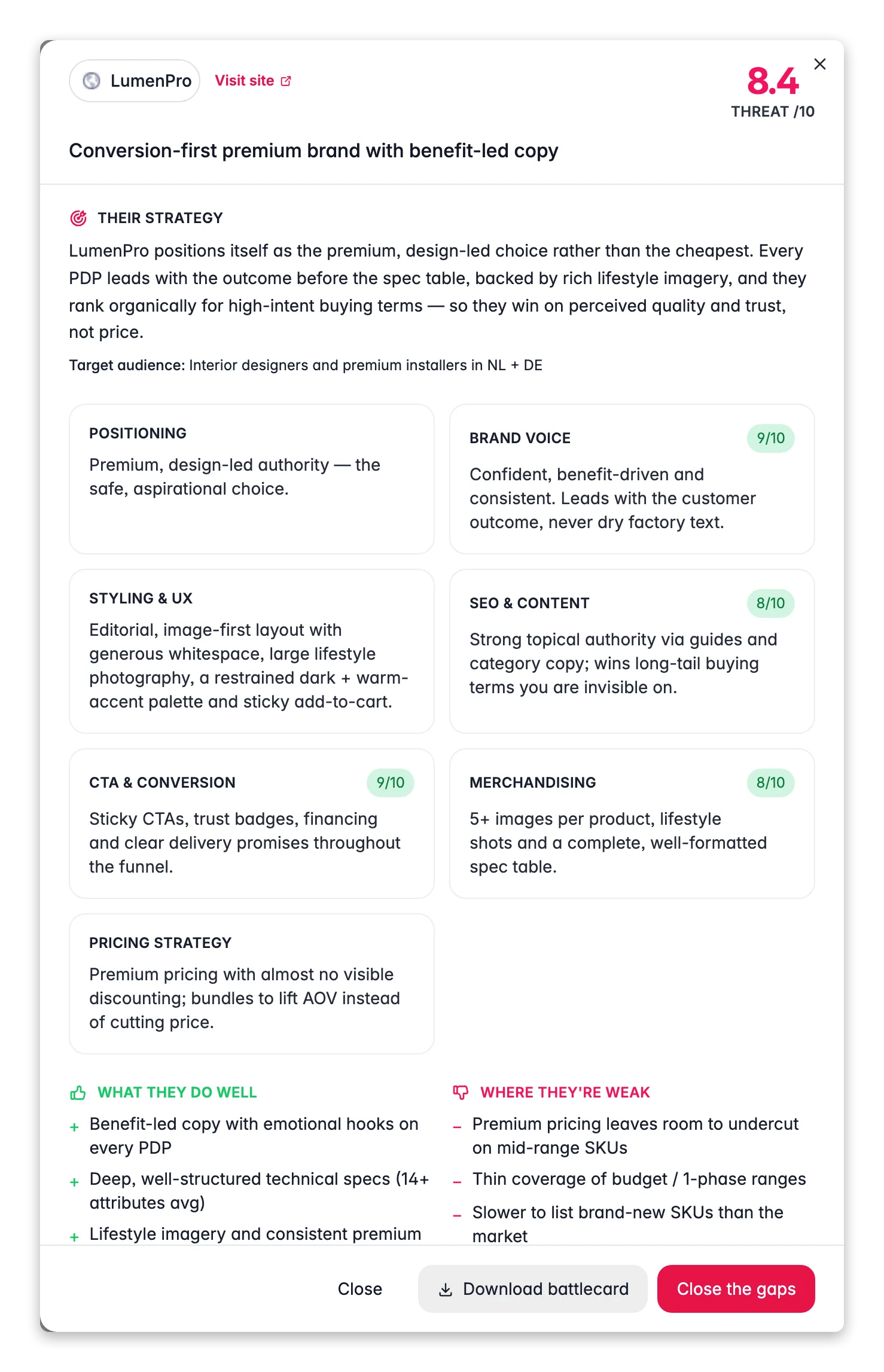
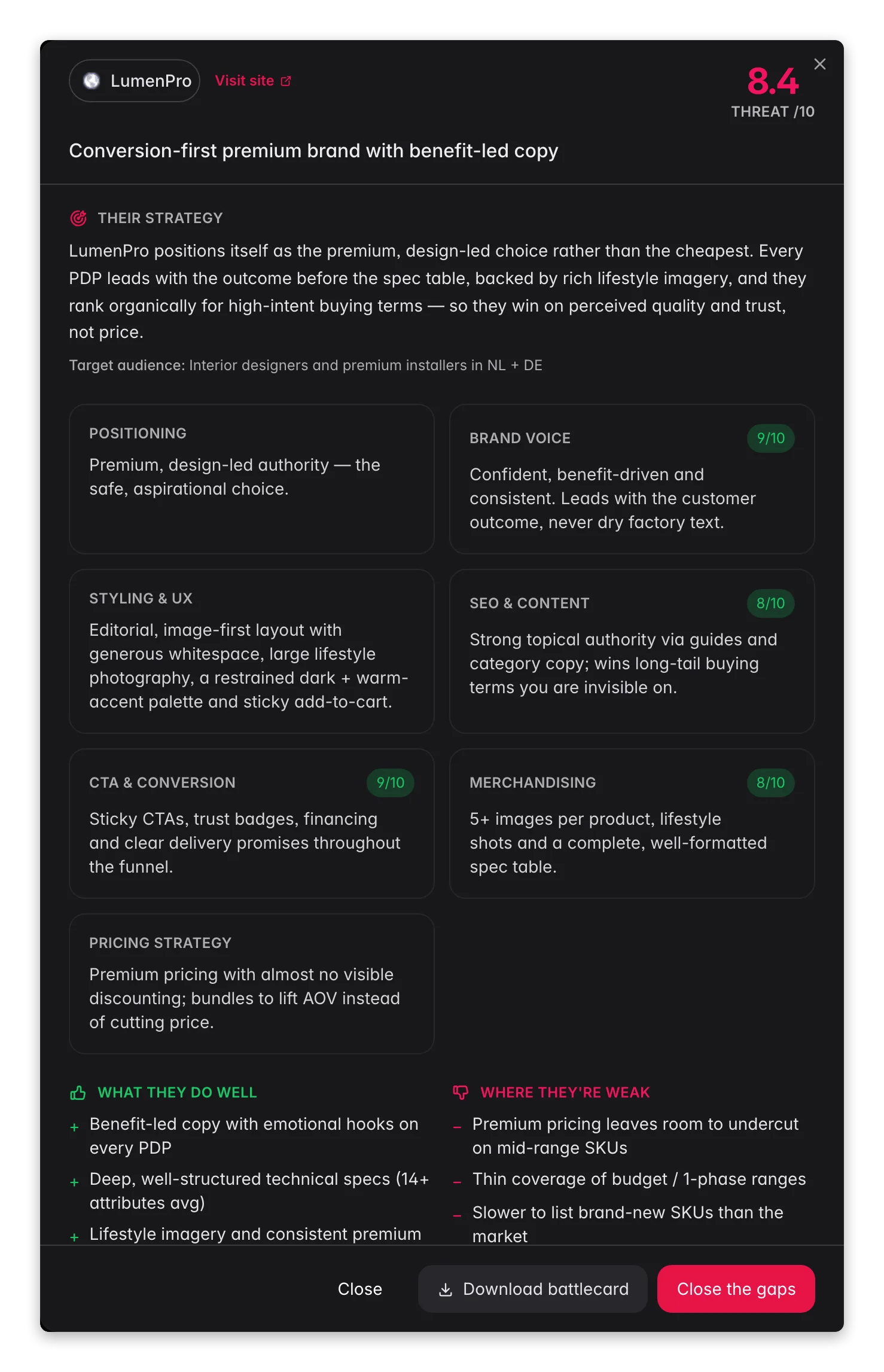 The drawer holds:
| Section | What you get |
| ---------------------- | ---------------------------------------------------------------------------------------------------------------------------------- |
| **Their strategy** | How the shop presents itself, plus the target audience it seems built for. |
| **Scored dimensions** | A card and score for Positioning, Brand voice, Styling & UX, SEO & content, CTA & conversion, Merchandising, and Pricing strategy. |
| **What they do well** | The things worth learning from. |
| **Where they're weak** | The openings you can take. |
| **How to beat them** | Concrete moves, with AI-Fix buttons built into the list. |
| **Detected stack** | The platform and tools the shop appears to run on. |
| **Analysed pages** | The pages the scrape actually read, so you can check the source. |
At the bottom: **Close**, **Download battlecard**, and **Close the gaps**.
**Download battlecard** builds a PDF of the teardown on the spot, named after the competitor's domain. It is the file to hand your sales team before a pitch, or to drop into a meeting where nobody has a WISEPIM login.
## Attribute Gaps
The drawer holds:
| Section | What you get |
| ---------------------- | ---------------------------------------------------------------------------------------------------------------------------------- |
| **Their strategy** | How the shop presents itself, plus the target audience it seems built for. |
| **Scored dimensions** | A card and score for Positioning, Brand voice, Styling & UX, SEO & content, CTA & conversion, Merchandising, and Pricing strategy. |
| **What they do well** | The things worth learning from. |
| **Where they're weak** | The openings you can take. |
| **How to beat them** | Concrete moves, with AI-Fix buttons built into the list. |
| **Detected stack** | The platform and tools the shop appears to run on. |
| **Analysed pages** | The pages the scrape actually read, so you can check the source. |
At the bottom: **Close**, **Download battlecard**, and **Close the gaps**.
**Download battlecard** builds a PDF of the teardown on the spot, named after the competitor's domain. It is the file to hand your sales team before a pitch, or to drop into a meeting where nobody has a WISEPIM login.
## Attribute Gaps
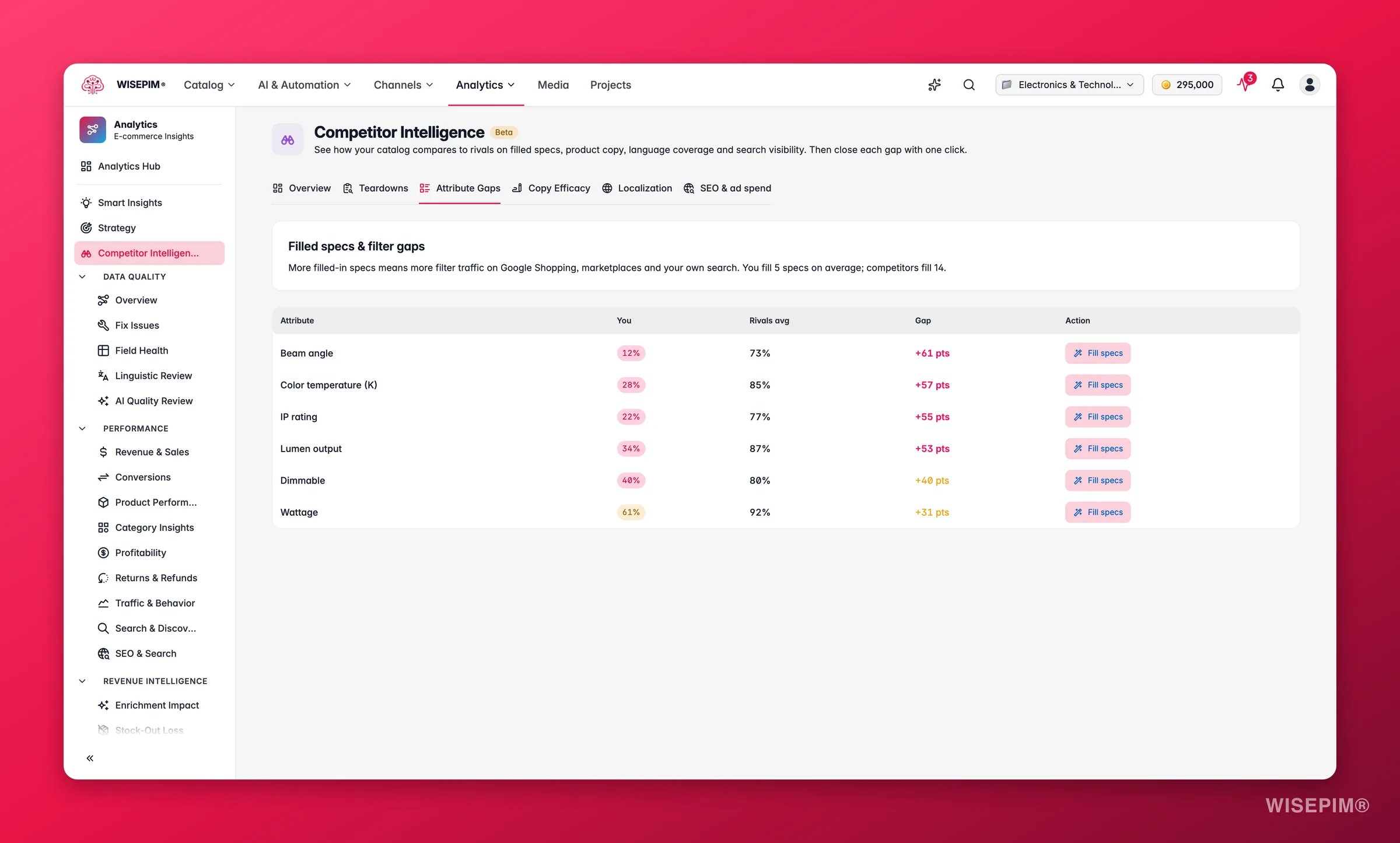
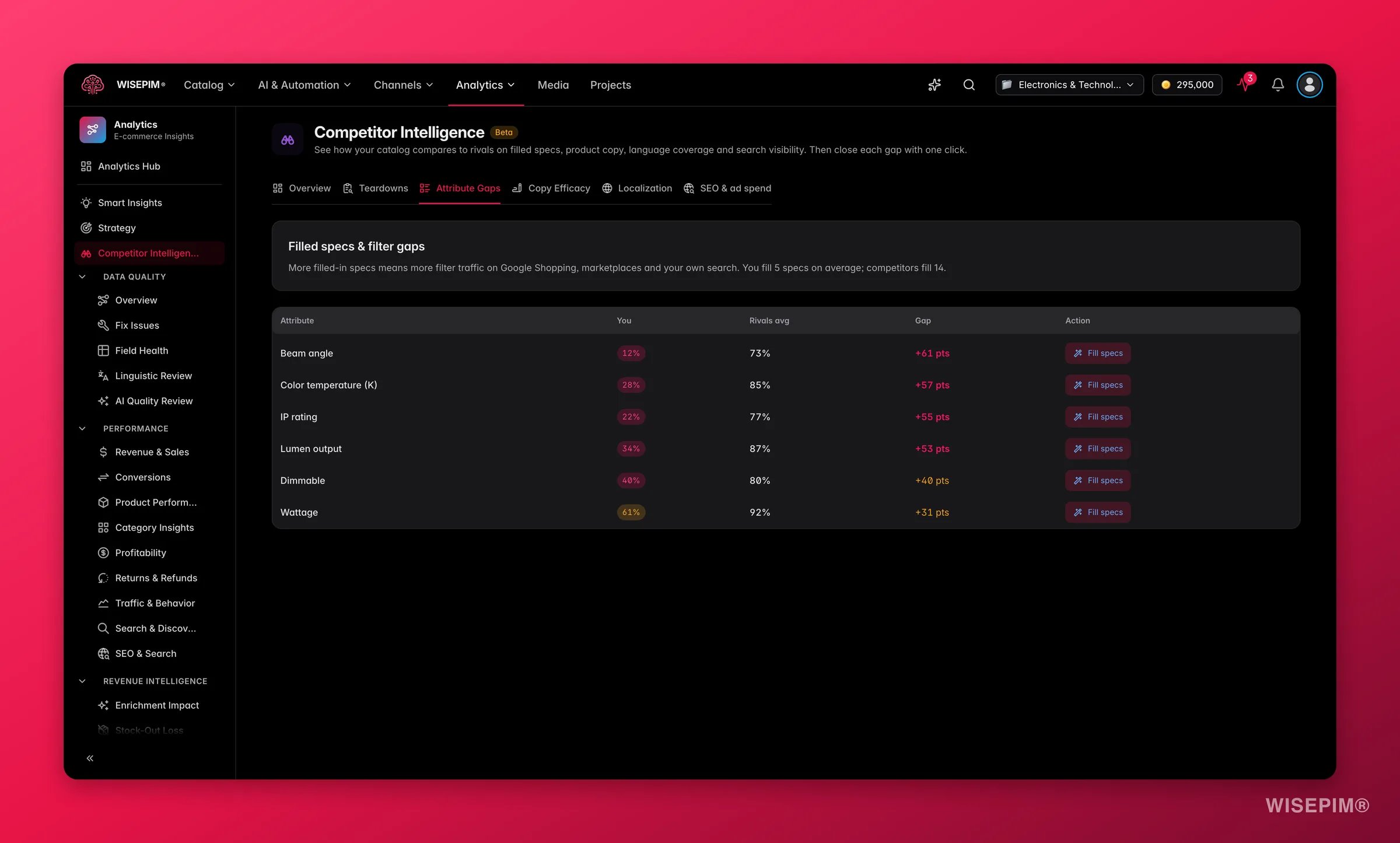 This tab is a table: **Attribute**, **You**, **Rivals avg**, **Gap**, **Action**. It shows which specs your competitors fill that you leave empty.
Missing specs cost more than they look. Shoppers filter on them, marketplaces require them, and comparison sites rank on them. Sort by the biggest gap, then click **Fill specs** on the rows that matter for your category.
## Copy Efficacy
This tab is a table: **Attribute**, **You**, **Rivals avg**, **Gap**, **Action**. It shows which specs your competitors fill that you leave empty.
Missing specs cost more than they look. Shoppers filter on them, marketplaces require them, and comparison sites rank on them. Sort by the biggest gap, then click **Fill specs** on the rows that matter for your category.
## Copy Efficacy
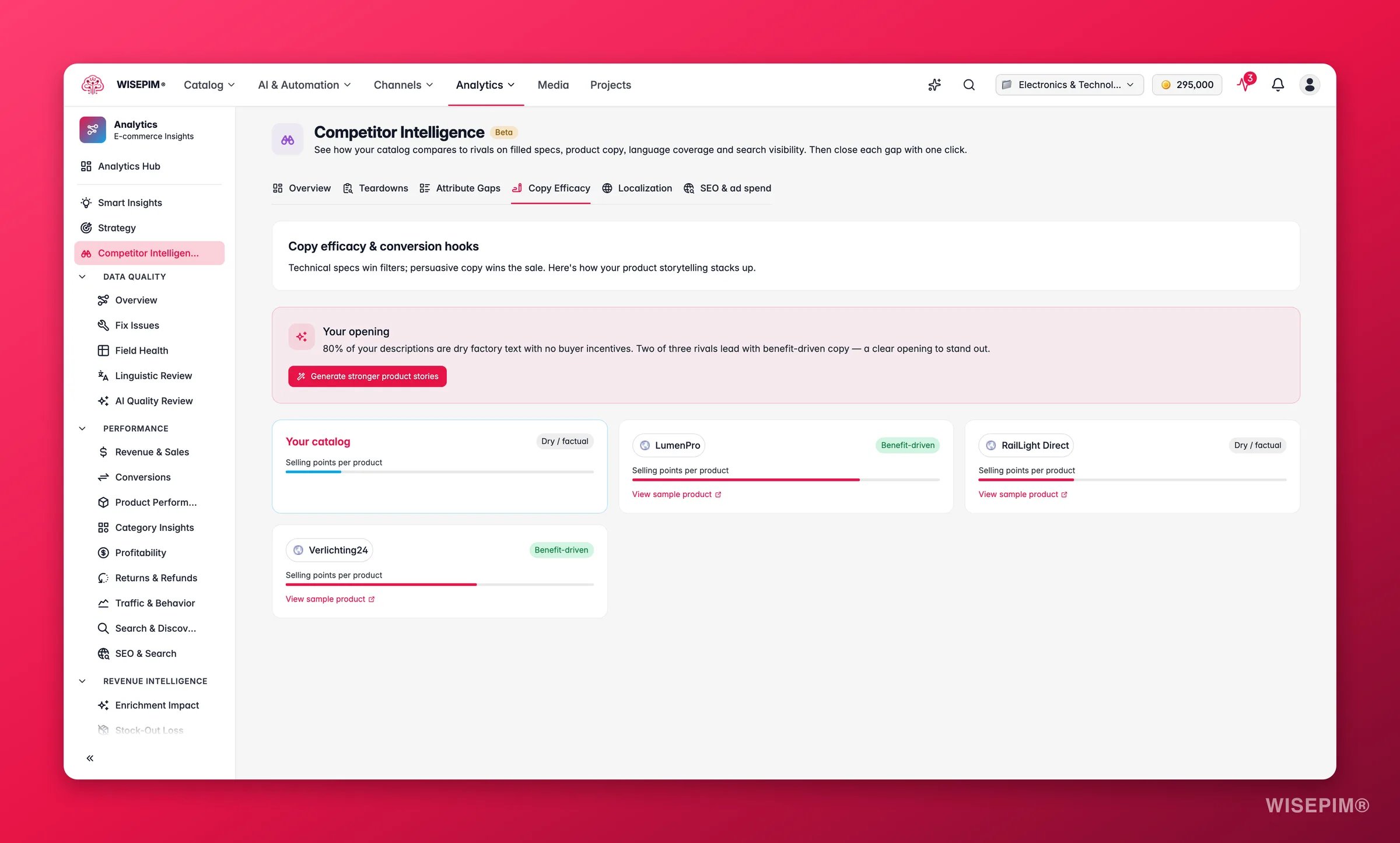
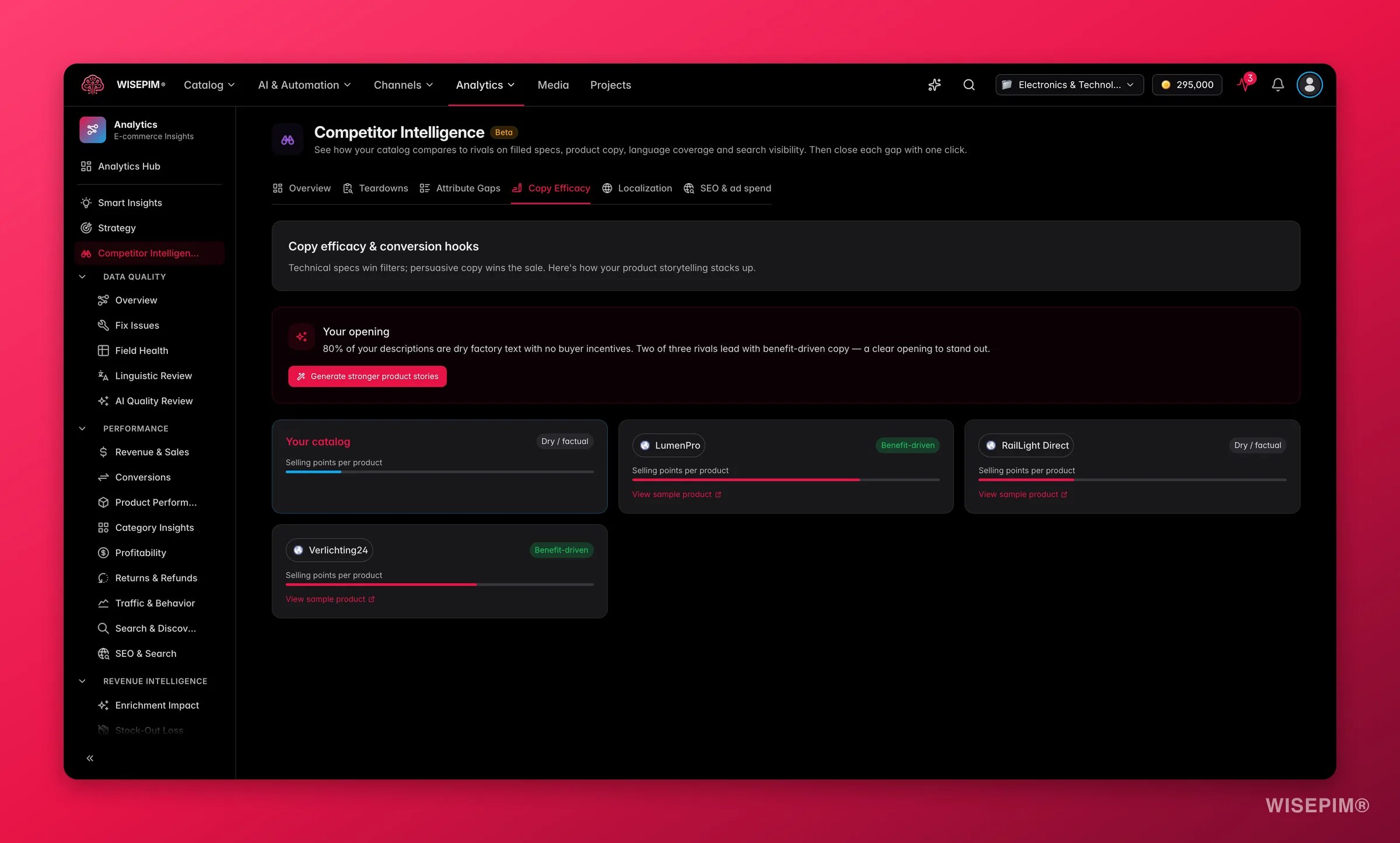 Here you get a card per competitor comparing how they write product copy against how you write it. Each shop is labelled **Benefit-driven** or **Dry / factual**, and a bar chart shows selling points per product across the field.
If your rivals are benefit-driven and you are dry, that is a conversion gap, not a style preference. Click **Generate stronger product stories** to rewrite your copy with AI.
## Localization
Here you get a card per competitor comparing how they write product copy against how you write it. Each shop is labelled **Benefit-driven** or **Dry / factual**, and a bar chart shows selling points per product across the field.
If your rivals are benefit-driven and you are dry, that is a conversion gap, not a style preference. Click **Generate stronger product stories** to rewrite your copy with AI.
## Localization
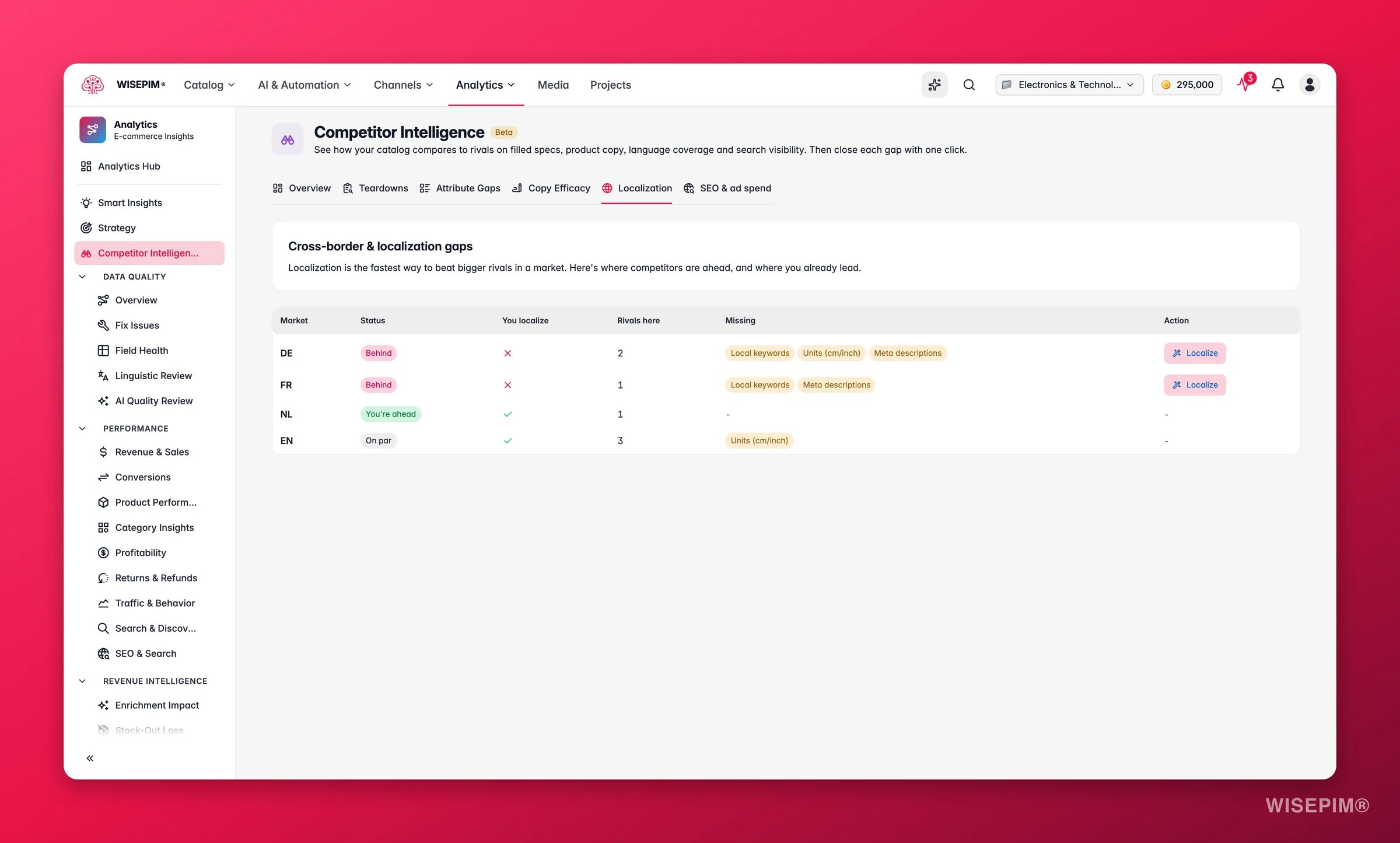
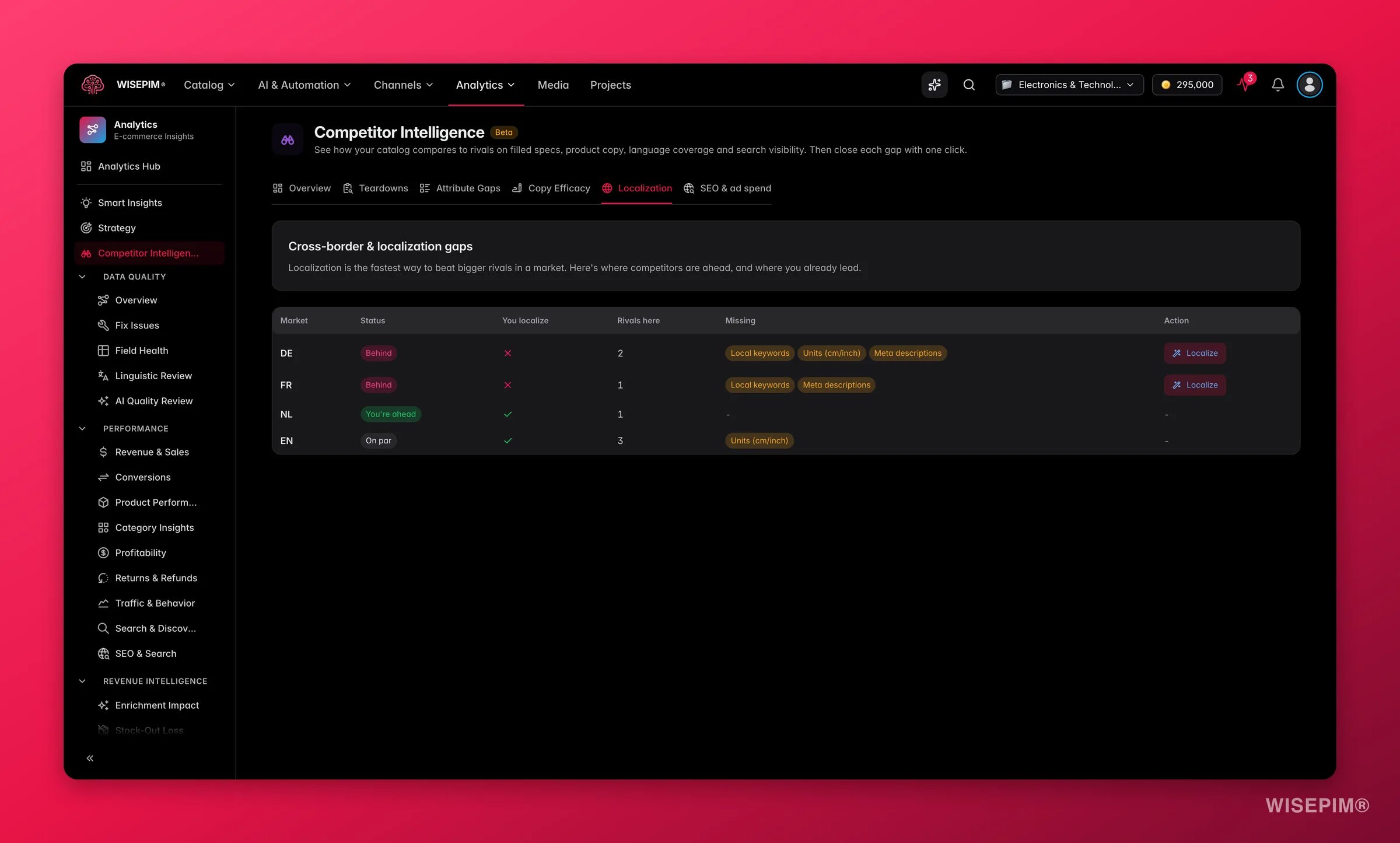 A table of markets: **Market**, **Status** (**Behind**, **You're ahead**, or **On par**), **You localize**, **Rivals here**, **Missing**, **Action**.
**Missing** is the useful column. It does not just say "not translated", it names what is absent: **Local keywords**, **Units (cm/inch)**, or **Meta descriptions**. A market where three rivals sell and you have no presence is a market someone already proved is worth entering. Click **Localize** to close it.
## SEO & ad spend
A table of markets: **Market**, **Status** (**Behind**, **You're ahead**, or **On par**), **You localize**, **Rivals here**, **Missing**, **Action**.
**Missing** is the useful column. It does not just say "not translated", it names what is absent: **Local keywords**, **Units (cm/inch)**, or **Meta descriptions**. A market where three rivals sell and you have no presence is a market someone already proved is worth entering. Click **Localize** to close it.
## SEO & ad spend
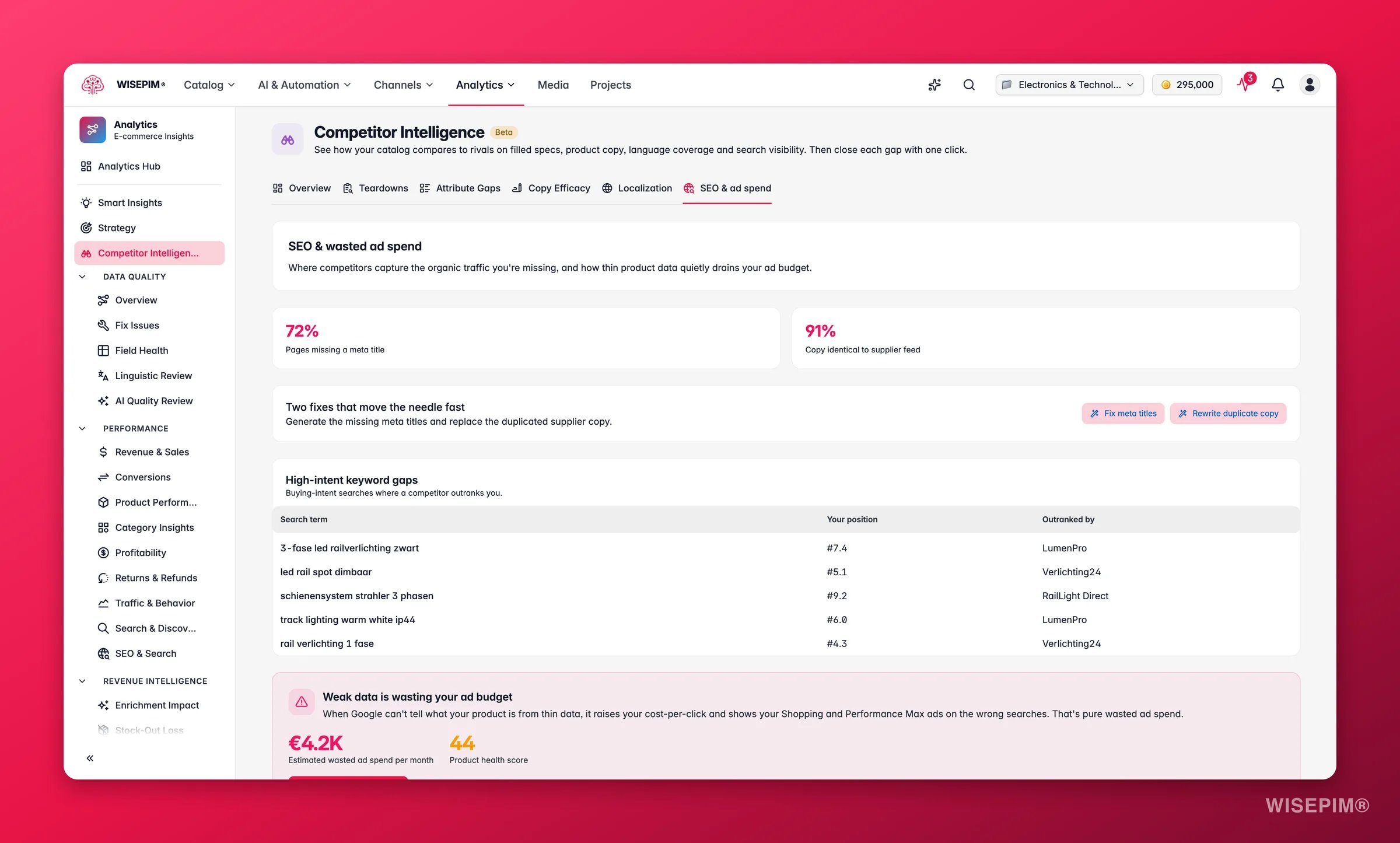
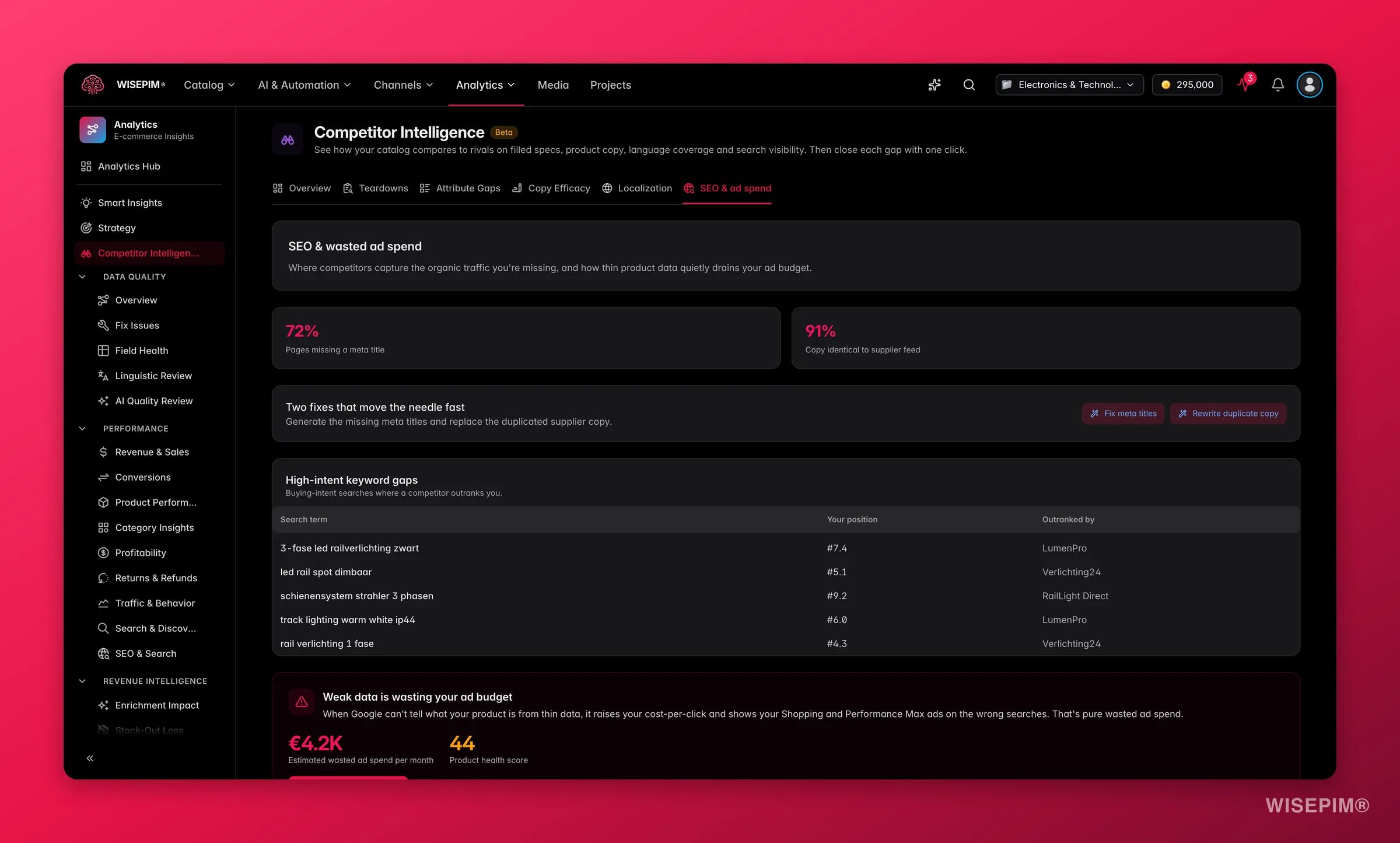 Two red stat cards open this tab with the problems costing you the most, each with its own action: **Fix meta titles** and **Rewrite duplicate copy**.
Below them, **High-intent keyword gaps** lists the searches your rivals show up for and you do not, weighted toward buying intent rather than raw volume. The ad-waste card points at products you are paying to send traffic to while their listings are too thin to convert, with **Lift low-health products** to fix them. Links to your sitemap tools sit at the bottom.
This tab compares you against the competitors you added. For your own organic performance from Google Search Console, including sitemap coverage and cannibalization, use [SEO & Search](/en/analytics/seo).
## Fix with AI
Every **Fix with AI** button, in the pillar cards, the tab tables, and the teardown drawer, opens the same Fix Review drawer used across Analytics. Nothing is applied until you say so.
The drawer shows you the projected impact, who is affected and how many products, and exactly what is about to happen including the credit estimate against your balance. You can run **Test on one** first to see a before-and-after on a single product without saving anything. Only then do you apply to all.
Credits are charged when a fix is applied, at the standard rate for the content being written. Testing on one product and browsing the analysis cost nothing.
## Staying ahead automatically
You do not have to remember to check.
* WISEPIM re-analyzes your competitors **every Monday**, so each week starts with fresh numbers.
* Your threat score is kept as history, which is what makes the **Threat trend** chart and **What changed since last analysis** possible.
* When a competitor makes a significant move, you get an alert in the app and by email.
Make Monday the day you open the page and act on **Start here**. Ten minutes a week compounds faster than one big audit a quarter.
## Act on what you find
Do not try to fix everything. Open **Start here**, apply that one fix, then re-run the analysis and watch the score. A high score usually comes from one or two systemic gaps, most often empty specs or missing meta titles, that touch thousands of products at once. **Outcome:** the biggest possible drop in threat for the least work.
Low content completeness and low SEO visibility together means shoppers cannot find you, and when they do the listing does not convince them. Fix content first, since search visibility follows better pages. Start with **Attribute Gaps**, then **Copy Efficacy**. **Outcome:** you move right on the chart first, then up.
Your content is strong but nobody sees it. Skip the content tabs and go straight to **SEO & ad spend**: fix meta titles, rewrite duplicate copy, and work the high-intent keyword gaps. **Outcome:** the catalog you already built starts earning traffic.
Open **Attribute Gaps**, sort by the largest gap, and use **Fill specs** on the attributes your category actually filters on. Check the result in [Data Quality](/en/analytics/data-quality) afterwards, since attribute coverage feeds your catalog score too. **Outcome:** your products start appearing in filtered results and comparison tables where they were invisible before.
Sort **Localization** by **Behind** and look at the **Rivals here** count. Several rivals in one market is evidence that the market pays. Use **Localize** to translate and adapt, including the local keywords and units the table flags as missing. **Outcome:** you enter a proven market without guessing whether it is worth it.
Open that competitor's teardown, read **Where they're weak** and **How to beat them**, then click **Download battlecard**. The PDF works on its own, so the person carrying it into the meeting does not need a WISEPIM account. **Outcome:** your team walks in knowing the other side's soft spots.
## How it relates to the other analytics tools
* **[SEO & Search](/en/analytics/seo)** measures your own organic performance using Google Search Console, and can track competitor sitemaps for coverage gaps. Competitor Intelligence is broader: it scrapes and scores full rival shops on content, copy, language, and search together.
* **[Data Quality](/en/analytics/data-quality)** tells you what is missing against your own standard. Competitor Intelligence tells you what is missing against the market. A field nobody in your category fills is not urgent, a field everyone fills is.
* The **Fix with AI** flow is the same one used in Data Quality, Channel Readiness, Grow Sales, and Reduce Returns, so anything you learn about reviewing fixes carries across.
## Related
Your own search performance, sitemap coverage, and competitor sitemap gaps.
The always-on catalog health score behind most attribute fixes.
The AI writing that powers every Fix with AI action here.
Score your own listings the way a demanding customer would read them.
Two red stat cards open this tab with the problems costing you the most, each with its own action: **Fix meta titles** and **Rewrite duplicate copy**.
Below them, **High-intent keyword gaps** lists the searches your rivals show up for and you do not, weighted toward buying intent rather than raw volume. The ad-waste card points at products you are paying to send traffic to while their listings are too thin to convert, with **Lift low-health products** to fix them. Links to your sitemap tools sit at the bottom.
This tab compares you against the competitors you added. For your own organic performance from Google Search Console, including sitemap coverage and cannibalization, use [SEO & Search](/en/analytics/seo).
## Fix with AI
Every **Fix with AI** button, in the pillar cards, the tab tables, and the teardown drawer, opens the same Fix Review drawer used across Analytics. Nothing is applied until you say so.
The drawer shows you the projected impact, who is affected and how many products, and exactly what is about to happen including the credit estimate against your balance. You can run **Test on one** first to see a before-and-after on a single product without saving anything. Only then do you apply to all.
Credits are charged when a fix is applied, at the standard rate for the content being written. Testing on one product and browsing the analysis cost nothing.
## Staying ahead automatically
You do not have to remember to check.
* WISEPIM re-analyzes your competitors **every Monday**, so each week starts with fresh numbers.
* Your threat score is kept as history, which is what makes the **Threat trend** chart and **What changed since last analysis** possible.
* When a competitor makes a significant move, you get an alert in the app and by email.
Make Monday the day you open the page and act on **Start here**. Ten minutes a week compounds faster than one big audit a quarter.
## Act on what you find
Do not try to fix everything. Open **Start here**, apply that one fix, then re-run the analysis and watch the score. A high score usually comes from one or two systemic gaps, most often empty specs or missing meta titles, that touch thousands of products at once. **Outcome:** the biggest possible drop in threat for the least work.
Low content completeness and low SEO visibility together means shoppers cannot find you, and when they do the listing does not convince them. Fix content first, since search visibility follows better pages. Start with **Attribute Gaps**, then **Copy Efficacy**. **Outcome:** you move right on the chart first, then up.
Your content is strong but nobody sees it. Skip the content tabs and go straight to **SEO & ad spend**: fix meta titles, rewrite duplicate copy, and work the high-intent keyword gaps. **Outcome:** the catalog you already built starts earning traffic.
Open **Attribute Gaps**, sort by the largest gap, and use **Fill specs** on the attributes your category actually filters on. Check the result in [Data Quality](/en/analytics/data-quality) afterwards, since attribute coverage feeds your catalog score too. **Outcome:** your products start appearing in filtered results and comparison tables where they were invisible before.
Sort **Localization** by **Behind** and look at the **Rivals here** count. Several rivals in one market is evidence that the market pays. Use **Localize** to translate and adapt, including the local keywords and units the table flags as missing. **Outcome:** you enter a proven market without guessing whether it is worth it.
Open that competitor's teardown, read **Where they're weak** and **How to beat them**, then click **Download battlecard**. The PDF works on its own, so the person carrying it into the meeting does not need a WISEPIM account. **Outcome:** your team walks in knowing the other side's soft spots.
## How it relates to the other analytics tools
* **[SEO & Search](/en/analytics/seo)** measures your own organic performance using Google Search Console, and can track competitor sitemaps for coverage gaps. Competitor Intelligence is broader: it scrapes and scores full rival shops on content, copy, language, and search together.
* **[Data Quality](/en/analytics/data-quality)** tells you what is missing against your own standard. Competitor Intelligence tells you what is missing against the market. A field nobody in your category fills is not urgent, a field everyone fills is.
* The **Fix with AI** flow is the same one used in Data Quality, Channel Readiness, Grow Sales, and Reduce Returns, so anything you learn about reviewing fixes carries across.
## Related
Your own search performance, sitemap coverage, and competitor sitemap gaps.
The always-on catalog health score behind most attribute fixes.
The AI writing that powers every Fix with AI action here.
Score your own listings the way a demanding customer would read them.